HackTheBox Mirai Writeup
Nmap Enumeration
1
2
3
4
5
6
7
8
9
10
11
12
13
14
15
16
17
18
19
20
21
22
23
24
25
26
27
28
29
30
31
┌──(wzwr㉿kali)-[~/Documents/htb/mirai]
└─$ cat nmap
# Nmap 7.95 scan initiated Wed May 21 07:51:08 2025 as: /usr/lib/nmap/nmap -sC -sV -vv -oN nmap 10.10.10.48
Nmap scan report for 10.10.10.48
Host is up, received echo-reply ttl 63 (0.095s latency).
Scanned at 2025-05-21 07:51:08 CDT for 17s
Not shown: 997 closed tcp ports (reset)
PORT   STATE SERVICE REASON         VERSION
22/tcp open  ssh     syn-ack ttl 63 OpenSSH 6.7p1 Debian 5+deb8u3 (protocol 2.0)
| ssh-hostkey:
|   1024 aa:ef:5c:e0:8e:86:97:82:47:ff:4a:e5:40:18:90:c5 (DSA)
| ssh-dss AAAAB3NzaC1kc3MAAACBAJpzaaGcmwdVrkG//X5kr6m9em2hEu3SianCnerFwTGHgUHrRpR6iocVhd8gN21TPNTwFF47q8nUitupMBnvImwAs8NcjLVclPSdFJSWwTxbaBiXOqyjV5BcKty+s2N8I9neI2coRBtZDUwUiF/1gUAZIimeKOj2x39kcBpcpM6ZAAAAFQDwL9La/FPu1rEutE8yfdIgxTDDNQAAAIBJbfYW/IeOFHPiKBzHWiM8JTjhPCcvjIkNjKMMdS6uo00/JQH4VUUTscc/LTvYmQeLAyc7GYQ/AcLgoYFHm8hDgFVN2D4BQ7yGQT9dU4GAOp4/H1wHPKlAiBuDQMsyEk2s2J+60Rt+hUKCZfnxPOoD9l+VEWfZQYCTOBi3gOAotgAAAIBd6OWkakYL2e132lg6Z02202PIq9zvAx3tfViuU9CGStiIW4eH4qrhSMiUKrhbNeCzvdcw6pRWK41+vDiQrhV12/w6JSowf9KHxvoprAGiEg7GjyvidBr9Mzv1WajlU9BQO0Nc7poV2UzyMwLYLqzdjBJT28WUs3qYTxanaUrV9g==
|   2048 e8:c1:9d:c5:43:ab:fe:61:23:3b:d7:e4:af:9b:74:18 (RSA)
| ssh-rsa AAAAB3NzaC1yc2EAAAADAQABAAABAQCpSoRAKB+cPR8bChDdajCIpf4p1zHfZyu2xnIkqRAgm6Dws2zcy+VAZriPDRUrht10GfsBLZtp/1PZpkUd2b1PKvN2YIg4SDtpvTrdwAM2uCgUrZdKRoFa+nd8REgkTg8JRYkSGQ/RxBZzb06JZhRSvLABFve3rEPVdwTf4mzzNuryV4DNctrAojjP4Sq7Msc24poQRG9AkeyS1h4zrZMbB0DQaKoyY3pss5FWJ+qa83XNsqjnKlKhSbjH17pBFhlfo/6bGkIE68vS5CQi9Phygke6/a39EP2pJp6WzT5KI3Yosex3Br85kbh/J8CVf4EDIRs5qismW+AZLeJUJHrj
|   256 b6:a0:78:38:d0:c8:10:94:8b:44:b2:ea:a0:17:42:2b (ECDSA)
| ecdsa-sha2-nistp256 AAAAE2VjZHNhLXNoYTItbmlzdHAyNTYAAAAIbmlzdHAyNTYAAABBBCl89gWp+rA+2SLZzt3r7x+9sXFOCy9g3C9Yk1S21hT/VOmlqYys1fbAvqwoVvkpRvHRzbd5CxViOVih0TeW/bM=
|   256 4d:68:40:f7:20:c4:e5:52:80:7a:44:38:b8:a2:a7:52 (ED25519)
|_ssh-ed25519 AAAAC3NzaC1lZDI1NTE5AAAAILvYtCvO/UREAhODuSsm7liSb9SZ8gLoZtn7P46SIDZL
53/tcp open  domain  syn-ack ttl 63 dnsmasq 2.76
| dns-nsid:
|_  bind.version: dnsmasq-2.76
80/tcp open  http    syn-ack ttl 63 lighttpd 1.4.35
|_http-title: Site doesnt have a title (text/html; charset=UTF-8).
| http-methods:
|_  Supported Methods: OPTIONS GET HEAD POST
|_http-server-header: lighttpd/1.4.35
Service Info: OS: Linux; CPE: cpe:/o:linux:linux_kernel

Read data files from: /usr/share/nmap
Service detection performed. Please report any incorrect results at https://nmap.org/submit/ .
# Nmap done at Wed May 21 07:51:25 2025 -- 1 IP address (1 host up) scanned in 17.55 seconds
Full Scan
1
2
3
4
5
6
7
8
9
10
11
12
13
14
15
16
17
18
19
20
21
22
23
24
25
┌──(wzwr㉿kali)-[~/Documents/htb/mirai]
└─$ sudo nmap -sT -Pn -T4 -vv -p- 10.10.10.48
Starting Nmap 7.95 ( https://nmap.org ) at 2025-05-21 07:59 CDT
Initiating Parallel DNS resolution of 1 host. at 07:59
Completed Parallel DNS resolution of 1 host. at 07:59, 0.00s elapsed
Initiating Connect Scan at 07:59
Scanning 10.10.10.48 [65535 ports]
Discovered open port 80/tcp on 10.10.10.48
Discovered open port 22/tcp on 10.10.10.48
Discovered open port 53/tcp on 10.10.10.48
Discovered open port 1733/tcp on 10.10.10.48
Connect Scan Timing: About 27.71% done; ETC: 08:01 (0:01:21 remaining)
Increasing send delay for 10.10.10.48 from 0 to 5 due to max_successful_tryno increase to 5
Increasing send delay for 10.10.10.48 from 5 to 10 due to 11 out of 26 dropped probes since last increase.
Discovered open port 32469/tcp on 10.10.10.48
Connect Scan Timing: About 30.89% done; ETC: 08:02 (0:02:17 remaining)
Connect Scan Timing: About 35.45% done; ETC: 08:03 (0:02:46 remaining)
Connect Scan Timing: About 40.01% done; ETC: 08:04 (0:03:01 remaining)
Discovered open port 32400/tcp on 10.10.10.48
Connect Scan Timing: About 61.91% done; ETC: 08:06 (0:02:45 remaining)
Connect Scan Timing: About 68.62% done; ETC: 08:06 (0:02:23 remaining)
Connect Scan Timing: About 74.55% done; ETC: 08:07 (0:02:00 remaining)
Connect Scan Timing: About 80.48% done; ETC: 08:07 (0:01:35 remaining)
Connect Scan Timing: About 85.89% done; ETC: 08:07 (0:01:10 remaining)
Connect Scan Timing: About 91.36% done; ETC: 08:07 (0:00:44 remaining)
Found port 1733, 32400, 32469.
1
2
3
4
5
6
7
8
9
10
11
12
13
14
15
16
17
18
19
20
21
22
23
24
25
26
27
28
29
30
31
32
33
34
35
36
37
38
39
40
41
42
┌──(wzwr㉿kali)-[~/Documents/htb/mirai]
└─$ sudo nmap -sC -sV -p 1733 10.10.10.48
Starting Nmap 7.95 ( https://nmap.org ) at 2025-05-21 08:08 CDT
Nmap scan report for 10.10.10.48
Host is up (0.054s latency).

PORT     STATE SERVICE VERSION
1733/tcp open  upnp    Platinum UPnP 1.0.5.13 (UPnP/1.0 DLNADOC/1.50)

Service detection performed. Please report any incorrect results at https://nmap.org/submit/ .
Nmap done: 1 IP address (1 host up) scanned in 11.92 seconds

┌──(wzwr㉿kali)-[~/Documents/htb/mirai]
└─$ sudo nmap -sC -sV -p 32400 10.10.10.48
Starting Nmap 7.95 ( https://nmap.org ) at 2025-05-21 08:08 CDT
Nmap scan report for 10.10.10.48
Host is up (0.053s latency).

PORT      STATE SERVICE VERSION
32400/tcp open  http    Plex Media Server httpd
|_http-favicon: Plex
|_http-cors: HEAD GET POST PUT DELETE OPTIONS
| http-auth:
| HTTP/1.1 401 Unauthorized\x0D
|_  Server returned status 401 but no WWW-Authenticate header.
|_http-title: Unauthorized

Service detection performed. Please report any incorrect results at https://nmap.org/submit/ .
Nmap done: 1 IP address (1 host up) scanned in 14.90 seconds

┌──(wzwr㉿kali)-[~/Documents/htb/mirai]
└─$ sudo nmap -sC -sV -p 32469 10.10.10.48
Starting Nmap 7.95 ( https://nmap.org ) at 2025-05-21 08:09 CDT
Nmap scan report for 10.10.10.48
Host is up (0.055s latency).

PORT      STATE SERVICE VERSION
32469/tcp open  upnp    Platinum UPnP 1.0.5.13 (UPnP/1.0 DLNADOC/1.50)

Service detection performed. Please report any incorrect results at https://nmap.org/submit/ .
Nmap done: 1 IP address (1 host up) scanned in 11.90 seconds
HTTP Enumeration
1
2
3
4
5
6
7
8
9
10
11
12
13
14
15
16
17
18
19
┌──(wzwr㉿kali)-[~/Documents/htb/mirai]
└─$ curl http://10.10.10.48 -v
*   Trying 10.10.10.48:80...
* Connected to 10.10.10.48 (10.10.10.48) port 80
> GET / HTTP/1.1
> Host: 10.10.10.48
> User-Agent: curl/8.8.0
> Accept: */*
>
* Request completely sent off
< HTTP/1.1 404 Not Found
< X-Pi-hole: A black hole for Internet advertisements.
< Content-type: text/html; charset=UTF-8
< Content-Length: 0
< Date: Wed, 21 May 2025 04:31:53 GMT
< Server: lighttpd/1.4.35
<
* Connection #0 to host 10.10.10.48 left intact
Gobuster
1
2
3
4
5
6
7
8
9
10
11
12
13
14
15
16
17
18
19
20
21
22
┌──(wzwr㉿kali)-[~/Documents/htb/mirai]
└─$ gobuster dir -u http://10.10.10.48/ -w /usr/share/wordlists/dirb/big.txt
===============================================================
Gobuster v3.6
by OJ Reeves (@TheColonial) & Christian Mehlmauer (@firefart)
===============================================================
[+] Url:                     http://10.10.10.48/
[+] Method:                  GET
[+] Threads:                 10
[+] Wordlist:                /usr/share/wordlists/dirb/big.txt
[+] Negative Status codes:   404
[+] User Agent:              gobuster/3.6
[+] Timeout:                 10s
===============================================================
Starting gobuster in directory enumeration mode
===============================================================
/admin                (Status: 301) [Size: 0] [--> http://10.10.10.48/admin/]
/versions             (Status: 200) [Size: 13]
Progress: 20469 / 20470 (100.00%)
===============================================================
Finished
===============================================================
Admin Page
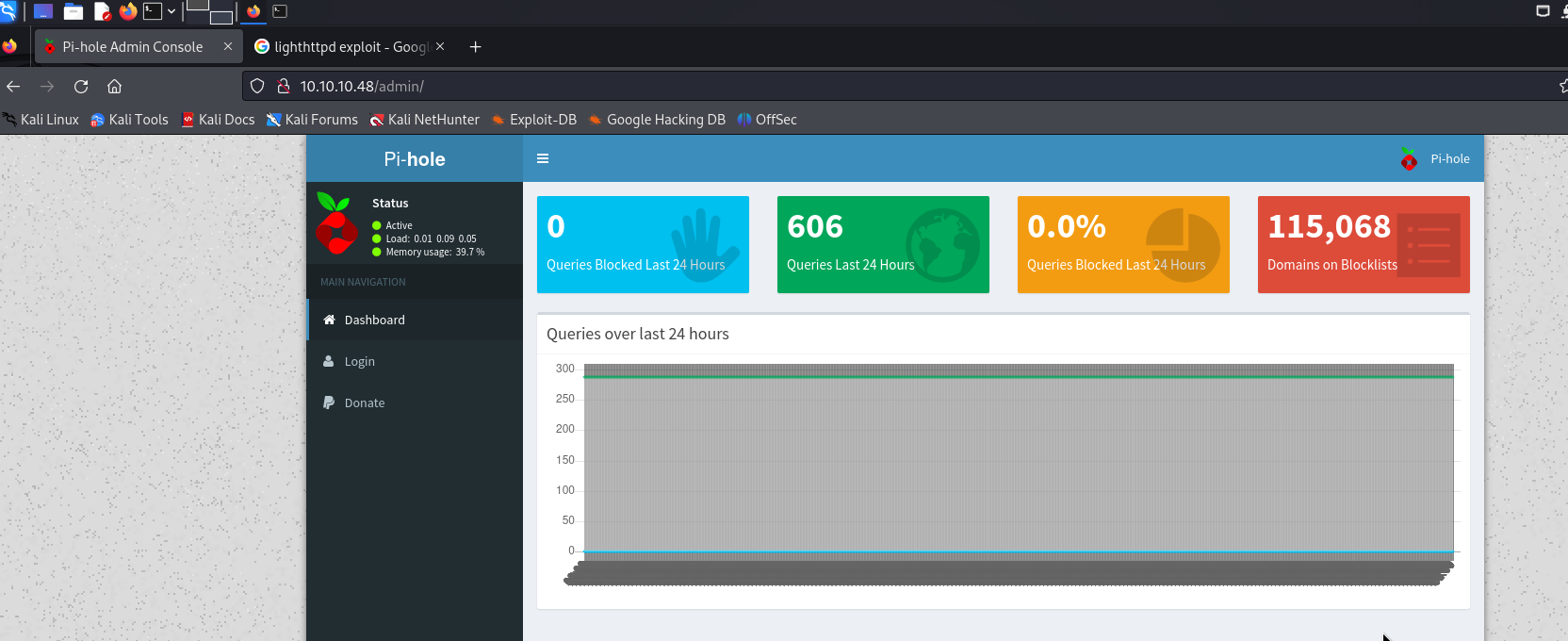

There is a login page
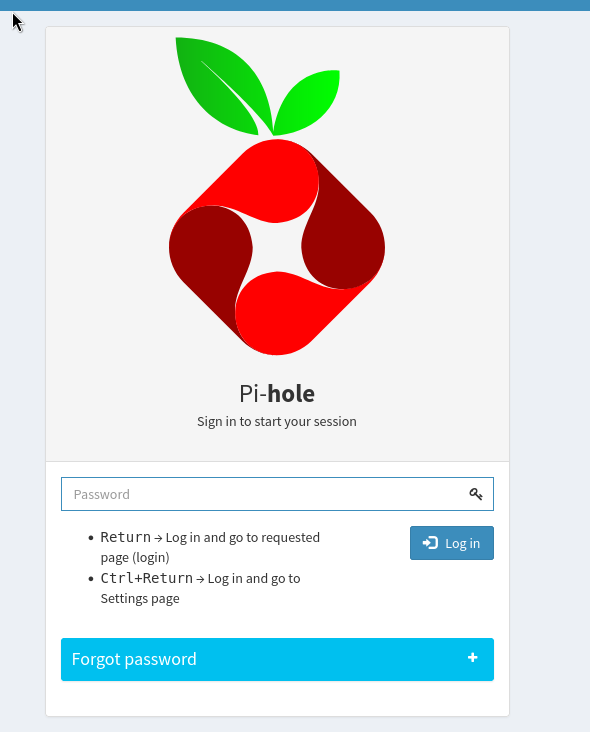
We might need to login to exploit, as we found several vulnerability must be authenticated first. However, some enumeration, we didn’t found any interesting, we need to get back to pi-hole.
Since it is the services for raspberry, we can check for the information of raspberry, which found the default username and password of the raspberry devices is pi:raspberry, we can use this credentials to login into the services.
1
2
3
4
5
6
7
8
9
10
11
12
13
14
15
16
17
18
19
20
21
22
23
24
25
┌──(wzwr㉿kali)-[~/Documents/htb/mirai]
└─$ ssh pi@10.10.10.48
The authenticity of host '10.10.10.48 (10.10.10.48)' can't be established.
ED25519 key fingerprint is SHA256:TL7joF/Kz3rDLVFgQ1qkyXTnVQBTYrV44Y2oXyjOa60.
This key is not known by any other names.
Are you sure you want to continue connecting (yes/no/[fingerprint])? yes
Warning: Permanently added '10.10.10.48' (ED25519) to the list of known hosts.
pi@10.10.10.48's password:

The programs included with the Debian GNU/Linux system are free software;
the exact distribution terms for each program are described in the
individual files in /usr/share/doc/*/copyright.

Debian GNU/Linux comes with ABSOLUTELY NO WARRANTY, to the extent
permitted by applicable law.
Last login: Sun Aug 27 14:47:50 2017 from localhost

SSH is enabled and the default password for the 'pi' user has not been changed.
This is a security risk - please login as the 'pi' user and type 'passwd' to set a new password.


SSH is enabled and the default password for the 'pi' user has not been changed.
This is a security risk - please login as the 'pi' user and type 'passwd' to set a new password.

pi@raspberrypi:~ $
Good, we login in to the server
Privileges Escalation
Sudo Permissions Check
1
2
3
4
5
6
7
pi@raspberrypi:~/Desktop $ sudo -l
Matching Defaults entries for pi on localhost:
    env_reset, mail_badpass, secure_path=/usr/local/sbin\:/usr/local/bin\:/usr/sbin\:/usr/bin\:/sbin\:/bin

User pi may run the following commands on localhost:
    (ALL : ALL) ALL
    (ALL) NOPASSWD: ALL
We have sudo permissions on all command, let’s try to get root.txt
1
2
3
pi@raspberrypi:~/Desktop $ sudo cat /root/root.txt
I lost my original root.txt! I think I may have a backup on my USB stick...
pi@raspberrypi:~/Desktop $
Seems like we need to recover the root.txt
Found USB Stick
1
2
3
4
5
6
7
8
9
10
11
12
13
14
15
16
17
18
19
20
21
22
23
24
pi@raspberrypi:/ $ df -h
Filesystem      Size  Used Avail Use% Mounted on
aufs            8.5G  2.8G  5.3G  34% /
tmpfs           100M  4.8M   96M   5% /run
/dev/sda1       1.3G  1.3G     0 100% /lib/live/mount/persistence/sda1
/dev/loop0      1.3G  1.3G     0 100% /lib/live/mount/rootfs/filesystem.squashfs
tmpfs           250M     0  250M   0% /lib/live/mount/overlay
/dev/sda2       8.5G  2.8G  5.3G  34% /lib/live/mount/persistence/sda2
devtmpfs         10M     0   10M   0% /dev
tmpfs           250M  8.0K  250M   1% /dev/shm
tmpfs           5.0M  4.0K  5.0M   1% /run/lock
tmpfs           250M     0  250M   0% /sys/fs/cgroup
tmpfs           250M  8.0K  250M   1% /tmp
/dev/sdb        8.7M   93K  7.9M   2% /media/usbstick
tmpfs            50M     0   50M   0% /run/user/999
tmpfs            50M     0   50M   0% /run/user/1000
pi@raspberrypi:/ $ cd /media/usbstick/
pi@raspberrypi:/media/usbstick $ ls
damnit.txt  lost+found
pi@raspberrypi:/media/usbstick $ cat damnit.txt
Damnit! Sorry man I accidentally deleted your files off the USB stick.
Do you know if there is any way to get them back?

-James
In this case, our missions is to somehow Recover the data from the devices.
Recover by forensics tools
Referencing: https://superuser.com/questions/1724898/how-do-i-recover-data-on-a-usb-drive-that-was-partially-overwritten-by-the-linux
1
2
3
4
5
6
7
8
9
10
11
12
13
14
15
16
17
18
19
20
21
22
23
┌──(wzwr㉿kali)-[~/Documents/htb/mirai/output]
└─$ cat audit.txt
Foremost version 1.5.7 by Jesse Kornblum, Kris Kendall, and Nick Mikus
Audit File

Foremost started at Wed May 21 08:25:06 2025
Invocation: foremost ./usbstick.bin
Output directory: /home/wzwr/Documents/htb/mirai/output
Configuration file: /etc/foremost.conf
------------------------------------------------------------------
File: ./usbstick.bin
Start: Wed May 21 08:25:06 2025
Length: 10 MB (10485760 bytes)

Num      Name (bs=512)         Size      File Offset     Comment

Finish: Wed May 21 08:25:06 2025

0 FILES EXTRACTED

------------------------------------------------------------------

Foremost finished at Wed May 21 08:25:06 2025
seems like failed to use foremost to recover the flag
Another tools
We can try to use extundelete
1
2
3
4
5
6
7
8
9
10
11
12
13
14
15
16
17
18
19
20
┌──(wzwr㉿kali)-[~/Documents/htb/mirai]
└─$ extundelete ./usbstick.dd --restore-all
NOTICE: Extended attributes are not restored.
Loading filesystem metadata ... 2 groups loaded.
Loading journal descriptors ... 23 descriptors loaded.
Searching for recoverable inodes in directory / ...
1 recoverable inodes found.
Looking through the directory structure for deleted files ...
0 recoverable inodes still lost.

┌──(wzwr㉿kali)-[~/Documents/htb/mirai]
└─$ cd RECOVERED_FILES

┌──(wzwr㉿kali)-[~/Documents/htb/mirai/RECOVERED_FILES]
└─$ ls
root.txt

┌──(wzwr㉿kali)-[~/Documents/htb/mirai/RECOVERED_FILES]
└─$ cat root.txt
3d3e483143ff12ec505d026fa13e020b
Bonus (Using testdisk)
1
2
3
4
5
┌──(wzwr㉿kali)-[~/Documents/htb/mirai]
└─$ testdisk usbstick.dd
TestDisk 7.1, Data Recovery Utility, July 2019
Christophe GRENIER <grenier@cgsecurity.org>
https://www.cgsecurity.org
Then
- Select Disk
usbstick.dd - Select
None - Select Partition (only one, ext4) with
Listoptions 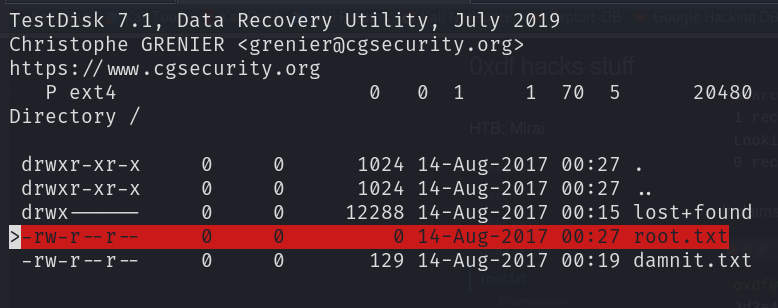
- Found root.txt, press
cto copy the file into our directory, then presscagain to copy - quit the program and find
root.txt
However it seems empty QQ
1
2
3
┌──(wzwr㉿kali)-[~/Documents/htb/mirai]
└─$ cat root.txt